What Is Vectorless RAG? Is PageIndex a Real RAG Alternative?
A current guide to why PageIndex says it can search long documents without vector databases or chunking, and how to read its pricing, MCP surface, FinanceBench claims, and real limits.

Quick take
Start with this judgment
19 min readBottom line
A current guide to why PageIndex says it can search long documents without vector databases or chunking, and how to read its pricing, MCP surface, FinanceBench claims, and real limits.
- Best for
- Readers comparing cost, capability, and real limits before choosing a tool
- What to check
- PageIndex · vectorless RAG · RAG alternative
- Watch out
- Pricing and features can change, so confirm with the official source too.
3 key points
- PageIndex makes more sense as a reasoning-first document retrieval tool for long structured documents than as a magic system that simply “replaces vector RAG.”
- As of May 7, 2026, the project has 29,161 GitHub stars, an MIT license, and real MCP, API, and chat surfaces, but the 98.7% FinanceBench story still needs to be read as a vendor-owned benchmark claim, not a universal verdict.
- The most practical way to read it is not “the tool that kills vector RAG,” but “a strong hybrid candidate when long PDFs and cross-references keep hurting retrieval quality.”
목차
- What exactly is PageIndex?
- Does retrieval really work without a vector DB?
- How are self-host and cloud/API actually different?
- How much does it cost?
- How much should you trust the 98.7% FinanceBench claim?
- How is it different from vector RAG, GraphRAG, and LLM Wiki?
- What workflow do you get through MCP?
- Is installation really easy?
- What kinds of documents fit it well, and where does it fit poorly?
- FAQ: Common questions about PageIndex
- Conclusion: Is PageIndex worth trying right now?
The short version is this: PageIndex does not prove that “RAG is over.” What it does offer is a more convincing retrieval path for long financial reports, rulebooks, and technical manuals where document structure carries real meaning and vector similarity often misses the point. As of May 7, 2026, the repository is growing fast and the pricing surface is public, but it is very easy to overstate the story if you blur together the open-source self-host path and the managed cloud path. This post keeps those two lanes separate.
What exactly is PageIndex?
In one sentence, PageIndex is a retrieval tool that turns a document’s hierarchy into a JSON tree and lets an LLM navigate that tree instead of chunking the document and searching it through embeddings. The official framing leans on the phrase “vectorless, reasoning-based RAG,” but in practice it is easier to understand as a document search engine that builds a tree index and then reasons over it (sources: PageIndex GitHub, PageIndex introduction).
The open-source repository and the managed service are not the same product surface
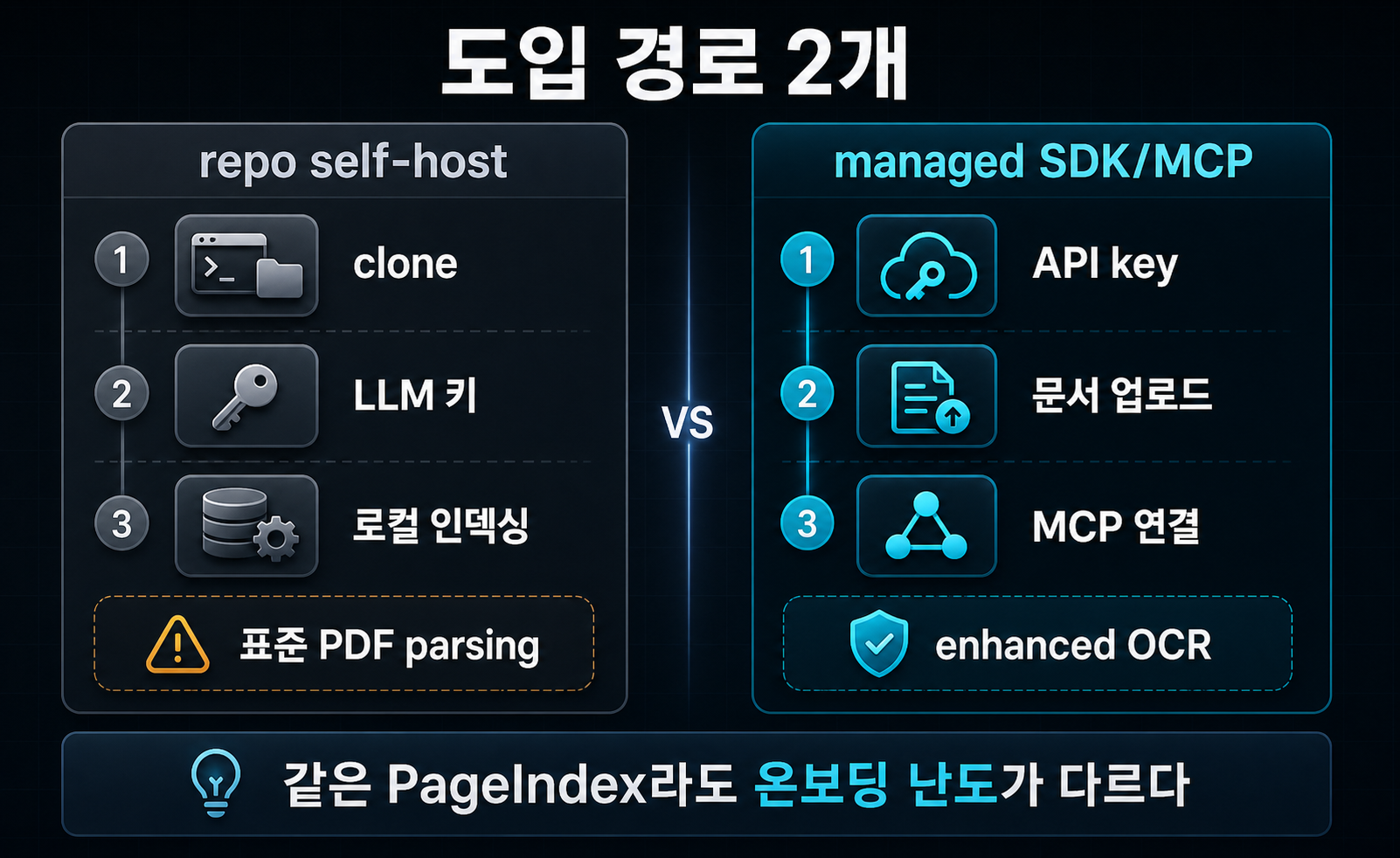
This is the first place people get confused. The GitHub repository is the open-source self-host path for locally turning PDFs or Markdown files into a tree structure. The official Getting Started docs, by contrast, describe a managed cloud path that begins with the developer dashboard and an API key (sources: PageIndex GitHub, Getting Started).
So when someone says “I tried PageIndex,” they may mean one of two very different things:
- Cloning the repo and indexing local documents themselves
- Uploading documents into the managed product and using MCP or the Chat API
If you do not split those apart, claims like “installation is easy” or “you can plug it into MCP immediately” become only half-true.
The core difference is tree traversal, not vector search
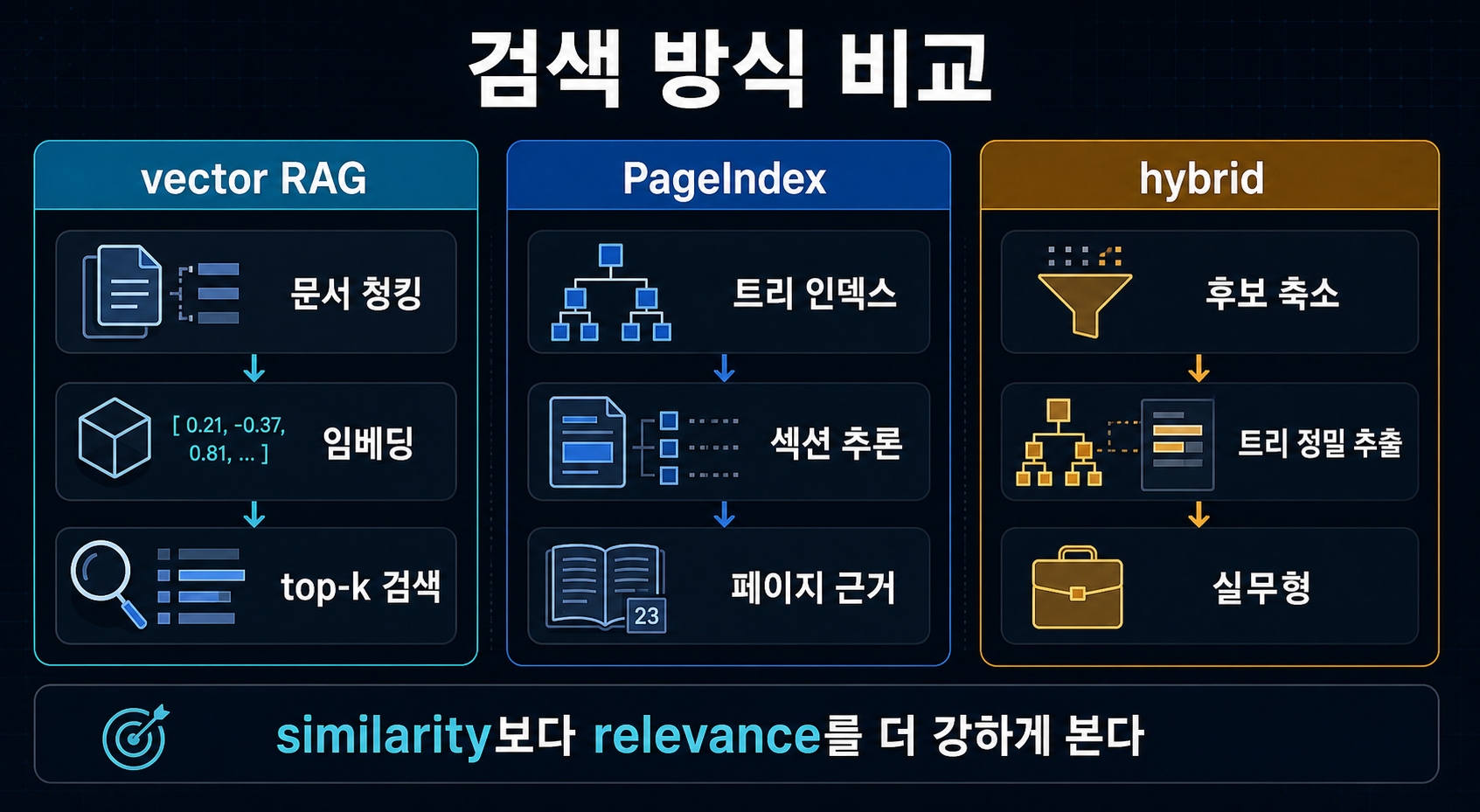
The main break from vector RAG is the retrieval unit. Standard vector RAG chunks a document into fixed pieces, embeds them, and pulls the top-k most similar pieces for a query. PageIndex instead turns the document into a table-of-contents-like tree and lets the model reason about which branch it should open next (sources: PageIndex introduction, Thoughtworks Radar).
That matters most when the document is full of cross-references like “see Appendix G” or “refer to Table 5.3.” Finding the most similar chunk and deciding where the document tells you to go next are not the same task.
What does the repository look like right now?
The public signals are strong. Based on the GitHub API, VectifyAI/PageIndex is a public Python repo created on April 1, 2025. As of May 7, 2026, it had 29,161 stars and 2,472 forks, and it uses the MIT license. At the same time, the GitHub Releases API is empty, which means the project moves through docs and blog updates faster than through clearly tagged release history (source: PageIndex GitHub).
That creates both a positive signal and a caution signal. Growth is real, but it is still harder than ideal to track operational maturity through formal release tags.
Does retrieval really work without a vector DB?
Yes, but the word “retrieval” means something different here. This is not cosine-similarity ranking. It is much closer to reasoning-driven navigation through a document structure.
The real argument is similarity versus relevance
The central PageIndex thesis is that similarity is not the same as relevance. That line can sound like marketing, but it becomes more convincing in financial and legal documents where wording is repetitive and tiny structural differences carry a lot of meaning. If ten sections look semantically similar, the real job is not just to find a similar chunk. It is to find the right place in the document for this question (sources: PageIndex introduction, Adaptive Query Routing).
Tree structure helps most when the document points somewhere else
One of the most compelling use cases is internal cross-reference. When the answer is not stated directly but deferred to “Appendix G” or “Table 5.3,” vector RAG often stumbles. Tree traversal can notice that the current section is not enough and move to another section. That is the real substance behind the “human-like retrieval” idea in the PageIndex story (source: PageIndex introduction).
That still does not mean it solves every search problem
This is where you need to slow down. Thoughtworks put PageIndex in the Assess ring on April 15, 2026, but explicitly noted that pulling LLM inference into retrieval increases latency and cost (source: Thoughtworks Radar).
The April 2026 Adaptive Query Routing paper lands in a similar place. Tree reasoning beats vector RAG on FinanceBench, but no single retrieval paradigm wins every query type, and hybrid systems perform better on some query classes (source: Adaptive Query Routing). So “vectorless means always better” is the wrong takeaway.
How are self-host and cloud/API actually different?
This is the most important practical section. To evaluate PageIndex honestly, you have to treat the open-source repo and the managed document-processing service as different onboarding paths.
The open-source repo is much closer to a local tree generator
The self-host path in the README is simple on paper. You install dependencies, put an LLM key in .env, and run run_pageindex.py to turn a PDF or Markdown document into a tree structure. The dependency list in requirements.txt centers on litellm, pymupdf, PyPDF2, python-dotenv, and pyyaml, and client.py reads OPENAI_API_KEY or CHATGPT_API_KEY. So yes, it avoids a vector DB. No, it does not avoid LLM inference (sources: PageIndex README, requirements.txt, client.py).
pip3 install --upgrade -r requirements.txt
python3 run_pageindex.py --pdf_path /path/to/your/document.pdf
The README also says plainly that this open-source path uses standard PDF parsing. That is exactly why it recommends the cloud path for complex PDFs with harder OCR needs (source: PageIndex README).
The cloud/API path uploads documents first, then connects through MCP or Chat API
The official docs follow a different route. Instead of cloning the repository, you generate an API key in the developer dashboard, install the SDK with pip install -U pageindex, upload your document, and then connect your own LLM or agent via MCP or use the PageIndex Chat API directly (sources: Getting Started, MCP docs).
pip install -U pageindex{
"mcpServers": {
"pageindex": {
"type": "http",
"url": "https://api.pageindex.ai/mcp",
"headers": {
"Authorization": "Bearer your_api_key"
}
}
}
}The practical decision changes depending on which path you mean
The contrast is easiest to see in table form.
| Item | Open-source repo | Cloud / SDK / MCP |
|---|---|---|
| Primary entry point | GitHub clone + local execution | Dashboard + API key + SDK |
| Document processing | Standard PDF parsing | Enhanced OCR + managed processing |
| Query surface | Your own local code | MCP or Chat API |
| Cost structure | Mostly your own LLM cost | Credits plus, in some cases, your own LLM cost |
| Current feel | Good for structure experiments | More natural for production-style onboarding |
How much does it cost?
The pricing is public in the official docs, and that matters more than it may seem. PageIndex is not a simple “no vector DB, therefore cheap” story. It has a subscription surface, a credit surface, and in some workflows a separate LLM-cost surface too (source: Pricing docs).
Subscriptions and credits both matter
In the March 30, 2026 pricing docs, the free trial includes 200 credits and 200 active pages. Paid tiers are Standard at $30 per month, Pro at $50, and Max at $100. Included credits are 1,000 / 2,000 / 6,000, and active-page ceilings are 10,000 / 50,000 / 500,000 respectively (source: Pricing docs).
| Plan | Monthly price | Monthly credits | Active pages | Notes |
|---|---|---|---|---|
| Free Trial | $0 | 200 | 200 | Basic MCP and API evaluation |
| Standard | $30 | 1,000 | 10,000 | Entry point for document-AI builders |
| Pro | $50 | 2,000 | 50,000 | More realistic team throughput |
| Max | $100 | 6,000 | 500,000 | Larger-scale processing and multiple workspaces |
MCP separates PageIndex cost from model cost
The most important fine print in the pricing docs is this: Page indexing costs 1 credit per page, while LLM integration is unlimited but inference billing belongs to your LLM provider. In other words, MCP mode separates PageIndex costs from OpenAI, Anthropic, or Google model costs (sources: Pricing docs, MCP docs).
That structure creates both upside and friction. The upside is that PageIndex fits more easily into an existing agent stack. The friction is that “it’s only $30 per month” is not the whole budget story. You still need to think about both document indexing and model calls.
It can feel cheap until page count becomes the real budget lever
There is also a top-up model. Extra credits cost $0.01 each and do not expire. That means teams processing long PDFs at volume may find that page count becomes a more important budget lever than query count surprisingly quickly (source: Pricing docs).
How much should you trust the 98.7% FinanceBench claim?
If you search for PageIndex, you will almost always run into the 98.7% number. The important question is not just whether the number is real. It is where it comes from and how far it should be generalized.
The number is real, but the strongest presentation is vendor-owned
The Mafin 2.5 FinanceBench repository and the official developer surface both say that a PageIndex-based system reached 98.7% accuracy on FinanceBench. That number is a real published claim. But it is also most forcefully presented through VectifyAI-owned benchmark reporting and product-marketing surfaces (sources: Mafin2.5-FinanceBench, PageIndex Developer).
There is some independent support for the general tree-reasoning idea
That does not mean the number should be dismissed outright. The Adaptive Query Routing paper reports that tree reasoning shows real advantages over vector RAG across financial, legal, and medical query sets, especially on cross-reference recall (source: Adaptive Query Routing).
Thoughtworks Radar also treats PageIndex as something worth exploring and explicitly notes that the approach can work well when meaning depends heavily on document structure (source: Thoughtworks Radar).
But broad multi-document generalization is still a stretch
This is where the brakes should go on. The Mafin repository itself acknowledges benchmark ambiguity and the lack of multi-document reasoning coverage. So 98.7% is best read not as “PageIndex dominates document retrieval in general,” but as “PageIndex is very strong on FinanceBench-style single-document financial QA” (sources: Mafin2.5-FinanceBench, FinanceBench paper).
| Headline | What it really means | What readers should mentally add |
|---|---|---|
| 98.7% on FinanceBench | A strong public result on financial document QA | Also remember the benchmark and reporting are vendor-owned |
| Vectorless RAG | Retrieval through tree indexing and reasoning, not a vector DB | That does not remove LLM cost or latency |
| Million-document scale | An enterprise or cloud scaling claim built on a file-system layer | Do not treat the open-source repo alone as proof of that scale |
PageIndex coverage gets slippery when it quietly translates one benchmark headline into a general product verdict. FinanceBench strength and universal RAG replacement are not the same claim.
How is it different from vector RAG, GraphRAG, and LLM Wiki?
To understand PageIndex properly, you need to separate it not only from vector databases but also from other “structure-first” alternatives. The key question is not the marketing label. It is what unit of knowledge gets stored, and what gets traversed at query time.
The break from vector RAG is the retrieval unit
Vector RAG normally uses the chunk as its retrieval unit. PageIndex uses a tree of sections and pages. That lets it preserve the flow of long structured documents, but it also means the system pays a real reasoning cost during retrieval (sources: PageIndex introduction, Thoughtworks Radar).
Graphify and LLM Wiki are solving different jobs
Cut Claude Code Tokens 71x with Graphify: Hands-On Guide (2026) is about compiling code and documents into a graph topology that Claude can traverse. RAG Is Over? Karpathy’s LLM Wiki Pattern Explained (2026) is closer to cumulative knowledge compilation into Markdown. All three approaches move outside the usual vector-DB lane, but PageIndex is primarily document retrieval, Graphify is graph-based code and doc navigation, and LLM Wiki is stateful knowledge compilation.
The realistic answer is hybrid, not total replacement
As argued in AI Apps Are Built with Harnesses, Not Prompts, real systems rarely depend on one retrieval strategy alone. A practical setup is often to use vector or metadata search to narrow the candidate set, then use a reasoning-heavy retriever like PageIndex for final extraction. The Adaptive Query Routing paper points in the same direction: hybrid systems often outperform one-paradigm purism on real mixed query sets (source: Adaptive Query Routing).
| Category | Vector RAG | PageIndex | Graphify / LLM Wiki |
|---|---|---|---|
| Traversal unit | Chunk | Section and page tree | Graph node or wiki page |
| Best at | Broad candidate reduction | Deep retrieval in long structured documents | Long-lived knowledge structuring |
| Weak at | Cross-references and structural distortion | Latency, cost, and very broad corpora | General document QA |
| Most realistic role | First-pass candidate search | Second-pass precision extraction | Long-term memory or code understanding support |
What workflow do you get through MCP?
One reason PageIndex is genuinely interesting right now is that it is not just a PDF-QA toy. It has a relatively well-shaped surface as an agent tool.
PageIndex MCP is a developer surface, not the end-user chat product
The official MCP docs explicitly say that PageIndex MCP does not share file space or usage with the end-user Chat product. It uses a bearer API key and the MCP server endpoint https://api.pageindex.ai/mcp (source: MCP docs).
That matters because “it works nicely in the chat UI” and “it integrates reliably into my agent pipeline” are very different statements.
The OpenAI Agents SDK example shows what the product is really trying to be
The repository’s agentic_vectorless_rag_demo.py uses the OpenAI Agents SDK to register three tools: get_document, get_document_structure, and get_page_content. The agent reads the structure first and then fetches only the pages it needs. That makes the intended identity of PageIndex much clearer. It is not “the model that answers for you.” It is a retrieval tool that helps an agent read more precisely (source: agentic_vectorless_rag_demo.py).
The cleanest way to think about it is as a harness component
This is where the argument links straight into AI Apps Are Built with Harnesses, Not Prompts. PageIndex is less like a new frontier model and more like a harness component that swaps out one retrieval layer for another. So the better question is not “is PageIndex smart?” It is “what retrieval failures does it actually reduce inside my agent loop?”
Is installation really easy?
The honest answer is: it depends which path you mean.
The managed SDK path is currently smooth
The official Getting Started path built around pip install -U pageindex succeeded in a clean Python 3.11 virtual environment on May 7, 2026. So if your goal is to upload documents, get a doc_id, and connect through API or MCP, the managed SDK entry point is currently quite smooth (source: Getting Started).
But repo-clone self-host hits real friction immediately
The repository-clone path is another story. A clean Python 3.11 install using pip install -r requirements.txt failed because litellm==1.83.7 requires python-dotenv==1.0.1, while the repository pins python-dotenv==1.2.2. So the README path is currently best described as “simple on paper, but not passing a clean install as-is at this moment” (source: requirements.txt).
So “easy” only makes sense if the path is specified
That difference is not cosmetic. The answer changes depending on whether a team wants pure open-source self-hosting or a managed document-processing service plus MCP integration.
- Whether the
requirements.txtpin conflict has been resolved\n2. Which LLM provider key you intend to use\n3. Whether standard PDF parsing is enough for your real documents\n4. Whether enhanced cloud OCR is actually non-negotiable for your domain
What kinds of documents fit it well, and where does it fit poorly?
The most accurate way to use PageIndex is to narrow down where it fits before you decide whether it is worth adopting at all.
Strong fit: long structured documents and cross-reference-heavy questions
PageIndex is most convincing on documents where section structure and reference flow matter: financial reports, regulatory documents, legal texts, and technical manuals. That is exactly the kind of setting Thoughtworks highlights, and it is also the kind of setting most FinanceBench-style evaluation reflects (sources: Thoughtworks Radar, FinanceBench paper).
Weaker fit: short FAQs, ultra-low latency, and broad multi-document sweep
Short documents, generic semantic search, latency-sensitive realtime UX, and huge broad-corpus discovery problems are where vector RAG or hybrid retrieval are often more realistic. Even the official blog frames million-document scale around an added PageIndex File System layer. Treating the basic open-source repo as proof of that whole scaling story is too aggressive (sources: PageIndex File System blog, Adaptive Query Routing).
The independent cautionary evidence points the same way. Nathan A. King reported 47% answer correctness for traditional RAG versus 22% for PageIndex on a commercial loan document corpus, with average latency of 4.7 seconds versus 27.2 seconds. One evaluation is not enough to generalize from forever, but it is absolutely enough to show that less-structured documents plus fast-response requirements can flip the advantage the other way (source: PageIndex as RAG Alternative).
The million-document story should be read as an enterprise-layer claim
This is the real boundary. Single-document deep retrieval and massive-corpus search are different problems. PageIndex is clearly pushing into the second category too, but the strongest public evidence still sits closer to the first.

FAQ: Common questions about PageIndex
Does PageIndex fully replace vector databases?
Can I use PageIndex immediately with the open-source repo alone?
Should I start with the managed service or the GitHub repo?
Is the 98.7% FinanceBench claim trustworthy?
What models does it make the most sense to pair it with?
Who should try PageIndex first?
Conclusion: Is PageIndex worth trying right now?
The recommendation at this point is fairly clear. If vector RAG keeps wobbling on long structured documents, PageIndex is absolutely worth testing. But the right starting question is not “should we replace RAG?” It is “which part of our retrieval stack gets better if we swap precision extraction to tree reasoning?”
The shortest judgment
PageIndex is a strong candidate when document structure carries real meaning, but the current public evidence is still not enough to treat it as a universal replacement for RAG in general.
Never compress the managed SDK or MCP path and the open-source self-host repo path into one sentence. The first is the fast validation lane. The second is the structure-experiment lane.
1. Compare on one real document first
Pick a financial report, policy manual, or other structure-heavy PDF and compare your current vector RAG against PageIndex on the same question set.
2. Start with the managed path
If fast onboarding matters, begin with the SDK and MCP route, then revisit the GitHub repo only if self-hosting becomes a real requirement.
3. Treat hybrid as the default mental model
Let your current search layer narrow the candidate set, then use a reasoning-heavy retriever for final precision extraction when the question really needs it.
Was this helpful?
One tap shapes what gets written next.

What Is PlayMCP? Kakao's MCP Hub and OpenClaw Integration Explained
A current guide to what PlayMCP really is, how Kakao's toolbox and mcp-gateway work, and why the OpenClaw integration matters.
Read
Beyond RAG: Karpathy's LLM Wiki Pattern Explained (2026)
Hit RAG's limits? Andrej Karpathy's LLM Wiki pattern is a markdown-first alternative — 3-layer architecture, 95% token savings, exploding ecosystem in 2 weeks.
Read
Andrej Karpathy's 4 AI Coding Warnings and the 100K-Star CLAUDE.md Repo
A deep dive into the four bad AI coding habits Karpathy warned about, the CLAUDE.md repo's four operating principles, what evidence supports them, and where the limits still are.
Read