What Is PlayMCP? Kakao's MCP Hub and OpenClaw Integration Explained
A current guide to what PlayMCP really is, how Kakao's toolbox and mcp-gateway work, and why the OpenClaw integration matters.
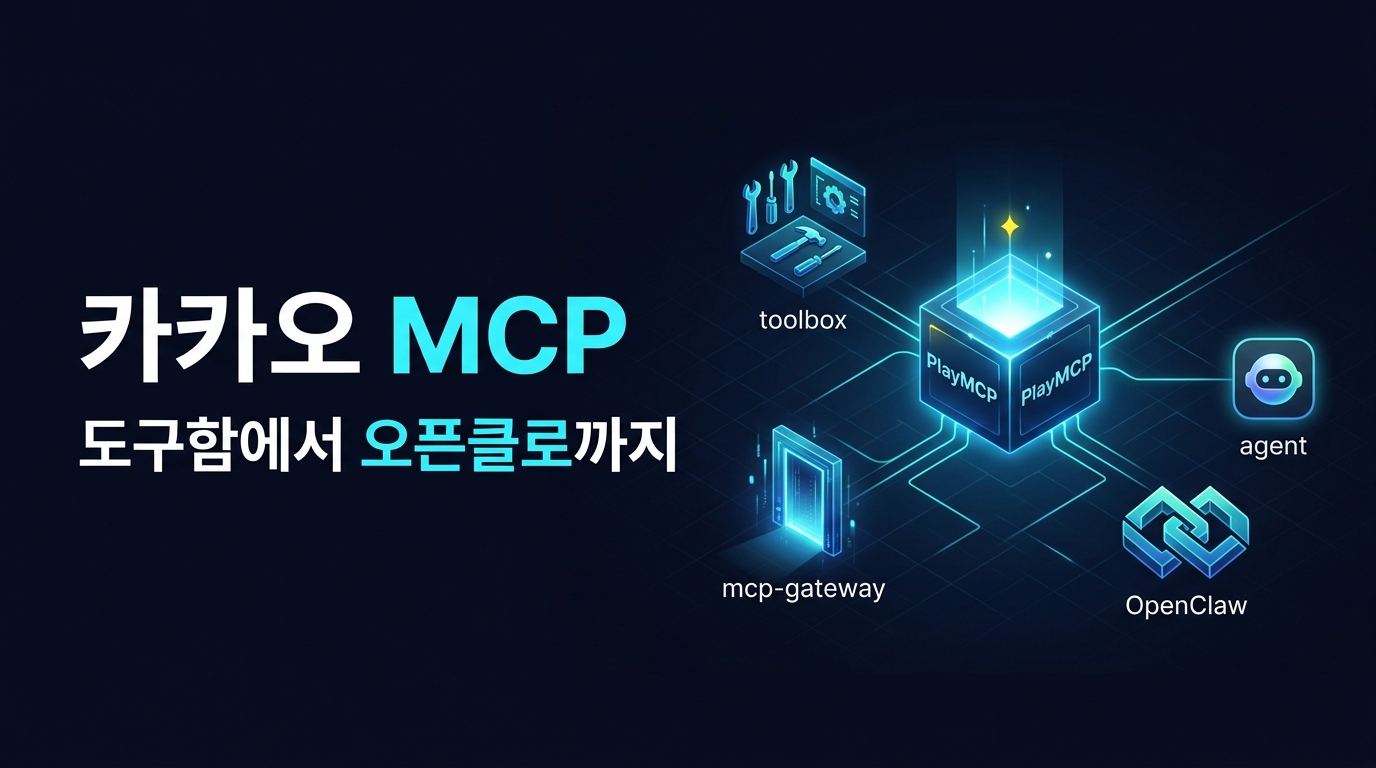
Quick take
Start with this judgment
17 min readBottom line
A current guide to what PlayMCP really is, how Kakao's toolbox and mcp-gateway work, and why the OpenClaw integration matters.
- Best for
- Readers comparing cost, capability, and real limits before choosing a tool
- What to check
- PlayMCP · OpenClaw · Kakao MCP
- Watch out
- Pricing and features can change, so confirm with the official source too.
3 key points
- PlayMCP is not just a list of MCP servers. It is closer to a Kakao-operated hub built around a toolbox, an
mcp-gateway, and multiple connection surfaces for AI agents. - The OpenClaw announcement matters because PlayMCP now reaches beyond “call a tool inside a chatbot” into scheduled and recurring local-agent automation.
- At the same time, PlayMCP is still a transition-stage platform between public beta and rapid expansion. Kakao has disclosed meaningful details about the toolbox, gateway, and OAuth flow, but the full trust and data-retention model is still only partially visible.
목차
- What exactly is PlayMCP?
- Why did Kakao build PlayMCP?
- How is the toolbox different from a simple MCP list?
- Why does the OpenClaw integration matter now?
- How much of the actual connection flow is public?
- Can you really use PlayMCP in ChatGPT and Claude?
- How much security detail is public?
- Who should pay attention to PlayMCP right now?
- What should you avoid overstating?
- FAQ: Common questions about PlayMCP
- Conclusion: Is it worth trying now?
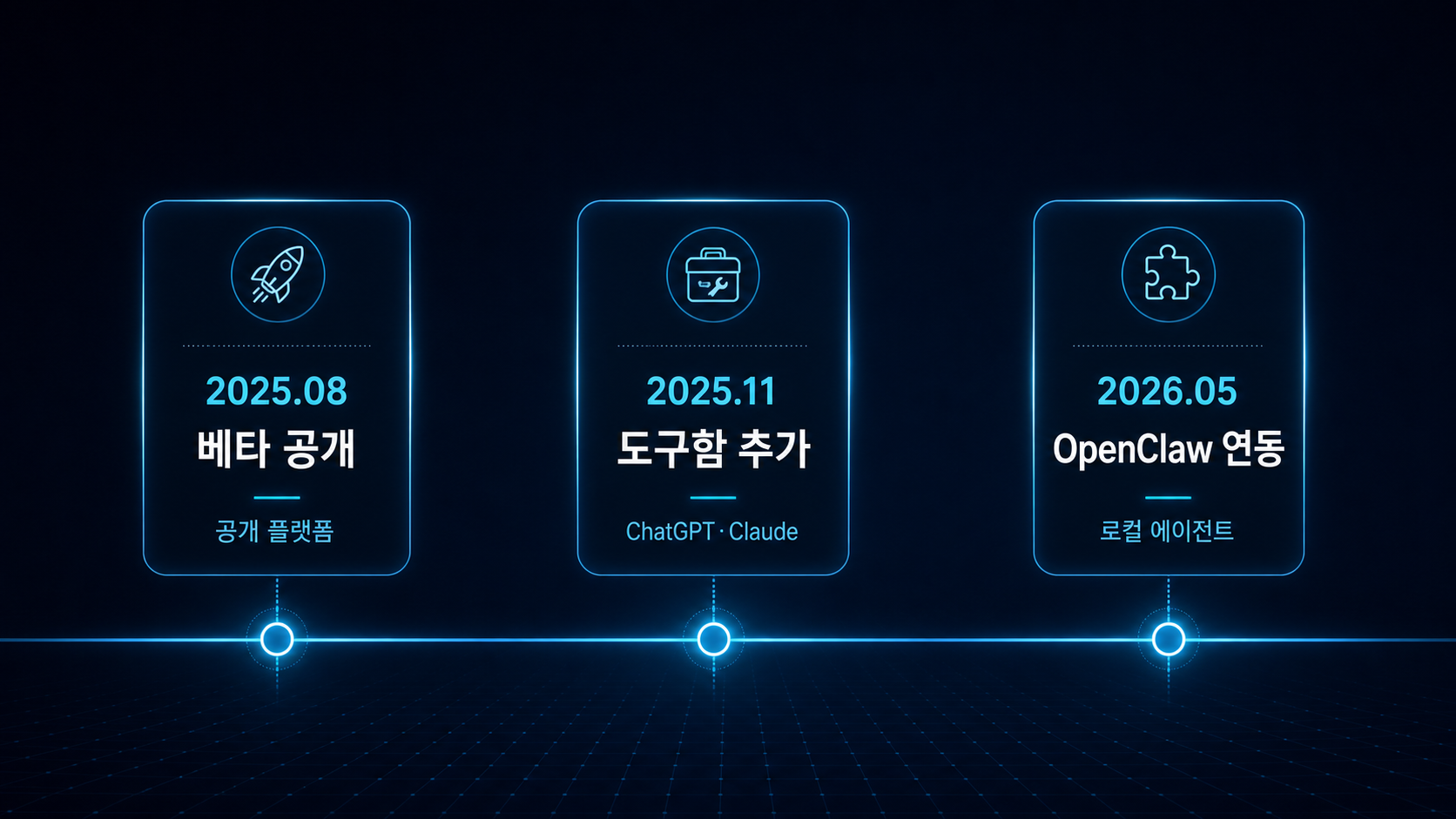
If we start with the short answer, as of May 5, 2026, PlayMCP is better understood as “Kakao’s connection hub for Kakao services and external MCP servers” than as “a Korean MCP app store.” The timeline from the official beta in August 2025, to the toolbox launch in November 2025, to OpenClaw integration on May 1, 2026, shows Kakao building PlayMCP into a real agent surface rather than a one-off demo site (sources: PlayMCP beta launch, toolbox announcement, OpenClaw integration announcement).
This is not meant to be a press-release rewrite. PlayMCP is genuinely interesting, but it is not a magical connector that works the same way in every AI app, and it is not a fully transparent security architecture either. The useful way to read it is to separate three things: what PlayMCP is, why the OpenClaw integration matters, and how much Kakao has actually made public.
What exactly is PlayMCP?
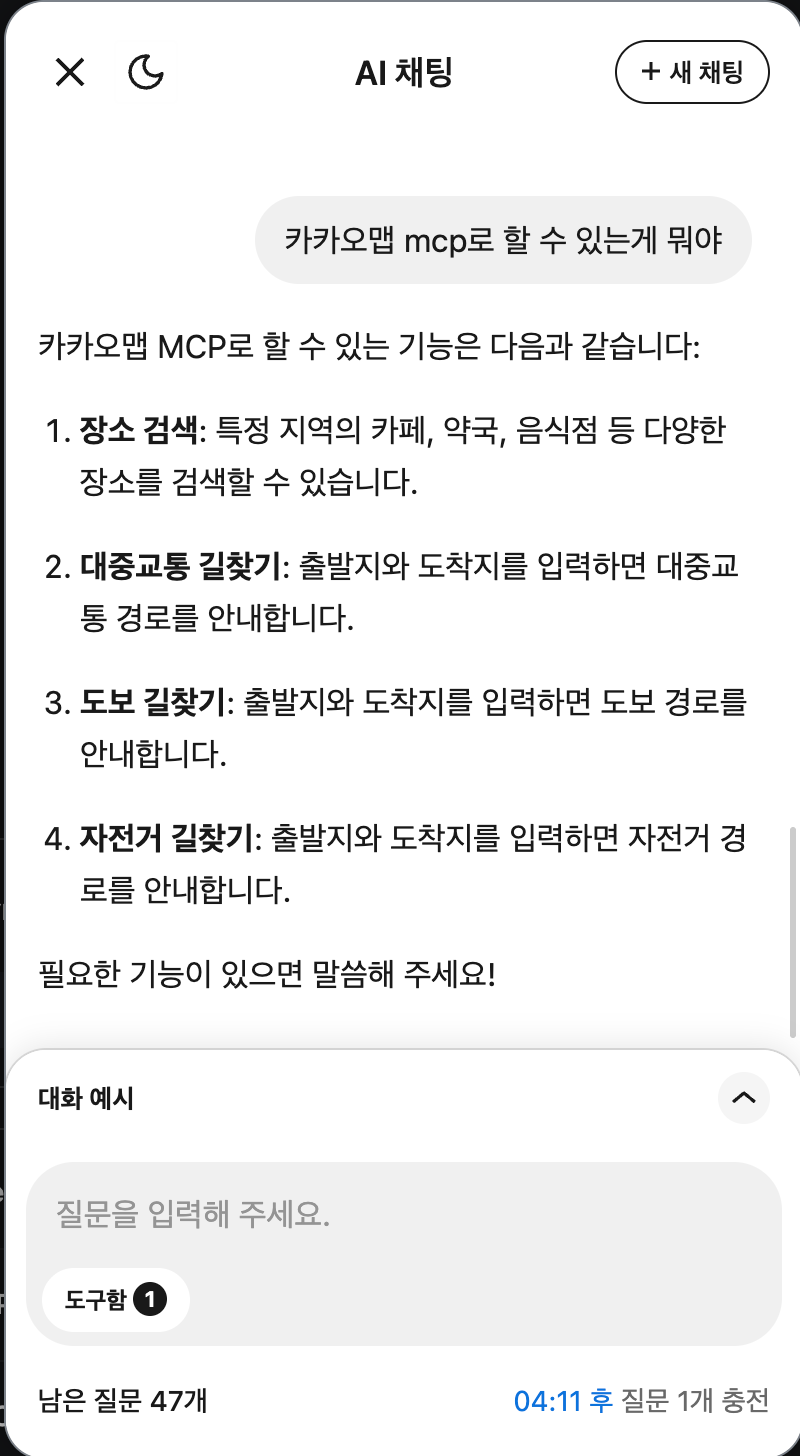
In one sentence, PlayMCP is Kakao’s MCP-based tool integration platform and playground. Users can discover Kakao-run or third-party MCP servers and connect them to an AI agent, while developers can register their own servers for exposure inside the ecosystem (source: PlayMCP llms.txt).
It is not just a directory. It ships with a gateway.
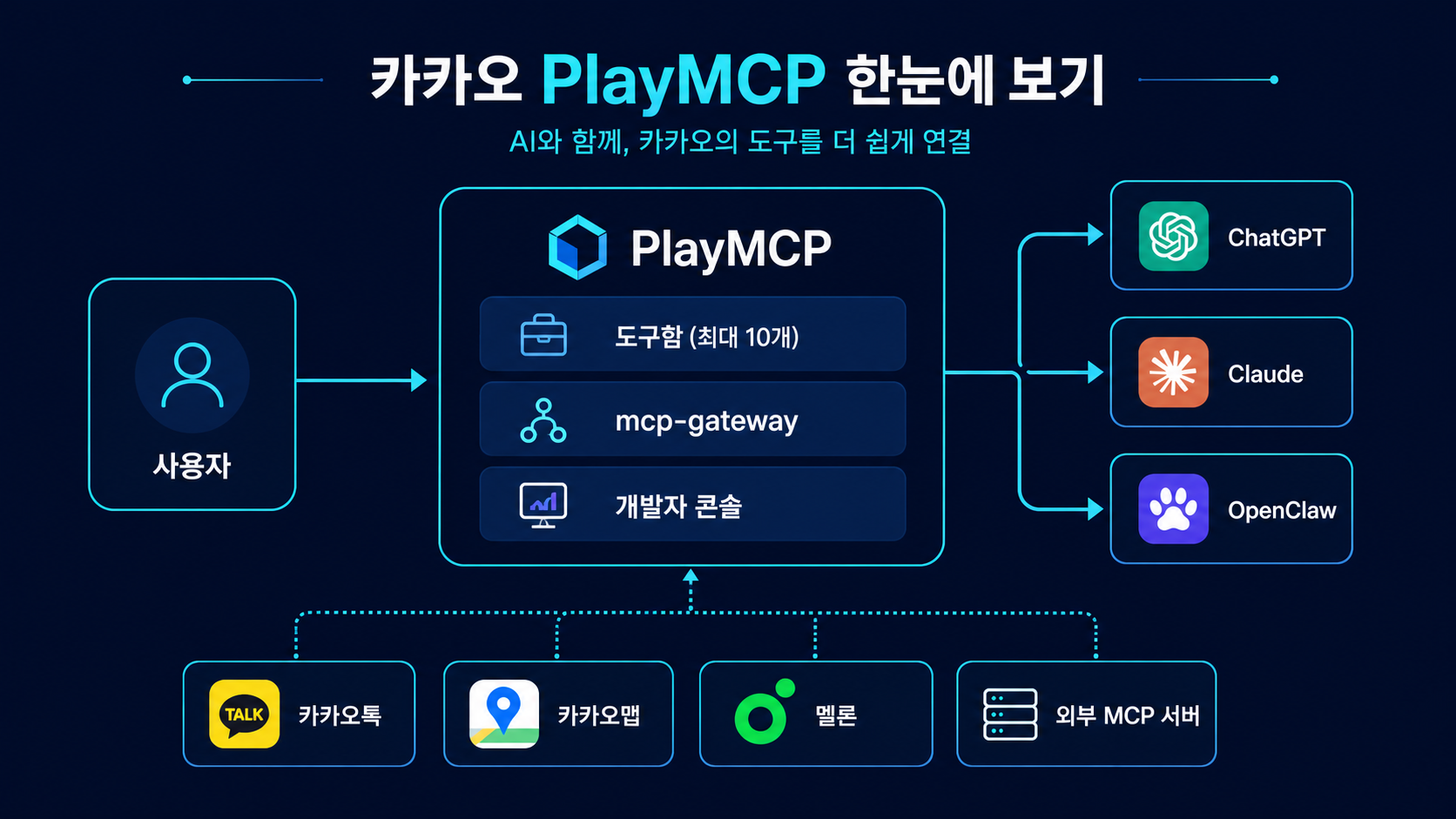
This is the most important distinction. Based on the public llms.txt, PlayMCP includes a toolbox, AI chat, a developer console, and a gateway at https://playmcp.kakao.com/mcp. In other words, it does not stop at “a place to browse MCP servers.” It also provides the layer that bundles the user’s selected tools and exposes them to external AI services through a shared connection surface (source: PlayMCP llms.txt).
The service opening date and the official launch date are slightly different
Kakao’s corporate press page treats August 13, 2025 as the beta launch date. Kakao’s engineering blog, however, describes PlayMCP as a service that opened on July 31, 2025. That does not necessarily mean the sources conflict. It more likely means the service became available before the formal public announcement. For a chronology in this article, it is safest to anchor on the official announcement date of August 13, 2025 (sources: PlayMCP beta launch, Kakao engineering post).
PlayMCP still feels like a beta platform
Taken together, the public materials suggest a product that is expanding quickly but has not settled into a fully finished consumer experience. Kakao’s technical materials go surprisingly deep on structure and auth flow, while the end-user surface still reads like a beta experience. That makes PlayMCP closer to “Kakao’s MCP-era experimentation surface” than a fully polished mainstream tool.
Why did Kakao build PlayMCP?
Kakao’s strategic angle is not primarily “sell the best model.” It is closer to “turn Kakao’s daily-life services into executable surfaces for AI agents.” In plain English, the goal is less about an AI that only answers questions, and more about an AI that can touch calendars, maps, gifting, and music services in an agent workflow.
Kakao keeps emphasizing “everyday AI”
From the August 2025 beta announcement, to the October 2025 ChatGPT for Kakao launch, to the November 2025 toolbox release, and then to the May 2026 OpenClaw integration, Kakao keeps returning to the same phrase: everyday AI. The center of gravity is not abstract reasoning, but agent experiences grounded in services like KakaoTalk, KakaoMap, gifting, and Melon (sources: PlayMCP beta launch, ChatGPT for Kakao, toolbox announcement).
PlayMCP is a connection layer, not a model page
That point matters. PlayMCP is not Kakao’s “foundation model” story. Based on Kakao’s if(kakao)25 keynote framing, PlayMCP and PlayTools are about reducing the friction of discovery, connection, authentication, and quality control in MCP adoption. The core question is not “which model is smartest?” but “how do we connect many tools reliably?” (source: if(kakao)25 day-2 keynote).
This is much closer to a harness than a prompt feature
That is exactly why PlayMCP fits the framing in AI Apps Are Built with Harnesses, Not Prompts. The more real tools you attach to an agent, the less the product is about prompt cleverness alone, and the more it becomes a question of orchestration, auth, and execution boundaries.
How is the toolbox different from a simple MCP list?
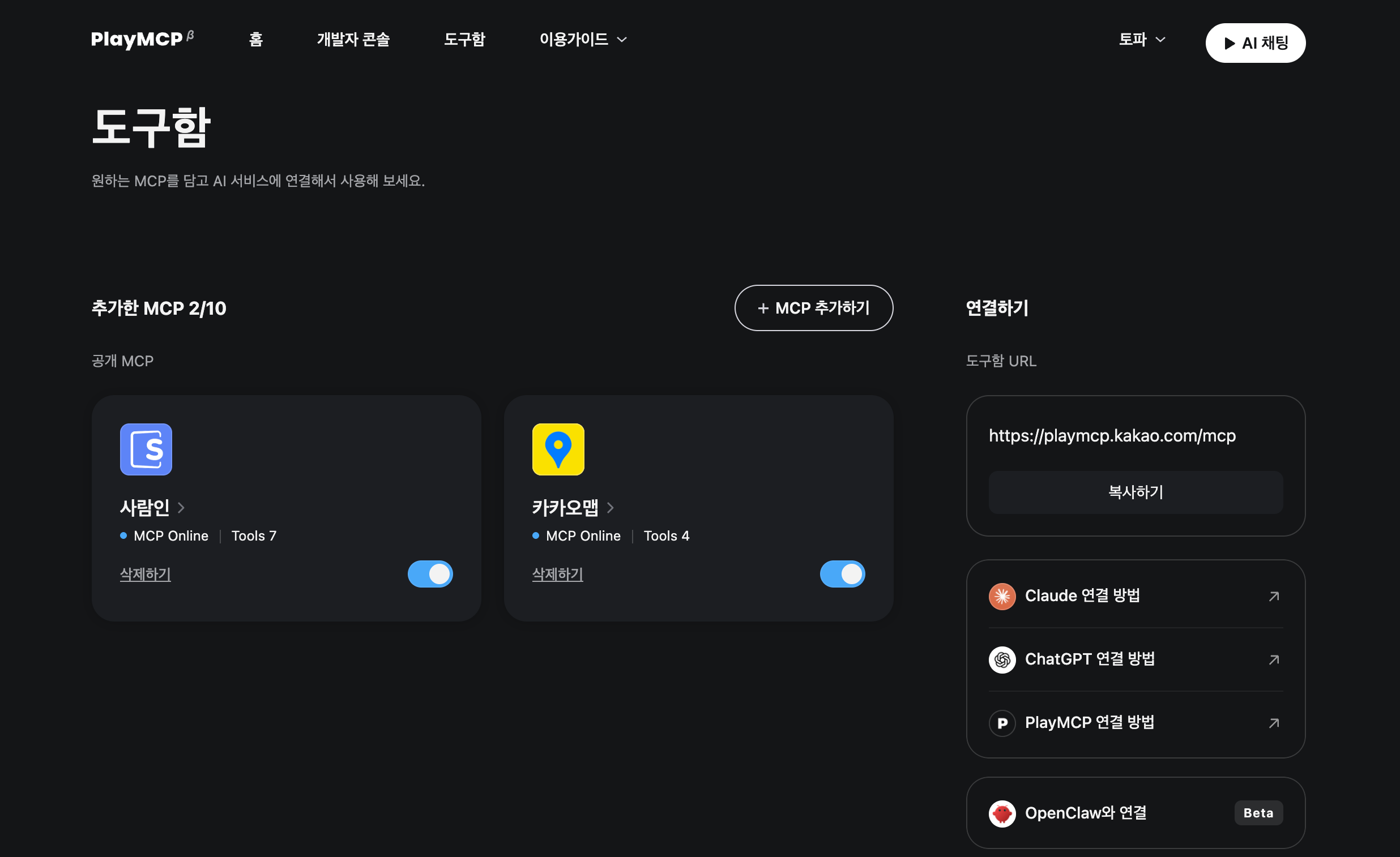
The toolbox is arguably the most practical concept in PlayMCP. It is not just a bookmarking layer for MCP servers. It is the user-level bundle that groups selected tools under one Kakao-authenticated gateway so they can be reused across external AI services.
You can manage up to 10 MCP servers as one bundle
The public llms.txt defines the toolbox as a collection of MCP servers selected by the member, and it sets the current limit at 10 servers. That may sound small, but it also signals a more execution-focused philosophy: a narrow set of tools you actually use, rather than an endless marketplace shelf (source: PlayMCP llms.txt).
External services connect to the gateway behind the toolbox
Internally, PlayMCP maps the user’s selected tools to a gateway. So from the perspective of an outside AI client, you are not directly attaching dozens of individual MCP servers one by one. You are mainly dealing with PlayMCP’s mcp-gateway plus an OAuth auth flow. That is a centralized solution to the classic MCP problem of “tool connections get messier as the number of tools grows.”
PlayTools and toolbox probably solve neighboring layers, but the naming is still fuzzy
One nuance worth keeping in the article: the naming is not perfectly clean in public sources. Late-2025 materials and the if(kakao)25 session use the name PlayTools, while the current llms.txt and corporate press materials foreground the toolbox and mcp-gateway. It is hard to say from public evidence alone whether these are identical surfaces or adjacent layers in an evolving product structure. The safest phrasing is that they appear to solve the same general coordination problem (sources: if(kakao)25 day-2 keynote, PlayMCP llms.txt).
Why does the OpenClaw integration matter now?
The May 1, 2026 announcement matters because it pushes PlayMCP from “humans occasionally calling tools inside a chatbot” toward “a local agent running recurring automation.” That is a material shift in the kind of work the platform can support.
OpenClaw is a local open-source agent
Kakao describes OpenClaw as an open-source AI agent that users install and run on their own computer. It is meant to connect channels, LLMs, and external tools so that recurring work can be automated in a local or self-controlled environment (source: OpenClaw integration announcement).
The real change is from asking questions to running continuously
Kakao’s own examples are telling: “tell me today’s school lunch every morning at 9” or “find junior server-developer job listings around Pangyo once a day.” Those are not just search prompts. They are persistent agent workflows that call tools on a schedule and deliver output to a chosen channel (source: OpenClaw integration announcement).
It also broadens PlayMCP’s ecosystem reach
PlayMCP already highlighted ChatGPT and Claude integrations. Once a local open-source agent like OpenClaw is added, Kakao service connectivity is no longer confined to closed chatbot apps. It becomes part of a wider automation ecosystem. If you follow multi-agent tooling more broadly, this pairs well with Oh My OpenAgent Review: A Multi-Agent Alternative to Claude Code (2026).
How much of the actual connection flow is public?
This is where reading the real docs matters more than reading the headline. PlayMCP has published both llms.txt and an external-agent connection guide, and together they disclose the OpenClaw flow in a fairly concrete way.
This is not a first-person “I connected OpenClaw end to end” walkthrough. It is an explanation of the current public connection flow based on Kakao’s own guide. The point here is to clarify how much is documented, and where developer work still begins.
The user steps and the agent steps are explicitly separated
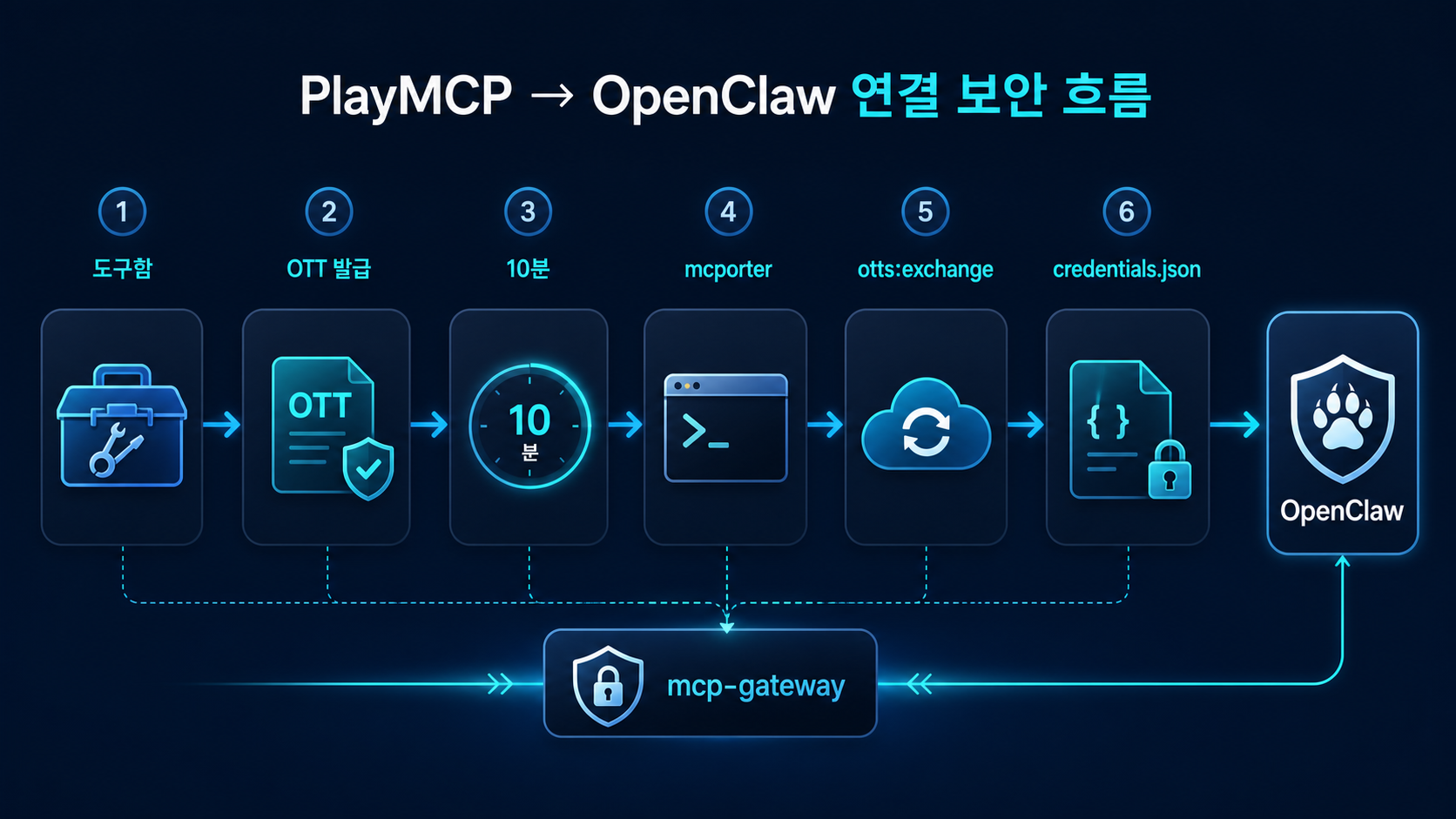
The public guide labels the first two steps as user-performed steps. The user logs into PlayMCP, opens the toolbox, and clicks Connect with OpenClaw to generate a connection prompt and a one-time token. After that, installation of mcporter, server registration, token exchange, and credential storage are all handled on the agent side (source: PlayMCP external-agent connection guide).
In practice, this still involves CLI work and credential-file editing
This is the important counterweight. Kakao’s high-level explanation can sound like “paste the connection prompt and OpenClaw handles the rest.” But the public guide clearly includes mcporter config add, an OTT exchange request, and editing ~/.mcporter/credentials.json. In other words, external-agent integration is still developer-friendly rather than consumer-simple.
mcporter config add mcp-gateway https://playmcp.kakao.com/mcp --auth oauth --scope homecurl -X POST 'https://playmcp.kakao.com/api/v1/auths/otts:exchange' \
-H 'accept: */*' \
-H 'Content-Type: application/json' \
-d '{"tokenValue":"<ONE_TIME_TOKEN>"}'The guide also publishes a verification step
That matters. The documentation ends by telling users to verify the connection with mcporter list mcp-gateway, which means this is not just a conceptual architecture slide. Kakao has published a real CLI path that can be executed and checked in the field.
Prepare PlayMCP and the toolbox
The user logs into PlayMCP and generates an OpenClaw connection prompt from the toolbox.
Register the gateway with mcporter
The agent environment adds the PlayMCP mcp-gateway definition and OAuth scope.
Exchange the OTT for tokens
The one-time token, valid for 10 minutes, is exchanged for an access token and a refresh token.
Store credentials and verify
The mcporter credential file is updated and the connection is checked through a list command.
Can you really use PlayMCP in ChatGPT and Claude?
Short answer: yes, but not under identical conditions for every user. Kakao’s November 2025 announcement described both integrations, and the current official docs that were cited in the Korean article support the broader claim that both platforms expose custom MCP connection paths. The important caveat is that pricing tiers and setup requirements differ (sources: toolbox announcement, OpenAI connectors in ChatGPT, Anthropic custom connectors).
ChatGPT currently requires a paid tier and, in some plans, developer mode
The cited OpenAI Help Center documentation says ChatGPT custom connectors are available on Plus, Pro, Business, Enterprise, and Edu. The Korean article also notes that Plus and Pro require developer mode, while managed workplace plans layer in admin-policy considerations. So Kakao’s “works with ChatGPT” claim is real, but it should not be read as “works on every free account out of the box” (source: OpenAI connectors in ChatGPT).
Claude is more open at the entry level, but practical use still depends on plan limits
The cited Anthropic Help Center guide says remote MCP custom connectors work in Claude, Cowork, and Claude Desktop. Free use is possible but restricted, while Pro, Max, Team, and Enterprise are more realistic for sustained use. The article also notes that remote connectors run through Anthropic’s cloud infrastructure, so internet reachability and permission review matter (source: Anthropic custom connectors).
The connection surface is shared, but the user experience is not
ChatGPT and Claude represent a cloud-chat style of usage. OpenClaw represents a local-agent style of usage. The same PlayMCP gateway can sit behind both, but the expectations should be different. If you are coming from coding-agent workflows, Claude Code Review: Complete Guide (2026) is a useful companion for understanding the broader agent tooling context.
| Target | Public integration path | Practical requirement | Typical feel |
|---|---|---|---|
| PlayMCP AI Chat | Built-in website surface | Login plus daily question limits | Quick testing / validation |
| ChatGPT | Custom MCP connector | Paid tier plus current connector setup requirements | Conversational cloud use |
| Claude | Custom connector via remote MCP | Free is possible but limited, paid tiers are more practical | Conversational cloud use |
| OpenClaw | OTT plus mcporter plus gateway | Local agent environment and CLI setup | Automation / recurring execution |
How much security detail is public?
Based on the current public materials alone, PlayMCP is not an opaque black box. The one-time token flow, OAuth-based gateway, and the separation between user-side and agent-side actions are all reasonably concrete. But it would still be an overstatement to call the entire security posture fully transparent or fully validated.
Some meaningful protections are clearly disclosed
Kakao states that the OpenClaw integration uses a one-time token valid for 10 minutes. The public guide shows how that OTT is exchanged for an access token and a refresh token. The general direction also aligns with broader MCP security guidance, which favors short-lived credentials and explicit validation boundaries (sources: OpenClaw integration announcement, PlayMCP external-agent connection guide, MCP Security Best Practices).
Many important details are still not public
The public materials do not fully answer questions like token retention length, how strongly third-party MCP servers are reviewed, how the quoted 200-plus external servers are quality-controlled, what the full limits of the internal AI chat are, or what the complete data-retention policy looks like. That is why it is safer to say “Kakao has published meaningful security-related mechanics” than “the platform is fully security-validated.”
It is also too simplistic to project every MCP fear directly onto PlayMCP
The opposite overreaction is not great either. General MCP security docs warn against token passthrough, recommend audience validation, and favor short token lifetimes. PlayMCP should be judged against those concrete principles rather than against a vague sense that “all MCP is dangerous” (sources: MCP Authorization, MCP Security Best Practices).
Who should pay attention to PlayMCP right now?
By this point the practical question becomes obvious: who actually benefits from looking at PlayMCP today?
MCP server developers
If you build MCP servers and want them to appear inside a Kakao-account-based user flow, PlayMCP is one of the more interesting public experiments to watch. Its value is not just exposure, but the way it combines discovery, approval, connection, and use inside one visible product surface.
ChatGPT and Claude power users
If you already use custom connectors in ChatGPT or Claude, PlayMCP can function as a bundled gateway for Kakao-side services. That matters most for daily-life services where execution is more important than conversation, such as maps, calendars, gifting, or media.
Local-agent and automation users
If you care about local-agent automation, the OpenClaw integration is the most important part of the story. It suggests that PlayMCP can be treated not just as a chat connector, but as an automation input surface. In that sense, it also pairs nicely with workflow-oriented reads like Cut Claude Code Tokens 71x with Graphify: Hands-On Guide (2026), where the question is how tools enter a real operating loop rather than a single chat window.
What should you avoid overstating?
PlayMCP is interesting, but there are also clear places where overstatement turns the story into marketing copy.
It is too early to call it the Korean MCP standard
Kakao describes it as Korea’s first open MCP-based platform, but that is not the same thing as saying it has already become the standard. Right now it is more accurate to call it a strong early hub candidate.
It is not equally easy for everyone
The toolbox-based ChatGPT or Claude connection path may look relatively simple, but external-agent integration through OpenClaw is still clearly developer-oriented. CLI steps, token exchange, and credential-file handling are part of the published flow.
”Many servers” is not the same as “good servers”
Kakao mentions roughly 200 external MCP servers. That says something about scale, but not enough about usefulness, category balance, or quality. Public material alone is not enough to make confident claims about that landscape yet.
| Topic | What the public materials support | What still needs caution |
|---|---|---|
| Platform identity | A Kakao-run MCP hub and playground | Calling it the settled standard for Korea's MCP ecosystem |
| OpenClaw integration | A documented OTT-based connection flow exists | Saying anyone can finish setup with a few clicks |
| Security | Short-lived OTT and OAuth exchange are disclosed | Claiming the full security architecture is already validated |
| Ecosystem scale | Kakao cites 200-plus servers | Claiming strong quality control across the entire catalog |
FAQ: Common questions about PlayMCP
Is PlayMCP just a website that lists MCP servers?
How many servers can the toolbox hold?
Is the OpenClaw integration really easy?
Can you use PlayMCP in ChatGPT and Claude?
How much of the security model is public?
Is it worth trying right now?
Conclusion: Is it worth trying now?
The best one-line summary right now is this: PlayMCP is an ambitious Korean hub experiment that tries to bundle Kakao services and external MCP servers into multiple AI-agent surfaces. The OpenClaw integration matters because it suggests the platform is stretching beyond chatbot connectors into local-agent automation.
Bottom line
PlayMCP is not a perfectly settled platform yet, but it is already one of the clearest public examples of how Kakao wants its services to appear in the MCP era.
Do not read PlayMCP as a universal solution. Read it as a concrete reference point: a useful example of what has already been exposed publicly, how the connection flow works today, and where important details are still missing.
If this is your first time hearing about PlayMCP
Separate the roles of the toolbox, AI chat, and mcp-gateway before evaluating the platform.
If you use ChatGPT or Claude
Check your current plan and whether custom connector setup is actually available in your environment.
If you use OpenClaw or other local agents
Read the OTT-based connection guide carefully and decide whether the current CLI-oriented setup matches your automation goals.
Was this helpful?
One tap shapes what gets written next.
Topic tags
What Is Vectorless RAG? Is PageIndex a Real RAG Alternative?
A current guide to why PageIndex says it can search long documents without vector databases or chunking, and how to read its pricing, MCP surface, FinanceBench claims, and real limits.
Read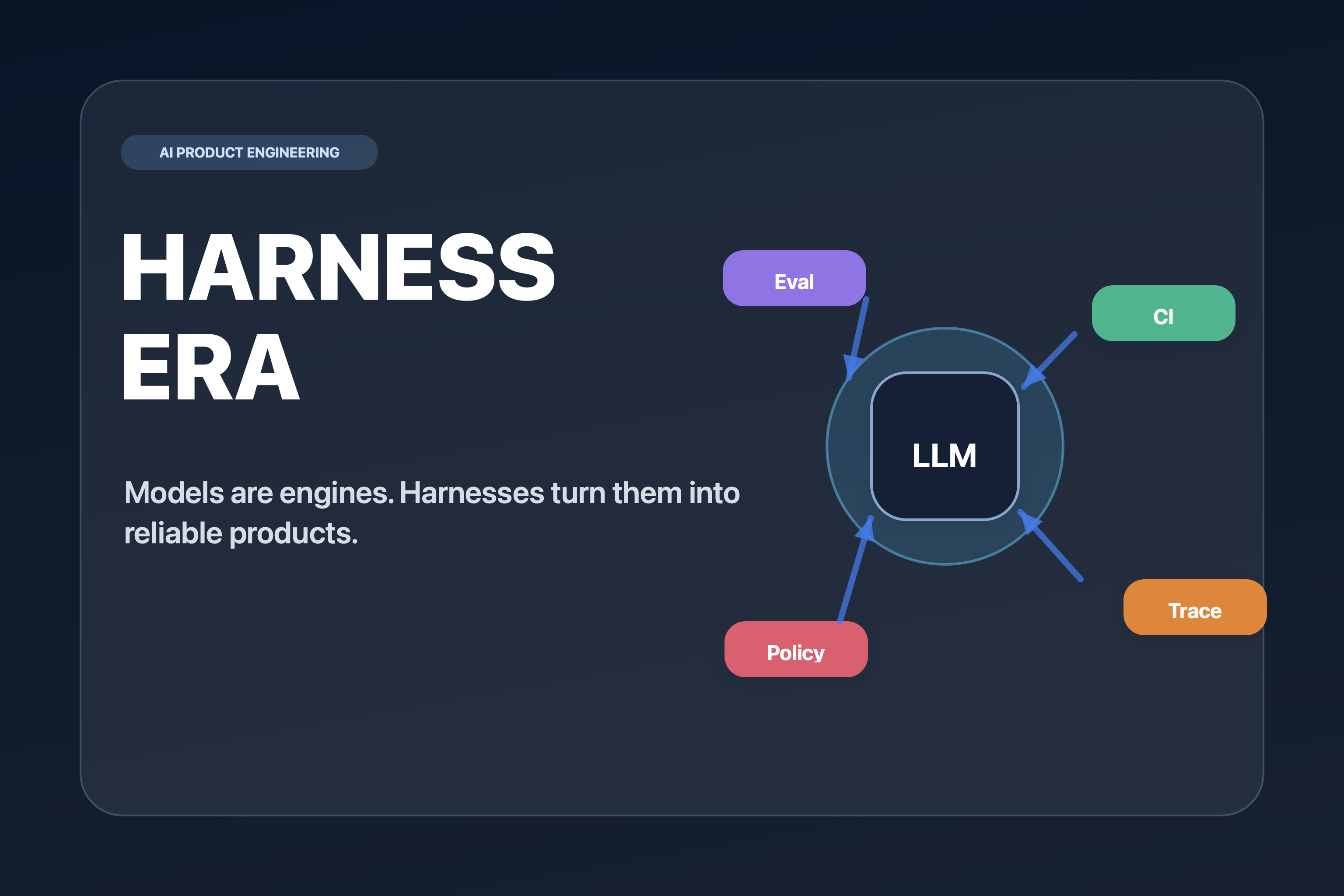
AI Apps Are Built with Harnesses, Not Prompts
A practical guide to harness engineering: context, tools, evals, observability, CI gates, and security for production AI apps.
Read
Andrej Karpathy's 4 AI Coding Warnings and the 100K-Star CLAUDE.md Repo
A deep dive into the four bad AI coding habits Karpathy warned about, the CLAUDE.md repo's four operating principles, what evidence supports them, and where the limits still are.
Read