Qwen 3.6 27B Review: A Local Coding Agent Tested on RTX 4090 and M4 Max (2026)
A practical review of Qwen 3.6 27B and 35B-A3B for local coding work, covering benchmarks, VRAM, token speed, Apache 2.0 licensing, and Claude alternatives.
Quick take
Start with this judgment
27 min readBottom line
A practical review of Qwen 3.6 27B and 35B-A3B for local coding work, covering benchmarks, VRAM, token speed, Apache 2.0 licensing, and Claude alternatives.
- Best for
- Readers comparing cost, capability, and real limits before choosing a tool
- What to check
- Qwen 3.6 · local coding agent · RTX 4090
- Watch out
- Pricing and features can change, so confirm with the official source too.
3 key points
- Claude Opus 4.7 If you are a solo developer who is burdened by the monthly bill, it is time to seriously review Qwen 3.6 27B, which scores 77.2% SWE-bench Verified with just a single RTX 4090 24GB.
- 27B Dense reaches about 60 t/s based on a single RTX 4090 in code operations with about 17GB VRAM when Q4_K_M quantization, and 35B-A3B (MoE) is faster thanks to active 3B on the same GPU.
- However, there are clearly limitations such as the gap between Terminal-Bench 2.0’s own measurements (38.2%) and the official value (59.3%), GitHub’s empty tool-call/infinite loop issue, and DashScope data routing issue in China.
목차
- Can the Qwen 3.6 27B really stand up to the Claude Opus 4.7?
- How much will the token speed be if I run 4bit quantization with RTX 4090 24GB?
- If I want to reduce the Claude API cost to 0 won, should I use 27B or 35B-A3B?
- Will Coding Agent run practically even with Mac M4 Max integrated memory?
- Apache 2.0 license, is it really safe to just upload it to in-house data?
- SWE-bench Verified 77%·Terminal-Bench 2.0 59%, will Korean code PR also be solved well?
- Where would it be most efficient to attach Qwen 3.6 27B to Cline·OpenCode·Aider?
- After using it for a month, what was the limit?
- Conclusion: Who should use it?
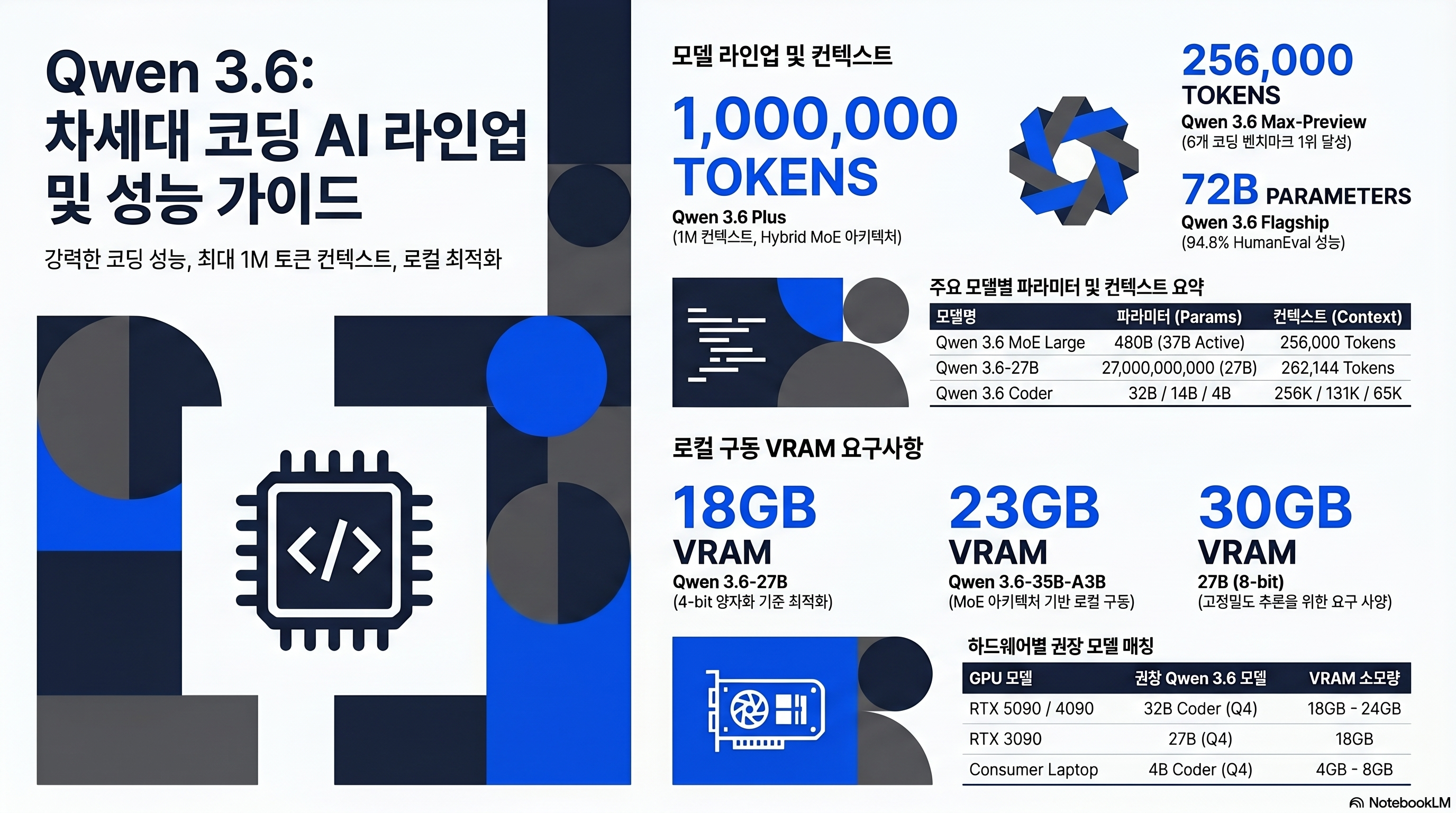
For a single developer whose unit price per token for Claude Opus 4.7 is a monthly bill, Qwen 3.6 27B, released by Alibaba in April 2026, is not simply another open source model. The fact that the Dense model, which scores 77.2% SWE-bench Verified on a single RTX 4090 (about 2.9 million won), has been released as Apache 2.0 means that the cost structure of coding workloads with large cost payloads must be recalculated. This article is a review that compiles external measurements of the two open weight lineups, 27B and 35B-A3B (MoE), on RTX 4090, dual 3090, and Mac M4 Max.
1. Can the Qwen 3.6 27B really compete with the Claude Opus 4.7?
Starting from the conclusion, coding accuracy is close, but agent execution still has a gap. Although it is the same one-line answer, it is a model with different evaluations depending on which axis one looks at.
Official Benchmark: 27B Dense beats 397B MoE across all coding items
The most powerful sentence is written literally on Qwen Official Model Card.
“With only 27B parameters, it outperforms the Qwen3.5-397B-A17B (397B total / 17B active) on every major coding benchmark — SWE-bench Verified (77.2 vs 76.2), SWE-bench Pro (53.5 vs 50.9), Terminal-Bench 2.0 (59.3 vs 52.5), SkillsBench (48.2 vs 30.0).”
The key point is that within the same Alibaba line, the 14 times smaller Dense model overtook the previous generation giant MoE in all items before coding. It’s almost like one-line proof that the model size race is over.
Direct comparison with Claude Opus 4.7
The target of comparison is Claude Opus 4.7, which was released on 2026-04-16. Since Opus 4.5 and 4.6 are previous versions, the table is summarized as 4.7.
| benchmark | Qwen3.6-27B | Qwen3.6-35B-A3B | Qwen3.5-397B-A17B | Claude Opus 4.7 |
|---|---|---|---|---|
| SWE-bench Verified | 77.2 | 73.4 | 76.2 | 80.9 |
| SWE-bench Pro | 53.5 | 49.5 | 50.9 | 57.1 |
| SWE-bench Multilingual | 71.3 | 67.2 | 69.3 | 77.5 |
| Terminal-Bench 2.0 | 59.3 | 51.5 | 52.5 | 74.7 |
| SkillsBench | 48.2 | 28.7 | 30.0 | 45.3 |
| AIME 2026 | 94.1 | 92.7 | 93.3 | 95.1 |
| LiveCodeBench v6 | 83.9 | 80.4 | 83.6 | 84.8 |
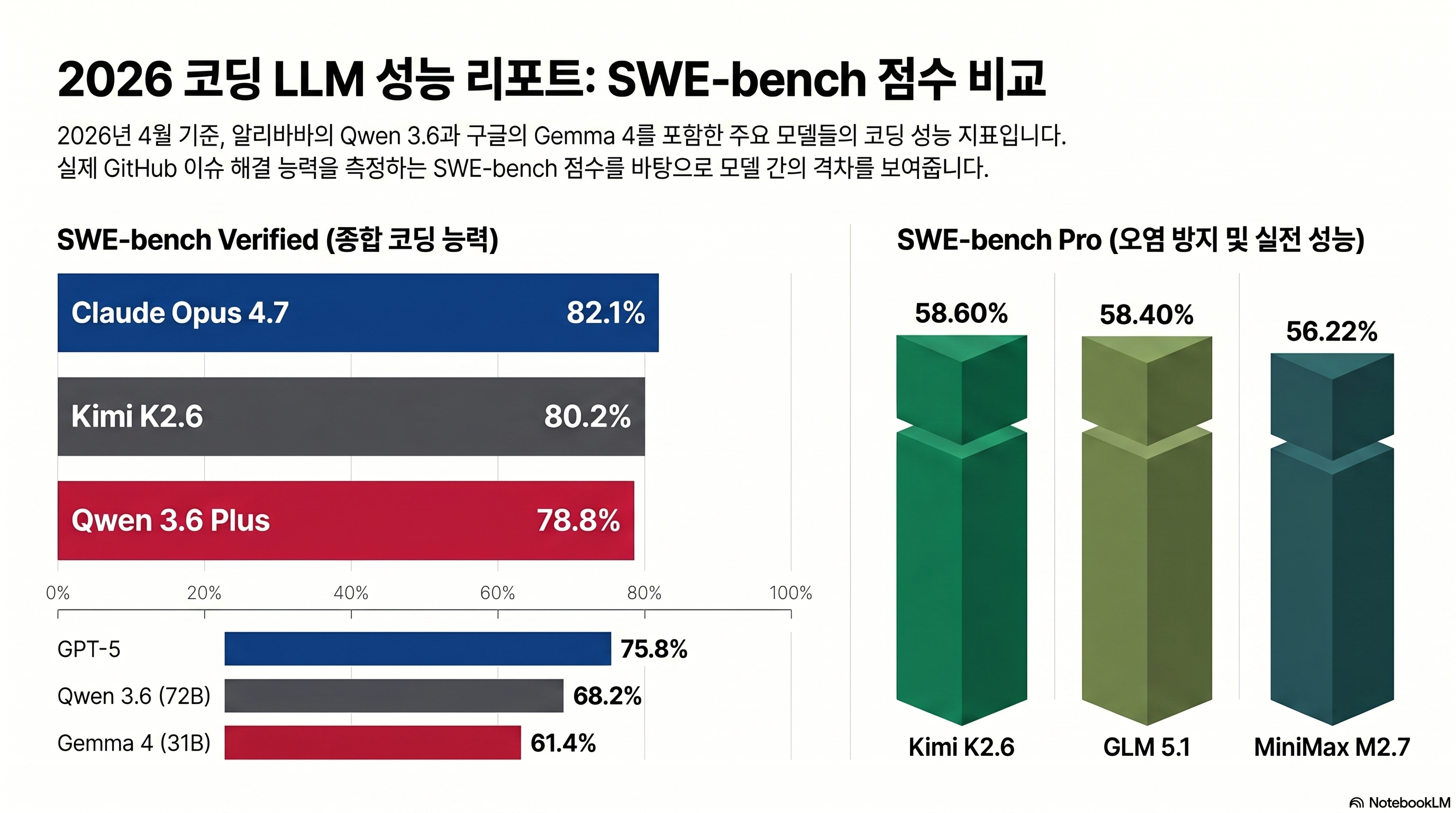
There are two ways to read. In code accuracy items such as SWE-bench Verified·LiveCodeBench v6, 27B is 3~4pp behind Opus 4.7. In SkillsBench (48.2 vs 45.3), 27B actually surpasses it. On the other hand, Terminal-Bench 2.0 has a gap of 15.4pp, 59.3 vs 74.7, where multi-step tool invocation and autonomous execution are evaluated. “Ability to write one line of code accurately” has almost caught up, but “Ability to push through orders as an agent” is still ahead of Claude. Sources: Qwen3.6-27B Official Card, Anthropic Claude Opus 4.7 Announcement.
The tone of external verification is more conservative
byteiota review insists that official benchmarks should only be viewed as “directional guidance.”
“Qwen3.6-27B is likely competitive with mid-tier proprietary models. It probably beats GPT-3.5-level performance. It almost certainly lags Claude Opus and the best of GPT-4. Run your own tests.”
Official card figures and self-measurement results vary depending on workload, so it is closer to actual operational judgment to look at both sources together rather than relying on just one axis.
2. How much will the token speed be when running 4-bit quantization with RTX 4090 24GB?
This is the first question asked by Persona A (local builder with RTX 3090/4090). The key question is whether code auto-completion can be used at a usable speed when rolling 27B on a single GPU.
VRAM requirements by quantization
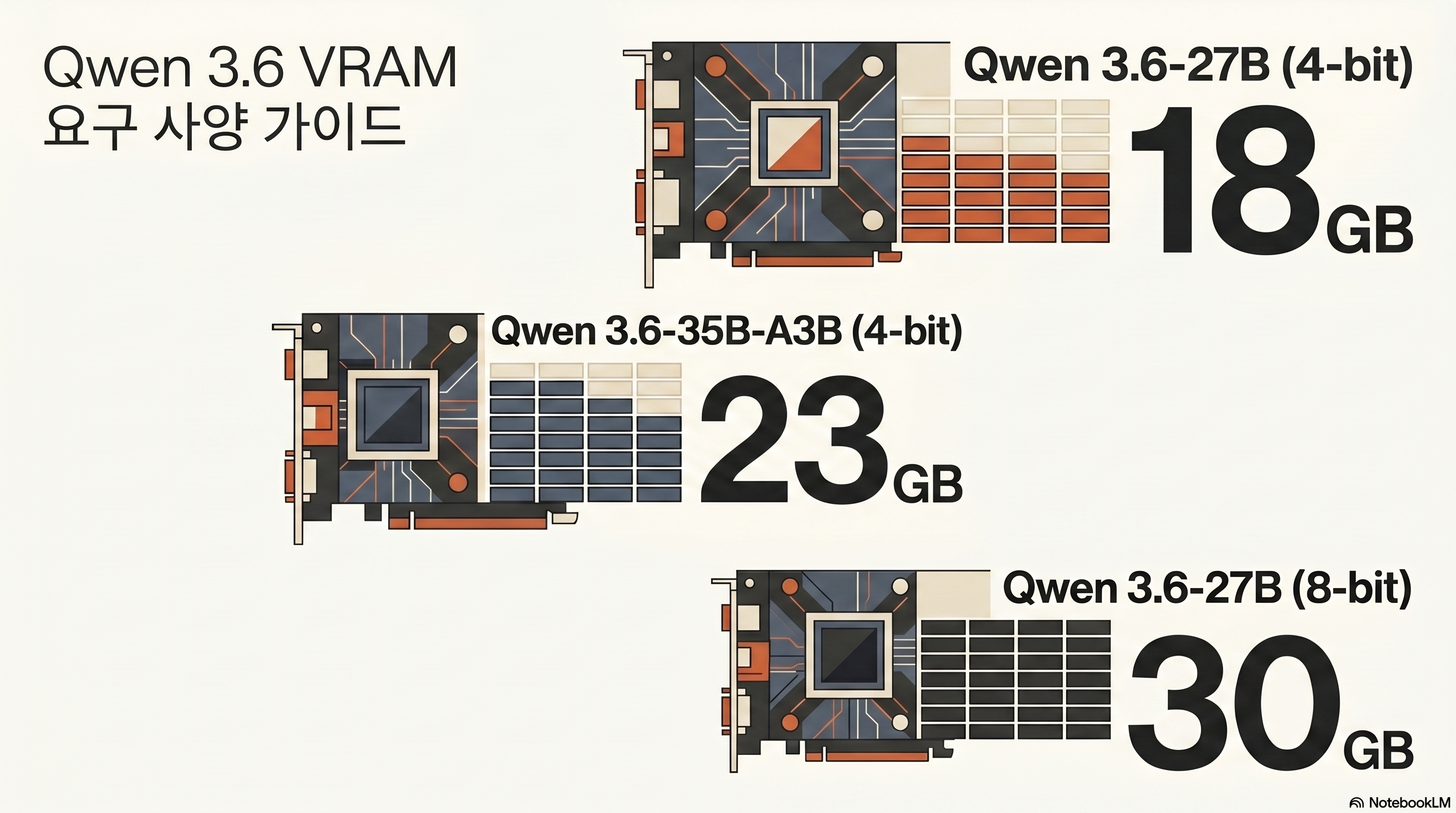
Based on Unsloth Guide, the VRAM requirements for 27B Dense are as follows.
| Quantization | Requires VRAM | recommended hardware | note |
|---|---|---|---|
| Q4_K_M (UD-Q4_K_XL) | Approximately 17 GB | RTX 3090/4090 (24GB) | Code working standards |
| Q5_K_M / Q6_K_M | Approximately 24 GB | RTX 3090/4090 (24GB) | Focus on accuracy |
| Q8_0 | Approximately 30 GB | RTX 5090 (32GB) / Dual 3090 | Preserved Quantization |
| BF16 (full) | Approximately 55 GB | A100 80GB / Dual 3090 80GB | Research and fine tuning |
35B-A3B (MoE) requires approximately 23GB as of Q4, but since the active parameter is 3B, the inference speed is faster than 27B Dense. Source: bartowski/Qwen3.6-35B-A3B-GGUF quantization card.
Tokens/second by environment
Even for the same model, the speed varies greatly depending on the combination of GPU and inference engine, so the primary measurements for each environment are gathered into one table and considered as the reference range.
| environment | Model/quantization | tokens/sec (actual) | source |
|---|---|---|---|
| RTX 4090 single (mainline llama.cpp + 3.5-4B draft) | 27B Q8, 8K ctx | Average 43, Peak 67 | outsourc-e/qwen36-4090-recipes |
| RTX 4090 Single (Q4_K_M) | 27B code operation | About 60~63 | byteiota·daily neural digest |
| Dual RTX 3090 (vLLM TP-2, AWQ-INT4) | 27B 256K ctx | about 100 | Chris Dzombak |
| RTX 5090 (vLLM 0.19) | 27B 218K ctx | about 80 | Daily Neural Digest |
| RTX 5090 + 4090 | 27B Q8 260,000 ctx | about 170 | r/LocalLLaMA Epicguru |
| Mac M4 Max 128GB (mlx_lm bf16) | 35B-A3B Batch 4 | 62~86 | walterra.dev 2026-04-18 |
The most frequently cited figure is the Epicguru comment from [r/LocalLLaMA “Qwen 3.6, finally a usable local model” thread] (https://www.reddit.com/r/LocalLLaMA/).
“At 5090+4090, the Q8 model is loaded into a 260,000 context pool and extracts about 170 tokens per second, which is also the fastest model I’ve used. 9 times out of 10, if you just say ‘done’ and then ask them to review the changes themselves, they’ll catch the mistakes and fix them.”
Of course, this figure is not typical because it is a two-GPU environment. A conservative reference for single RTX 4090 users is about 100 t/s in [Chris Dzombak’s dual 3090 vLLM Docker Compose recipe] (https://www.dzombak.com/blog/2026/04/a-vllm-docker-compose-recipe-for-running-qwen-3-6-27b-on-dual-rtx-3090s-opencode-configuration/), or about 40 t/s in Q4 in a single 3090 environment. The actual measurement by Korean user [Threads @dextune] (https://www.threads.com/@dextune/post/DXlWiKyEzYE/) is the most conservative.
“Talk about running the Qwen3.6-27B Q4 model with RTX 3090. There was a story on an overseas blog that 80tps was achieved through vLLM, but there seems to be a stability problem. Based on llama.cpp, if you push to about 100K contexts, it would be correct to see about 35 to 40 tps. Still, this figure is meaningful enough for an individual to test the 27B class model.”
In summary, about 40~63 t/s with Q4_K_M on a single RTX 3090/4090 is a realistic reference, and you can aim for over 100 t/s with dual GPU or vLLM tensor parallel.
3. If I want to reduce the Claude API cost to 0 won, should I use 27B or 35B-A3B?
For Persona B (a single developer burdened with API costs), calculating the break-even point takes precedence over model selection.
Token unit price comparison
This table is organized based on DashScope price. When processing the same amount of input and output, the difference between Opus 4.7 and Qwen3.6-72B is more than 30 times.
| model | Input ($/M) | Output ($/M) | Compared to Opus 4.7 |
|---|---|---|---|
| Claude Opus 4.7 | $5.00 | $25.00 | standard |
| GPT-5 | $2.50 | $15.00 | about half |
| Qwen3.6-72B (DashScope) | $0.20 | $0.80 | About 1/30 |
| Gemma 4 31B (reference) | $0.14 | $0.42 | About 1/40 |
Looking at the cost model alone, “Move everything to Qwen” seems like the answer, but the actual operation is not that simple. The decision frame organized by byteiota is the most practical.
“After a $1,600 hardware investment (RTX 4090), every token processed costs effectively nothing. GPT-4 charges $2.50 per million input tokens. Process 640 million tokens and you’ve paid for the GPU. Claude Opus at $5 per million input tokens makes local deployment even more attractive — the same RTX 4090 pays for itself after just 320 million tokens.”
The frame is to decide by API if it is less than 50M tokens per month, local if it is more than 100M tokens per month, and DevOps capabilities in the 50~500M range. If you take the RTX 4090 as a standard, the monthly usage will break even at 640 million tokens based on GPT-4 and 320 million tokens based on Opus 4.7. Source: byteiota Qwen3.6 RTX 4090 review.
27B Dense vs 35B-A3B MoE Selection Criteria
In the same 24GB VRAM environment, the two models have clearly different trade-offs.
- 27B Dense: Q4 17GB, simple deployment, consistent latency, no gating/expert routing. The code accuracy benchmark (SWE-bench Verified 77.2) is higher.
- 35B-A3B MoE: Q4 23GB, thanks to active 3B, there is an environment where tokens/second are produced about 3.5 times faster than 27B Dense on the same GPU (R_Duncan measurement 50
59 vs 190197 t/s). However, SWE-bench Verified is 73.4, which is about 4pp lower than 27B Dense.
If code accuracy is a priority, it is 27B Dense, and if token throughput (e.g., mass refactoring/automatic document creation) is a priority, it is 35B-A3B. In terms of price and routing, if Kimi K2.6 (88% cheaper replacement for Claude Opus 4.7) or GLM 5.1 (Claude Code cost 1/5) are examined together, the price range of the open weight camp can be seen more clearly.
4. Will the Coding Agent run practically even with Mac M4 Max integrated memory?
Apple Silicon uses a large model with a weapon called unified memory, but it is meaningful only when the amount of memory matches the size of the model.
M4 Max 128GB is the sweet spot of 35B-A3B
[walterra.dev 2026-04-18 review] (https://walterra.dev/blog/2026-04-18-qwen36-35b-a3b-m4-max-pi-coding-agent) summarized the actual tokens/sec of 35B-A3B in M4 Max 128GB + mlx_lm + bf16 environment.
- Fast chat (256/256): 62 t/s
- Long-context RAG (8K/128): 59 t/s
- Heavy code gen (512/2048): 59 t/s
- Batch=4: 86 t/s
The author comments, “Fast enough for coding tasks, free, and everything stays on my machine.” If you drop it to the 4-bit MLX variant, community reports show up to about 91 t/s, but there is a corresponding loss in accuracy. Even in M2 Max environment, 35B-A3B produces 30+ t/s thanks to active 3B.
Not recommended for M4 mini 32GB, 16GB up to 9B level
Even with the same integrated memory, 27B/32B models with 32GB or less immediately reach their limits. [Review compiled by Klian’s Phase] (https://www.clien.net/service/board/use/19170155) is the most honest.
- "When I increased 35B-A3B with mlx_lm on M4 Max 128GB, 60~80 t/s was stable in code work. What's attractive is that all data ends on my device." — walterra.dev 2026-04-18
- "5090+4090 combination raises 27B Q8 to 260,000 context pool and 170 t/s. 9 times out of 10, if you answer that it is finished and then request a review, you will catch the mistakes yourself." — r/LocalLLaMA Epicguru
- "Qwen 3.5 32B is so slow that I feel like I'm going to die of old age while waiting for an answer. It feels like 32GB of RAM is too much. In the end, I switched to OpenAI-OSS-20B." — Clien Phase (M4 mini 32GB)
- "The vLLM 80 tps report on the RTX 3090 seems to have a stability problem. If you push up to 100K context based on llama.cpp, 35~40 t/s is realistic." — Threads @dextune
For M4 mini 32GB and MacBook 16GB users, it is more realistic to use Qwen 3.6 27B/32B as the backend of a multi-model harness such as Cloud DashScope or Oh My OpenAgent rather than running it directly.
5. Apache 2.0 license, is it really safe to just upload it to in-house data?
This is the first item to be checked by Persona C (in-house AI introduction IT manager). Let us point out that licensing and compliance are separate axes.
What does Apache 2.0 mean?
If you unpack Apache License 2.0 original text as is, it is as follows.
- Commercial use permitted
- Modification and redistribution permitted
- Allow for proprietary fork
- Includes explicit patent grant (difference from Apache 2.0)
- Obligations: copyright notice + license text + amendment statement attached
- No royalties/sales sharing/approval required, compatible with GPLv3
In other words, it is possible to upload the 27B/35B-A3B weight to the in-house GitLab, fine-tune it in the in-house RAG, and even embed it in the company’s SaaS product. The point of persuasion for the legal team is that the risk of patent litigation is low thanks to the patent grant.
However, DashScope API is a separate compliance issue.
Just because the open weight license is clean does not mean that DashScope API calls are safe. theplanettools analysis clearly isolates this part.
“The Apache 2.0 license has no MAU caps, no revenue-share requirements, and no acceptable-use restrictions. The compliance question is separate: if you route traffic through the DashScope API, data goes through Alibaba Cloud infrastructure in China, which may not meet regulated-industry compliance (healthcare, finance, defense).”
In regulated industries such as healthcare·finance·defense, it is safer to avoid DashScope and use self-hosting or Western 3rd-party (Fireworks·Together·DeepInfra·Groq). byteiota makes a strong case for self-hosting.
“GDPR data residency requirements? Satisfied automatically. Air-gapped environments? Deploy locally and disconnect the internet.”
Once you receive an initial weight of about 54GB (BF16) or 17GB (Q4), you can run it in a closed mode on the company network without an Internet connection. When reviewing in-house adoption, it is standard practice to separate and evaluate the three axes: license (Apache 2.0), infrastructure (self-host vs DashScope), and data governance.
Avoid the DashScope API if you are a regulated industry or if your in-house data should not go out. Western hosting such as Fireworks, Together, DeepInfra, and Groq serve the same model at a price range of ±20% compared to DashScope. In a completely air-gapped environment, the weight is received once and the Internet connection is disconnected.
6. SWE-bench Verified 77%·Terminal-Bench 2.0 59%, will it solve Korean code PR well?
It’s clear if you just look at the numbers, but two clues are needed. There is a gap between self-measurement and official values, and there is no verification of Korean workload.
Formulated vs. self-measured — 38.2% gap in Terminal-Bench
The official card lists 27B’s Terminal-Bench 2.0 as 59.3%, but when the r/LocalLLaMA “Local model on coding has reached a certain threshold” thread user re-measured it with Q4_K_M and default timeout using its own harness, it came out at 38.2% (34/89). The gap is 21pp. The cause analysis is as follows.
“Main factor is benchmark task timeout, then quantization, harness, inference engine.”
Results vary greatly even on the same model and benchmark due to differences in benchmark timeout, quantization level, harness implementation, and inference engine. Rather than deciding to introduce it by looking only at the official card numbers, it is safer to re-measure once in your own environment.
Korean code PR — quantitative data is empty
Qwen 3.6 supports 119 languages [based on official card] (https://huggingface.co/Qwen/Qwen3.6-27B) and recorded SWE-bench Multilingual 71.3, but quantitative data such as Korean natural language PR description, issue triaging, and Korean code comment preservation are not officially disclosed. The qualitative evaluation of [AkaraLive Alpaca Channel] (https://arca.live/b/alpaca/168535591) is the closest reference for Korean users. The channel article is summarized as “Based on benchmarks, Qwen3.6 (27B, 35B) approaches or surpasses the performance of the Qwen3.5 122B model”, “Korean naturalness close to GPT-4o level”.
Jaehong Park’s Silicon Valley Blog is evaluated based on Plus, but it has the most balanced tone among Korean analyses.
“Opus 4.5 level performance at 1/4 the price”, “Provides almost SOTA level performance at a much lower price”. However, there are “Hallucinations occur when calling a tool”, “Degraded context quality above 300,000 tokens”, and “Disparity between 1 million token specifications and actual effects”, so “Direct verification required before putting into production”.
Rather than accepting the numbers as is, it is necessary to conduct a trial run for about a week under the Korean PR/issue workload.
7. Where is the most efficient way to attach Qwen 3.6 27B to Cline·OpenCode·Aider?
Rather than the model itself, how it is attached to a client makes a difference in the experience of daily workflow. The recommended combination for single GPU users and multi-GPU/simultaneous request environments are different.
The simplest start: llama.cpp + OpenCode
[deskriders.dev guide] Based on (https://deskriders.dev/), the fastest way for a single RTX 4090 user is to launch an OpenAI compatible endpoint with llama-server and attach it to OpenCode.
llama-server -hf unsloth/Qwen3.6-27B-GGUF:UD-Q4_K_XL --port 9090 -c 262144 -fa -ngl 99Combine the following blocks in ~/.opencode/config.json.
{
  "provider": {
    "llama.cpp": {
      "npm": "@ai-sdk/openai-compatible",
      "name": "llama.cpp local",
      "options": { "baseURL": "http://127.0.0.1:9090/v1" },
      "models": {
        "qwen36-27b-local": {
          "name": "Qwen3.6-27B (Local)",
          "limit": { "context": 262144, "output": 32000 }
        }
      }
    }
  }
}
This combination can be achieved by simply changing the model selection in OpenCode’s Build/Plan agent. The use of OpenCode’s own multi-agent has been summarized separately in Oh My OpenAgent Honest Review.
vLLM is a multi-GPU/simultaneous request environment
If it is dual 3090 or higher, vLLM brings out more throughput. Chris Dzombak’s vLLM Docker Compose Recipe is the best-organized reference.
vllm serve Qwen/Qwen3.6-27B --port 8000 --tensor-parallel-size 2 \
  --max-model-len 262144 --reasoning-parser qwen3 \
  --enable-auto-tool-choice --tool-call-parser hermes
Separate Thinking output with reasoning-parser qwen3, and make it compatible with the tool call format of OpenCode·Cline with tool-call-parser hermes.
Cline·Aider integration
- Cline (VS Code extension): Settings → API Provider =
OpenAI Compatible→ Base URLhttp://localhost:8000/v1→ Modelqwen3.6-27b→ Context Window 32K or higher. Cline’s system prompt is long, and if it’s less than 32768, the context pops up quickly. - Aider: If you separate the two roles of architect/editor with
aider --openai-api-base http://localhost:8080/v1 --model qwen3.6:27b --architect, you can avoid long-horizon tool calling, which is weak at 27B. - Claude Code: Specify
--api-baseas the vLLM endpoint afterclaude config set --global default_model qwen3.6:27b. Claude Code’s own flow was covered separately in Completely Conquering Claude Code.
The exact tag in the Ollama library is qwen3.6:27b. Be careful because variant notations such as qwen:27b-v3.6-q4_0 are not registered in the library. Additionally, the vision function is a separate mmproj file, so Ollama packaging does not yet automatically bundle vision. If you only do text coding, ollama run qwen3.6:27b is sufficient, but if you need vision/multimodal, it is more stable to load mmproj directly from llama.cpp or vLLM.
Thinking mode recommended parameters
Qwen Official Model Card recommends the following sampling when activating Thinking.
temperature=0.6, top_p=0.95, top_k=20, min_p=0.0,
presence_penalty=0.0, repetition_penalty=1.0, max_output=32768
There is one caveat when using vLLM.
“Due to the preprocessing of API requests in vLLM, which drops all reasoning_content fields, the quality of multi-step tool use with Qwen3 thinking models may be suboptimal.”
Walkaround means not extracting the Thinking content from the OpenAI compatible response but passing it as is. In workflows with frequent multi-step tool calls, this one line greatly determines the quality of the results.
8. After using it for a month, what was the limit?
Several limitations were reported that should be pointed out as clearly as the positive cases. We summarize five things that must be checked before introducing the operation.
Limit 1 — Terminal-Bench’s own measurement of 38.2%
The formula 59.3% is a value measured under specific timeout·harness conditions, and in Q4_K_M·basic timeout environment, it drops to 38.2%. Source: r/LocalLLaMA.
Limitation 2 — silent corruption bug
outsourc-e/qwen36-4090-recipes According to a report, the combination of ik_llama.cpp + cross-vocab speculative decoding seems fast at about 102 t/s, but the actual output is broken as follows.
“Output is unusable for anything structured.”
This is a case where JSON braces, list delimiters, quote escapes, and tool-call boundaries are broken silently. The workaround is to follow the recommended settings for each mainline llama.cpp + Qwen3.5-4B same-vocab draft combination, q8 KV cache, and 8K/32K context.
Limitation 3 — GitHub Open Issues
As of 2026-04-30, there is the following unresolved report in QwenLM/Qwen3.6 GitHub Issues.
- #150 (2026-04-28): Qwen3.6-27B frequently stopped with empty tool call
- #147 (2026-04-24): qwen3.6-35b-a3b Tool calling and more
- #145 (2026-04-23): Qwen3.5/3.6 series is recommended. Infinite loop when reasoning with sampling.
- #115 (2026-03-31): gibberish/repetitive loops in Qwen3.5-27B vllm 0.17.0 long context
If you use the combination of reasoning-parser qwen3 usage, Thinking activation, and long context at the same time, these issues may occur all at once. It is safer to run a short sanity test before full operation.
Limitation 4 — OOM/Vendor Trap
outsource-e recipes Cleanup:
- DFlash implementation is OOM even at 24GB
- vLLM INT4 hangs in hybrid attention
- TurboQuant TQ3_4S does not support runtime
-
32K in mainline llama.cpp + q8 KV hang (q4 KV recommended)
- CUDA 13.2 produces gibberish output (do not use it)
Limit 5 — English creative writing and 8+ tool calls
[theplanettools 48-hour production review] (https://theplanettools.ai/) clearly points out the gap with Claude Opus 4.7 in two areas. English blog, marketing, and narrative documents are noticeably less polished than Opus 4.7, and in long-horizon agentic workflows that require more than eight sequential tool calls, the frequency of logical errors increases, making Claude safer.
9. Conclusion: Who should use it?
The recommended options and rationale for each persona are summarized in one table as follows.
| persona | Recommended option | reason |
|---|---|---|
| Local builder with RTX 3090/4090 | 27B Q4 single GPU or dual 3090 vLLM | Q4 17GB single GPU capable, stable 35~63 t/s up to 100K contexts |
| Claude/GPT API cost burden for single developer | Local + Claude hybrid immediately after exceeding 100M tokens per month | RTX 4090 breaks even at 320M tokens compared to Opus |
| IT staff responsible for in-house AI introduction | Apache 2.0 self-hosted (avoiding DashScope) | Automatic compliance with GDPR, patent grant, and air-gapped possible |
| Mac M4/M5 Max users | For M4 Max 128GB or more, 35B-A3B mlx_lm | 62~86 t/s, 9~12B class recommended for 32GB or less |
| Trend/Benchmark Consumer | Citing only official card tables + specifying self-measurement clues | SWE-bench Verified 77.2 / Terminal-Bench 2.0 59.3 / SkillsBench 48.2 (overtaking Opus) |
Key takeaways
Qwen 3.6 27B is the first open weight dense model that is close to Claude Opus 4.7 in code accuracy with SWE-bench Verified 77.2%, but Claude is still ahead in long-horizon tool execution, as shown by the 15pp gap in Terminal-Bench 2.0. A single RTX 4090 Q4_K_M produces sufficiently practical speeds (approximately 40 to 63 t/s), and thanks to the Apache 2.0 license, legal operation is possible even in an in-house air-gapped environment. However, the compliance of DashScope API and self-hosting must be reviewed separately.
- Solo developer with RTX 3090/4090: If the Claude Opus 4.7 bill is too much for you, start at 27B Q4_K_M on a single GPU.
- IT managers considering the introduction of in-house AI: With Apache 2.0 + self-hosting, GDPR and data sovereignty issues can be resolved at once.
- M4 Max 128GB users: Raising the 35B-A3B to mlx_lm results in a stable 60-80 t/s in coding workloads.
Pros
- + Dense 27B surpasses 397B MoE in all items before coding (SkillsBench also surpasses Opus 4.7)
- + Q4_K_M 17GB gets practical speeds up to 100K contexts on RTX 4090 single GPU
- + Apache 2.0 + patent grant makes in-house introduction, fine tuning, and redistribution all legal
- + Various deployment options including DashScope, self-hosting, Seogu 3rd-party, Ollama, llama.cpp, vLLM, etc.
Cons
- − 15.4pp gap compared to Opus 4.7 in Terminal-Bench 2.0 — weak to 8+ sequential tool calls
- − 21pp gap between Terminal-Bench's own measurement (38.2%) and official value (59.3%), highly dependent on harness
- − Ollama vision No automatic integration, mmproj file needs to be processed separately
- − Sanity test required before operation due to GitHub open issue (empty tool call, infinite loop, gibberish loop)
- − DashScope API supports Alibaba Cloud China Infrastructure Routing — Regulated Industries Recommend Self-Hosting
Step 1 — Check your hardware
Secure integrated memory of RTX 3090/4090 24GB or M4 Max 64GB or more. For Macs under 32GB, 9~12B models are recommended.
Step 2 — Load Weights (2 choices)
(a) Ollama users: ollama run qwen3.6:27b (text only). (b) llama.cpp User: Receive unsloth/Qwen3.6-27B-GGUF UD-Q4_K_XL and run it on llama-server.
Step 3 — Expose OpenAI compatible endpoints
Expose http://localhost:8000/v1 (or 9090) with llama-server or vLLM. Activate tool-call-parser hermes, reasoning-parser qwen3 options.
Step 4 — Connect the Coding Agent Client
Connect endpoint to familiar tools among OpenCode·Cline·Aider·Claude Code. Cline requires a context window of 32K or higher.
Step 5 — Short sanity test
Considering GitHub issue #150·#145·#115, first check whether there is an infinite loop, empty tool call, or gibberish through a 5-minute multi-step tool operation.
Step 6 — Review operational adoption
If your monthly token usage is ≥ 100M or you need air-gapped in-house data, start with RTX 4090 self-hosted, or hybrid (API+local) for less.
- Qwen3.6-27B Official Model Card
- Qwen3.6-35B-A3B-GGUF Quantization Card
- byteiota — RTX 4090 Local Review
- Chris Dzombak — Dual RTX 3090 vLLM Docker Compose
- walterra.dev — M4 Max 128GB 35B-A3B actual measurement
- outsourc-e/qwen36-4090-recipes — silent corruption bug
- QwenLM/Qwen3.6 GitHub Issues
- Anthropic Claude Opus 4.7 announced
- Apache License 2.0 Original
- r/LocalLLaMA — Qwen 3.6 Coding Review
- theplanettools — Qwen 3.6 vs Gemma 4
- Clien — M4 mini 32GB local LLM review
- Threads @dextune — RTX 3090 actual measurements
- Jaehong Park Silicon Valley — Qwen3.6-Plus Evaluation
- [Acharive Alpaca Comparative Analysis] (https://arca.live/b/alpaca/168535591)
Does Qwen 3.6 27B also run on RTX 4080 16GB?
Can I just run ollama run qwen:27b-v3.6-q4_0 with Ollama?
Should I choose between 27B Dense and 35B-A3B MoE?
How do I turn on Thinking mode and what sampling should I use?
Is the license the first thing to take care of when introducing it within the company?
Can I attach Qwen 3.6 27B as a backend to Claude Code?
Are you good at Korean code PR reviews?
It says 1M context. Can RTX 4090 use up to 1M?
Was this helpful?
One tap shapes what gets written next.
GLM 5.1 Review: Run Claude Code at 1/5 the Price with Open-Weight SOTA
How to run GLM 5.1 in Claude Code at one-fifth the cost, plus what Z.AI's official docs reveal about subscription-backed API access, Vision MCP, and GLM-Image.
Read
Kimi K2.6 Deep Dive: 88% Cheaper Claude Opus 4.7 Alternative?
Kimi K2.6 is an open-weight MoE model with SWE-Bench Pro 58.6, HLE 54.0, 300-agent swarms, 256K context, and API pricing about 88% below Claude Opus 4.7.
Read
What Is Vectorless RAG? Is PageIndex a Real RAG Alternative?
A current guide to why PageIndex says it can search long documents without vector databases or chunking, and how to read its pricing, MCP surface, FinanceBench claims, and real limits.
Read