GLM 5.1 Review: Run Claude Code at 1/5 the Price with Open-Weight SOTA
How to run GLM 5.1 in Claude Code at one-fifth the cost, plus what Z.AI's official docs reveal about subscription-backed API access, Vision MCP, and GLM-Image.
Quick take
Start with this judgment
33 min readBottom line
How to run GLM 5.1 in Claude Code at one-fifth the cost, plus what Z.AI's official docs reveal about subscription-backed API access, Vision MCP, and GLM-Image.
- Best for
- Readers comparing cost, capability, and real limits before choosing a tool
- What to check
- GLM 5.1 · Z.AI · Claude Code
- Watch out
- Pricing and features can change, so confirm with the official source too.
3 key points
- GLM 5.1 is a 754B MoE open-weight model released by Z.AI (Zhipu AI) under MIT license in April 2026. It scored 58.4 on SWE-Bench Pro at launch, surpassing Claude Opus 4.6 and GPT-5.4.
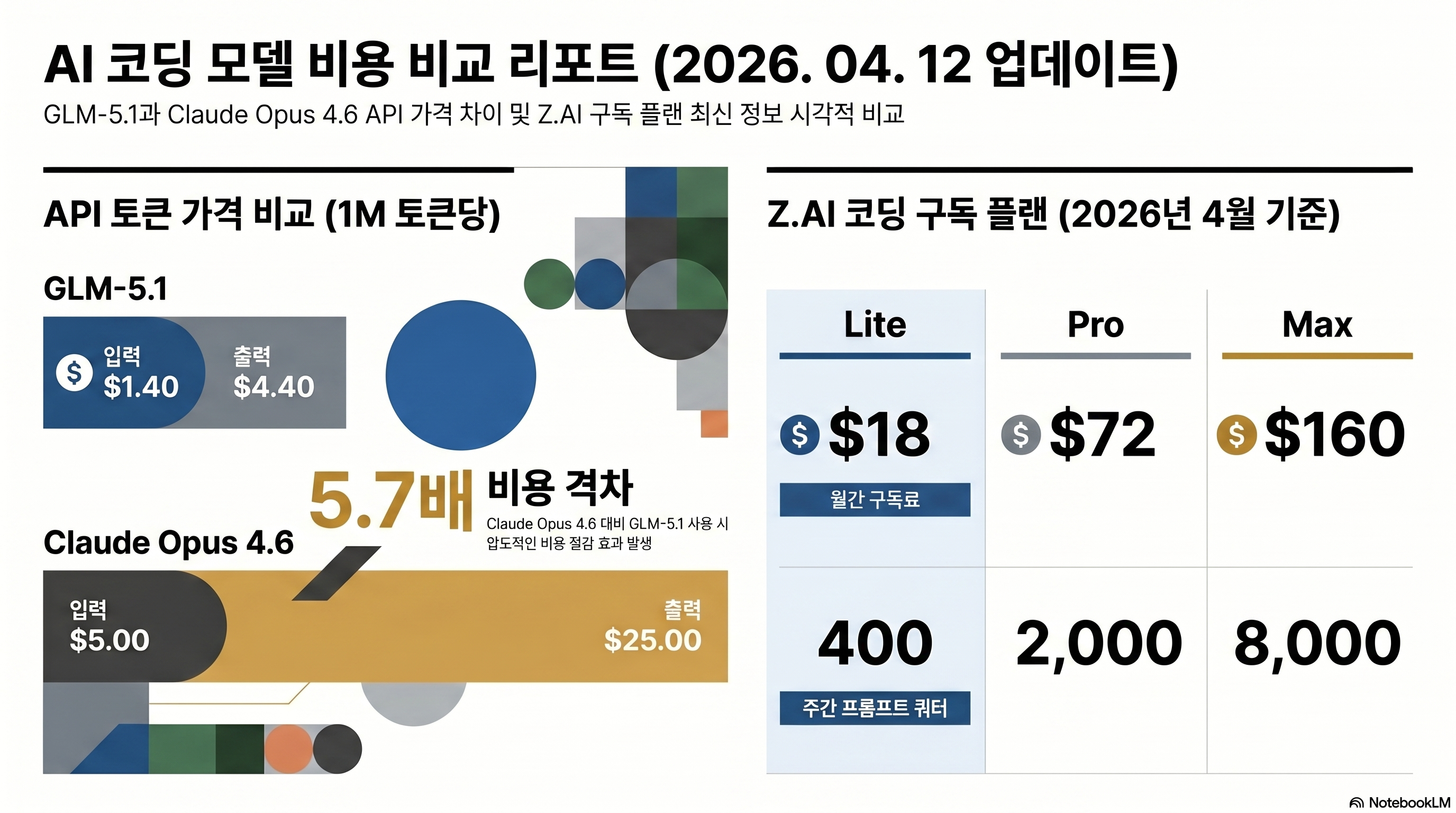
- Z.AI Coding Plans ($18 Lite / $72 Pro / $160 Max per month) issue API credentials that work directly in officially supported tools such as Claude Code, Cline, and OpenCode. Standard API output pricing is also just 1/5.7 of Claude Opus 4.6.
- GLM 5.1 itself is text-only, but the broader Z.AI stack also includes GLM-5V-Turbo for vision-based coding, Vision MCP for screenshot understanding, and GLM-Image for image generation.
목차
- Did GLM 5.1 actually beat Claude Opus 4.6?
- GLM 5.1 core specs — why a 754B MoE costs 5.7x less than Claude
- SWE-Bench Pro leader: what the numbers actually show
- What changed from GLM 4.6 to 5.1?
- Z.AI Coding Plan pricing — $18 to $160 per month
- Three ways to connect GLM 5.1 to Claude Code
- GLM 5.1 is only half the story — vision and image generation
- GLM 5.1 limitations — what benchmarks don't tell you
- Z.AI signup and referral discount
- Community reactions — international vs. local developers
- Troubleshooting Q&A
- Conclusion: who should try GLM 5.1 now?
Did GLM 5.1 actually beat Claude Opus 4.6?
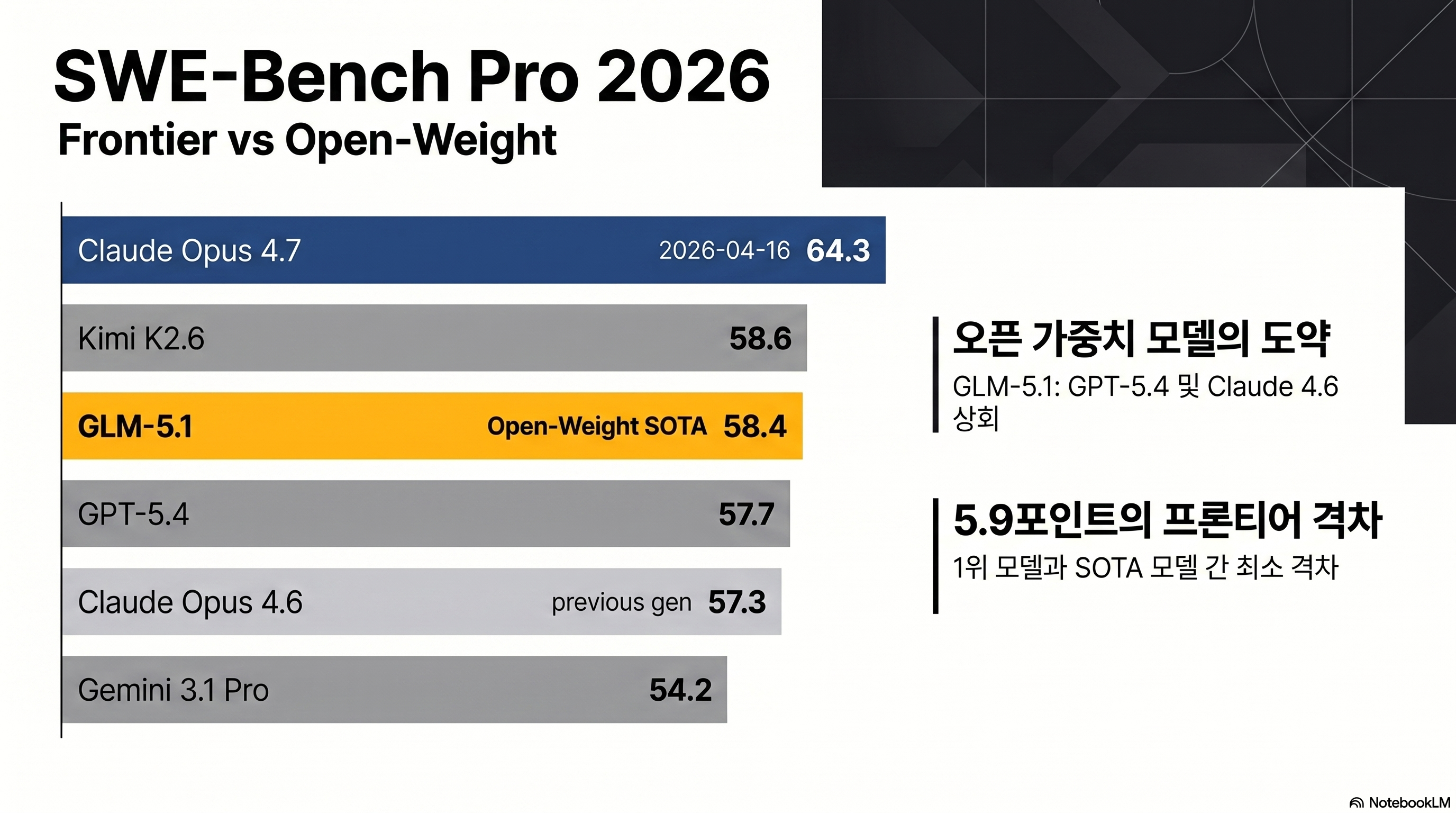
The most accurate short answer is: open-weight leader, still behind the frontier overall. When GLM 5.1 launched on 2026-04-07, it scored 58.4 on SWE-Bench Pro, edging past Claude Opus 4.6 (57.3) and GPT-5.4 (57.7) by 0.7–1.1 points (source: Z.AI official technical report). Nine days later, Claude Opus 4.7 arrived and reset the leaderboard. Opus 4.7 scores 64.3 on SWE-Bench Pro and 87.6 on SWE-Bench Verified, ahead of GLM 5.1 by 5.9 and 9.8 points respectively (source: Anthropic). On the Artificial Analysis Intelligence Index (v4.0 methodology), Opus 4.7, GPT-5.4, and Gemini 3.1 Pro share first place at 57 points while GLM 5.1 sits at 51 (source: Artificial Analysis).
The one-line framing: new open-weight coding champion
GLM 5.1 is a model from Beijing-based Zhipu AI, soft-launched as a Coding Plan on 2026-03-27 and released as open weights on HuggingFace under MIT license on 2026-04-07. It is a 754B total / 40B active MoE model with a 200K context window, 128K output limit, and text-only input. The case for it rests on three things converging at once: fully open MIT license, API input pricing at $1.40/1M tokens (28% of Opus 4.6’s $5.00), and SOTA coding performance among open-weight models.
What this post covers
- Benchmark reality check: raw numbers for SWE-Bench Pro/Verified, Terminal-Bench, BrowseComp, AIME, and GPQA, plus credibility caveats
- Pricing anatomy: Z.AI Coding Plan tiers and token unit costs, including the OpenRouter comparison
- Setup guide: three ways to connect GLM 5.1 to Claude Code — settings.json, Claude Code Router, and direct API calls
- Official-doc upgrade: what the subscription API can and cannot do, plus Vision MCP, GLM-5V-Turbo, and GLM-Image
- Honest limitations: community-reported failures from HackerNews, Reddit, and Medium
GLM 5.1 core specs — why a 754B MoE costs 5.7x less than Claude
GLM 5.1’s price competitiveness comes from MoE architecture: 754B total parameters, but only 40B are active per token.
Architecture: MoE + DSA
The model uses sparse activation across 256 experts, routing 8 per query. On top of that it applies DSA (DeepSeek Sparse Attention), a KV-cache compression technique shared by the DeepSeek team. DSA is what lets GLM 5.1 maintain a 200K context window without proportionally higher inference costs (source: Z.AI technical report). Training used 28.5T tokens on 100,000 Huawei Ascend 910B chips — a notable reference point given ongoing US-China semiconductor restrictions (source: VentureBeat).
Spec comparison with key competitors
| Item | GLM 5.1 | Claude Opus 4.7 | Kimi K2.6 | GPT-5.4 |
|---|---|---|---|---|
| Total parameters | 754B MoE | Undisclosed | 1T MoE | Undisclosed |
| Active parameters | 40B (8/256) | Undisclosed | 32B | Undisclosed |
| Context / Output | 200K / 128K | 1M / 128K | 256K / 128K | 400K / 128K |
| Multimodal | Text only | Text + Image | Text + Image | Text + Image + Audio |
| License | MIT open-weight | Proprietary | Modified MIT | Proprietary |
| API input $/1M | 1.40 | 5.00 | 0.60 | 1.25 |
| API output $/1M | 4.40 | 25.00 | 2.50 | 10.00 |
(Sources: Z.AI pricing, Anthropic pricing, Moonshot, OpenAI)
What the 5.7x output price gap means in practice
The 5.7x output price advantage compounds under repeated workloads. A developer running Claude Code for five hours a day easily generates two million output tokens — and at that point, the billing gap becomes stark.
Monthly cost breakdown — 2M output tokens, 5h/day workload
- Claude Opus 4.7 API direct: ~$1,500/mo
- GLM 5.1 API direct: ~$264/mo (drops under $50 with cache hits)
- Z.AI Coding Plan Pro: $72/mo flat (near-unlimited feel for most workloads)
What that gap does not mean is that reasoning quality falls by the same ratio — the benchmark section below unpacks where the difference actually shows up. For a similar price-tier comparison, Kimi K2.6 Deep Dive covers the other major open-weight competitor at this price point.
SWE-Bench Pro leader: what the numbers actually show
One or two benchmark wins don’t make a model. The table below covers coding, reasoning, agentic, and long-horizon tasks.
Coding: 0.7-point lead on SWE-Bench Pro, 5th on Verified
| Benchmark | GLM 5.1 | Claude Opus 4.7 | Kimi K2.6 | GPT-5.4 | Gemini 3.1 Pro |
|---|---|---|---|---|---|
| SWE-Bench Pro | 58.4 | 64.3 | 58.6 | 57.7 | 54.2 |
| SWE-Bench Verified | 77.8 | 87.6 | 80.2 | 78.2 | — |
| Terminal-Bench 2.0 | 63.5 | 69.4 | — | 75.1 | 68.5 |
| BrowseComp | 68.0 | 79.3 | — | 89.3 | — |
| AIME 2026 | 95.3 | Undisclosed | — | 98.7 | 98.2 |
| GPQA Diamond | 86.2 | 94.2 | 87.6 | 94.4 | 94.3 |
(Sources: Z.AI official report, benchlm.ai, artificialanalysis.ai)
SWE-Bench Pro tests whether a model can actually fix real open-source repository bugs and submit working pull requests. GLM 5.1’s 58.4 was second overall at launch (just behind Kimi K2.6’s 58.6), but once Claude Opus 4.7 came in at 64.3, GLM 5.1 settled at open-weight SOTA, third overall. On the more controlled SWE-Bench Verified, the picture is more nuanced: at 77.8 it trails Opus 4.7 (87.6), Sonnet 4.6 (79.6), Kimi K2.6 (80.2), and GPT-5.4 (78.2). Top-tier open-weight coding performance, but not frontier-grade polish — that is the honest characterization.
Reasoning and math: competitive but not first
AIME 2026 puts GLM 5.1 at 95.3 — behind GPT-5.4 (98.7), Gemini 3.1 Pro (98.2), and Opus 4.6 (95.6, with Opus 4.7 numbers still unreleased). Meaningful but not dominant. GPQA Diamond, which covers doctoral-level scientific reasoning, shows a bigger gap: GLM 5.1 at 86.2 versus Opus 4.7 at 94.2 and Gemini 3.1 Pro at 94.3. If complex scientific, medical, or legal reasoning is the primary workload, the 8-point gap makes a real difference.
Agentic and long-horizon tasks: strong among open-weight models
Vending Bench 2 runs an 8-hour autonomous sales-inventory-pricing simulation to measure long-horizon consistency. Claude Opus 4.6 earns $8,017; GLM 5.1 earns $5,634 — about 70% of Opus. Against other open-weight models, however, GLM 5.1 is dominant: Kimi K2.6 ($1,198) and DeepSeek V3.2 ($1,034) are far behind (source: VentureBeat). Z.AI’s “8-hour, 1,700-step autonomous execution” marketing claim has a real foundation here.
Web agent: BrowseComp advantage carries over
BrowseComp tests real-web navigation to find answers. GLM 5.1’s 68.0 clearly beats GLM 5 (62.0) and DeepSeek V3.2 (51.4). For Claude Code workflows that mix local development with web research, this shows up noticeably in practice.
Z.AI’s SWE-Bench Pro numbers come from their own evaluation setup. Communities including r/LangChain have raised questions about whether GLM 5.1’s 0.7–1.1 point lead over Opus 4.6 could be explained by training data contamination (source: r/LangChain). Run evaluations on your own repository before committing to a plan.
What changed from GLM 4.6 to 5.1?
GLM 4.6, released 2025-09-30, is still popular with Claude Code Router users as a Haiku replacement. Here is what the generational upgrade actually changed.
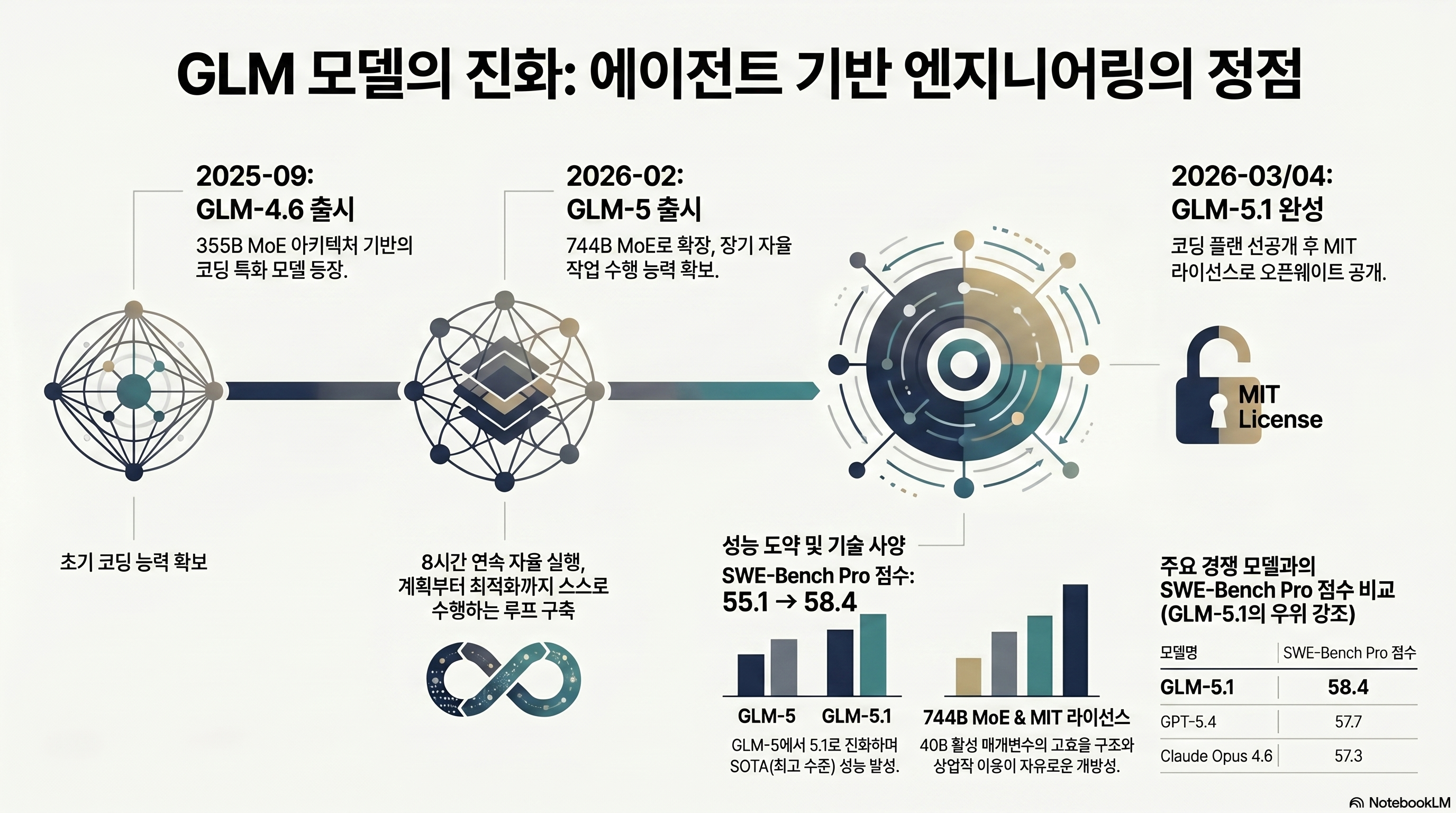
Parameters and architecture: 355B → 754B, new expert structure
GLM 4.6 was 355B MoE with 32B active parameters. GLM 5.1 is 754B with 40B active — 2.1x more total, 1.25x more active. The number of experts grew significantly while each expert became thinner. That design change improves specialization for narrow domains and aligns with GLM 5.1’s BrowseComp and SWE-Bench Pro gains.
Benchmark jumps across generations
| Benchmark | GLM 4.6 | GLM 5.1 | Change |
|---|---|---|---|
| SWE-Bench Verified | 68.0 | 77.8 | +9.8 |
| Terminal-Bench 2.0 (vs GLM 5) | 56.2 | 63.5 | +7.3 |
| BrowseComp (vs GLM 5) | 62.0 | 68.0 | +6.0 |
| AIME 2026 (vs GLM 5) | 95.4 | 95.3 | -0.1 |
| Vending Bench 2 revenue ($) | 4,432 | 5,634 | +27% |
SWE-Bench Verified jumped 9.8 points in one generation. Terminal-Bench 2.0 gained 7.3 points over GLM 5. The claim that GLM 5.1 entered open-weight SOTA territory is not hyperbole. The math section essentially held flat, which is realistic — math capability tends to come from training data depth rather than architectural scaling alone.
License change: MIT with no exceptions
GLM 4.6 was MIT-based but carried some commercial restriction language. GLM 5.1 is clean MIT: no restrictions on retraining, fine-tuning, redistribution, or commercial use. For context on how this compares to other major open-weight releases, Gemma 4 Review covers Google’s, Meta’s, and Chinese labs’ different approaches to open-source licensing.
Z.AI Coding Plan pricing — $18 to $160 per month
The cheapest path to GLM 5.1 is not raw API tokens — it is the Coding Plan subscription.
Three tiers and their quotas
| Plan | Monthly billing | Quarterly billing (approx. 10% off) | 5-hour prompts | Per week | Per month |
|---|---|---|---|---|---|
| Lite | $18 | ~$16/mo | 80 | 400 | 1,600 |
| Pro | $72 | ~$65/mo | 400 | 2,000 | 8,000 |
| Max | $160 | ~$144/mo | 1,600 | 8,000 | 32,000 |
(Sources: Z.AI Coding Plan page, Z.AI Devpack Overview)
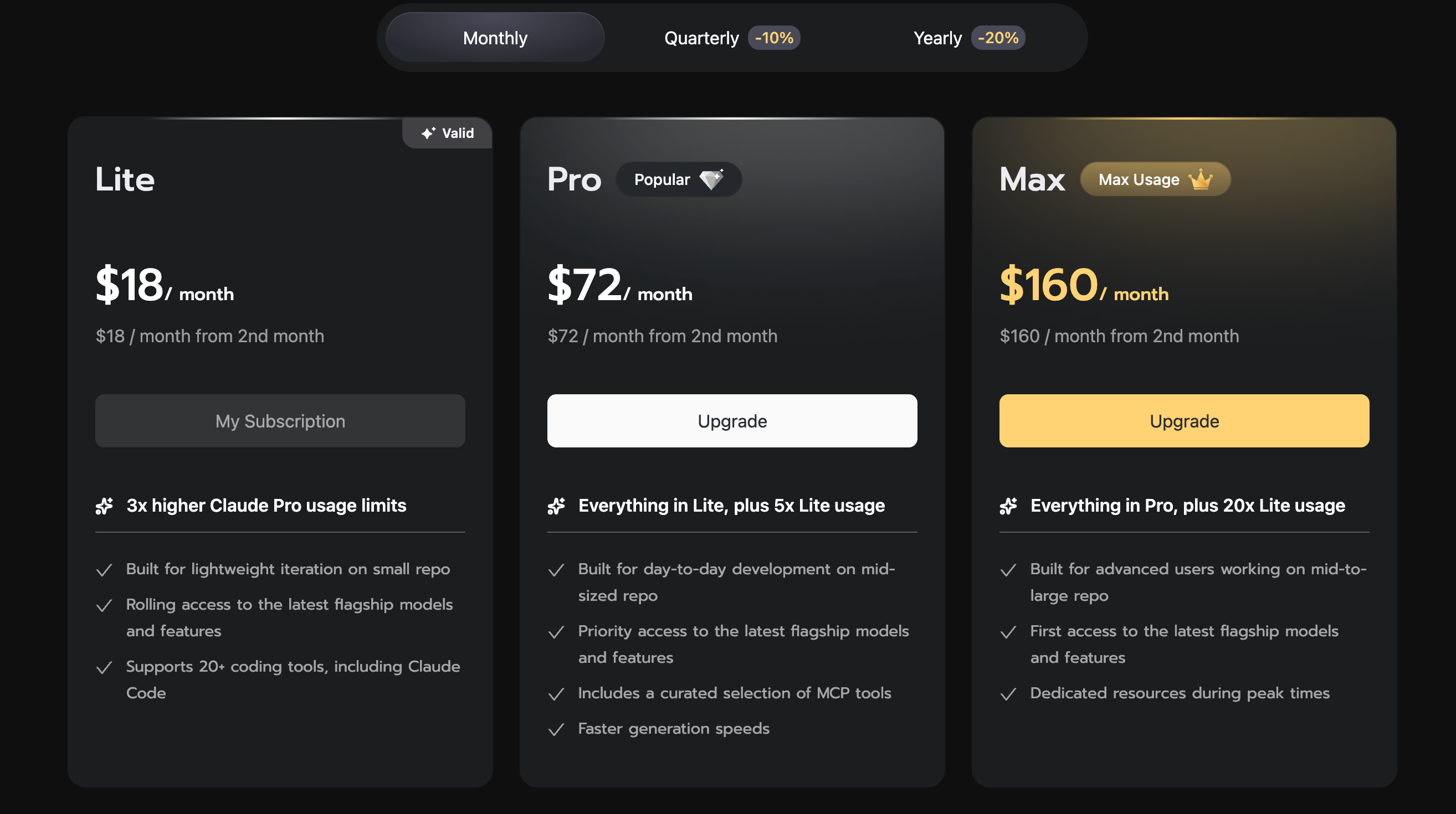
The currently listed public prices are $18/month for Lite, $72 for Pro, and $160 for Max. With the quarterly billing toggle, those land roughly around $16, $65, and $144 per month respectively. Because pricing and promotions can change, always verify the current amount on the official subscription page before paying.
One important note on quota accounting: Z.AI counts one “prompt” as one user-typed submit, but internally that single submit can expand into 15–20 model calls when tool calls and chain-of-thought reasoning are included. Lite’s 400 prompts per week is roughly 40–50 issues resolved comfortably; Pro’s 2,000 sustains an all-day Claude Code workflow.
Subscription access and general API access coexist — the key is quota vs separate billing
Reading the general Quick Start and the Devpack docs together makes one important point clear: after subscribing to a Coding Plan, you still generate an API key and point supported tools at either https://api.z.ai/api/anthropic for Claude Code or https://api.z.ai/api/coding/paas/v4 for other supported coding tools. That matters because the experience is not “pay for a web UI and stay there.” It is a subscription model that still plugs into your existing coding tool stack through normal base URL and API key configuration (sources: Z.AI Quick Start, Z.AI Coding Plan Quick Start).
The important nuance is that the docs are not perfectly aligned on this point as of May 4, 2026. The Overview, Usage Policy, and FAQ pages all stress that Coding Plan quota and subscription benefits are limited to officially supported tools, and that API calls are billed separately. But the TRAE guide explicitly distinguishes Z.ai-plan from Z.ai: the former routes through the Coding API and uses plan quota, while the latter routes to the general API and charges standard pricing from your account balance. So the most accurate interpretation right now is not “general API usage is impossible.” It is “general API usage may work, but it should be understood as standard API billing rather than a Coding Plan entitlement” (sources: Z.AI Coding Plan Overview, Z.AI Usage Policy, Z.AI Coding Plan FAQ, Z.AI TRAE Guide).
Peak-hour quota multiplier: afternoons in East Asia
Z.AI applies a 3x quota charge during UTC+8 14:00–18:00 (afternoons in East Asia). Outside that window, the rate is normally 2x, but the official docs say an off-peak 1x promotion runs through the end of June 2026. Scheduling heavier work for mornings or evenings effectively triples available quota compared to using the service during afternoon peak hours (sources: Z.AI Coding Plan Overview, Z.AI Coding Plan FAQ).
When direct API beats Coding Plan
For one-off requests, batch pipelines, or app embedding, the raw API is more efficient. GLM 5.1 on Z.AI’s API is $1.40 input / $0.26 cached input / $4.40 output per 1M tokens. Via OpenRouter it drops to $1.05 input / $3.50 output — cheaper per token than the official endpoint (source: OpenRouter GLM-5.1). The trade-off: OpenRouter cannot apply prompt caching. For Claude Code-style workflows with repeated system prompts, Z.AI’s direct API with cache hits ends up cheaper despite the higher list price.
In my own three-week trial on the Pro plan, with roughly five hours of Claude Code-style work per day, most routine tasks stayed on GLM without much friction. The failures clustered around deeper refactors and autonomous runs that lasted well beyond 20 minutes. This is closer to a personal workflow observation than a controlled benchmark, so your mileage will vary by repo size and task mix.
Three ways to connect GLM 5.1 to Claude Code
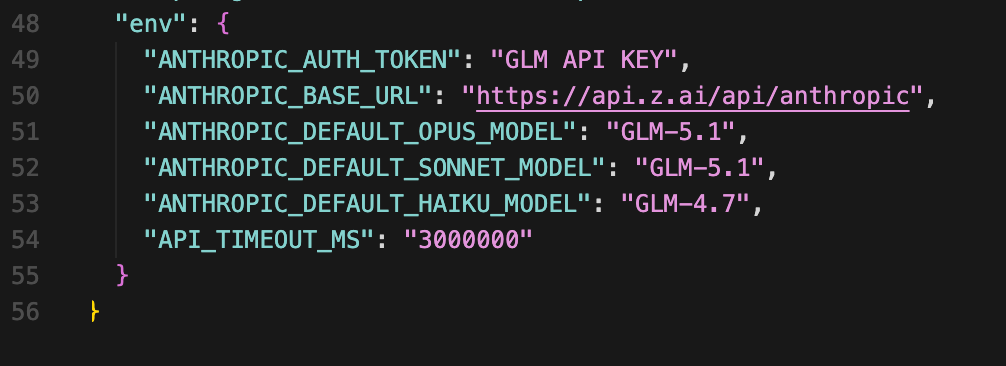
Z.AI’s key design decision is an Anthropic API-compatible endpoint. In the official docs, the minimum setup is ANTHROPIC_AUTH_TOKEN, ANTHROPIC_BASE_URL, and API_TIMEOUT_MS; add model-slot mappings on top when you want Claude Code to default specifically to GLM 5.1.
Method 1: Claude Code settings.json (Z.AI recommended)
Generate an API key from your Z.AI Coding Plan dashboard, then write it into Claude Code’s config file. This persists across reboots, new terminals, and all operating systems. Z.AI documents this flow in the Coding Plan Quick Start. Their minimum example sets token, base URL, and timeout; the version below adds explicit model mappings for a real GLM 5.1 workflow.
1-a. Permanent setup via ~/.claude/settings.json
{
  "env": {
    "ANTHROPIC_AUTH_TOKEN": "zai-xxxxxxxxxxxxxxxx",
    "ANTHROPIC_BASE_URL": "https://api.z.ai/api/anthropic",
    "ANTHROPIC_DEFAULT_OPUS_MODEL": "GLM-5.1",
    "ANTHROPIC_DEFAULT_SONNET_MODEL": "GLM-5.1",
    "ANTHROPIC_DEFAULT_HAIKU_MODEL": "GLM-4.7",
    "API_TIMEOUT_MS": "3000000"
  }
}
What each key does:
ANTHROPIC_AUTH_TOKENandANTHROPIC_BASE_URL— your Z.AI API key and the Anthropic-compatible endpointANTHROPIC_DEFAULT_OPUS_MODEL / SONNET / HAIKU— Claude Code internally uses three model slots (Opus for hard decisions, Sonnet for general coding, Haiku for fast summaries and autocomplete). Mapping heavy tasks toGLM-5.1and lightweight completions to the cheaperGLM-4.7conserves quota without needing Claude Code RouterAPI_TIMEOUT_MS: 3000000— 50-minute timeout that prevents connection drops during long autonomous runs
After saving the file, open a new terminal and run claude. If the file already exists, merge only the env object — do not overwrite the entire file.
To switch back to Anthropic’s official endpoint, delete the env object from settings.json (JSON doesn’t support comments, so remove the whole block) and restart claude in a new terminal. All three model slot mappings reset automatically. For fine-grained per-task routing across multiple providers, the Claude Code Router method below is more flexible.

1-b. Temporary shell export for testing
For a one-day trial or A/B comparison, exporting directly in the shell is faster. Closing the terminal automatically returns to the Claude endpoint.
export ANTHROPIC_AUTH_TOKEN="zai-xxxxxxxxxxxxxxxx"
export ANTHROPIC_BASE_URL="https://api.z.ai/api/anthropic"
claude
For permanent use, Method 1-a is safer because shell profile exports affect every tool that reads those variables, not just Claude Code. The full Claude Code setup guide is at Claude Code Complete Guide.
Method 2: Claude Code Router for per-task model routing
Claude Code Router (CCR) is a proxy that routes Claude Code’s internal Haiku, Sonnet, and Opus slots to different backends. The cost-effective combination in practice:
- Haiku (autocomplete, summarization) → GLM 4.7 (cheapest, fastest)
- Sonnet (general coding) → GLM 5.1
- Opus (hard decisions) → Claude Opus 4.7 direct API
{
  "providers": {
    "z-ai": { "base_url": "https://api.z.ai/api/anthropic", "api_key": "zai-xxx" },
    "anthropic": { "base_url": "https://api.anthropic.com", "api_key": "sk-ant-xxx" }
  },
  "routing": {
    "haiku": { "provider": "z-ai", "model": "glm-4.7" },
    "sonnet": { "provider": "z-ai", "model": "glm-5.1" },
    "opus": { "provider": "anthropic", "model": "claude-opus-4-7" }
  }
}
This configuration sends 90% of vibe-coding work to GLM and reserves Opus for the two or three architecture-level decisions that come up each week. Monthly Opus API spend can drop below $30 with this setup.
Method 3: Direct API with context caching
For app embedding or batch pipelines, the Anthropic-compatible SDK works as-is. Caching a long system prompt cuts the repeated-context cost from $1.40 to $0.26 per 1M tokens.
from anthropic import Anthropic

client = Anthropic(
    base_url="https://api.z.ai/api/anthropic",
    api_key="zai-xxx",
)

resp = client.messages.create(
    model="glm-5.1",
    max_tokens=4096,
    system=[{"type": "text", "text": LONG_SYSTEM_PROMPT,
             "cache_control": {"type": "ephemeral"}}],
    messages=[{"role": "user", "content": "Summarize this PR"}],
)
A pipeline that reuses a 200K-token system prompt 1,000 times saves tens of dollars per month just from the cache hit.
Exporting ANTHROPIC_AUTH_TOKEN in the shell and then creating a .env file in the same session is an easy way to accidentally commit credentials. Add .env and .env.local to .gitignore before creating those files. Z.AI’s dashboard rotates keys with two clicks, but a leaked key can drain quota before the rotation.
GLM 5.1 is only half the story — vision and image generation
Read a few more pages in the official documentation and Z.AI stops looking like “one cheap coding model.” The more accurate framing is a stack: subscription-based coding access, a separate multimodal coding model, and a separate image generation model. If your workflow includes screenshots, design-to-code, or diagram-heavy tasks, this matters more than the raw GLM 5.1 benchmark headline.
| Use case | Model / feature | Input | Pricing / limit | Best for |
|---|---|---|---|---|
| Long-horizon coding and agents | GLM-5.1 | Text | $1.4 / $4.4 per 1M or Coding Plan quota | Refactors, tests, agent runs |
| Screenshots and GUI understanding | GLM-5V-Turbo or Vision MCP (GLM-4.6V) | Image / video / file | GLM-5V-Turbo $1.2 / $4.0 per 1M, Vision MCP uses plan quota | UI debugging, design-to-code, screenshot diagnosis |
| Image generation | GLM-Image | Text | $0.015 / image | Posters, diagrams, thumbnails, visual explainers |
(Sources: Z.AI Overview, Z.AI Pricing, GLM-5V-Turbo, GLM-Image)
Coding Plan also includes Vision MCP
According to the Devpack docs, every Coding Plan includes Vision Understanding, Web Search, Web Reader, and Zread MCP access. Vision MCP in particular is powered by GLM-4.6V and is built for screenshot OCR, error-screen analysis, UI-to-code tasks, and other visual workflows. Lite, Pro, and Max differ on monthly web-search and web-reader quotas, while Vision MCP shares the same rolling 5-hour prompt pool as the underlying model. That makes the plan meaningfully more valuable than a plain text-only coding subscription (sources: Z.AI Coding Plan Overview, Z.AI Vision MCP Server).
Z.AI also has a dedicated multimodal coding model
GLM-5V-Turbo is presented by Z.AI as its first multimodal coding foundation model. It accepts image, video, text, and file input, keeps the same 200K context / 128K output shape, and is specifically positioned for vision-based coding tasks. The official examples are exactly the ones GLM 5.1 struggles with: recreating designs from mockups, spotting layout issues from screenshots, and reading technical diagrams. So the right conclusion is not “Z.AI is weak at vision.” It is “GLM 5.1 itself is text-only, while the broader platform splits vision into a different model” (source: GLM-5V-Turbo).
Image generation lives in GLM-Image
GLM-Image is the image-generation side of the stack. The official price is $0.015 per image, with support for common aspect ratios such as 1:1, 3:4, 4:3, and 16:9. Z.AI emphasizes text-heavy visuals as a strength: posters, slide-style layouts, science diagrams, and other images where rendering text accurately actually matters. That makes the Z.AI ecosystem more modular than it first appears: one model for text-centric coding, one for multimodal coding, one for image generation (sources: GLM-Image, Z.AI Pricing).
GLM 5.1 limitations — what benchmarks don’t tell you
Six practical weaknesses that the marketing materials tend to understate.
GLM 5.1 itself is text-only — the platform is not
This is the first nuance that gets lost in casual comparisons. GLM 5.1 itself cannot accept images, so workflows that involve dropping a screenshot into Claude Code and asking “what is visually wrong here?” will not work with GLM 5.1 alone. But that does not mean Z.AI lacks a vision story altogether; it means the platform splits those capabilities across GLM-5V-Turbo and Vision MCP instead of collapsing them into one flagship text model. If you care a lot about one-model simplicity, Opus 4.7 or Gemini 3.1 Pro is still the cleaner setup.
Quality degradation near 100–128K tokens
HackerNews user jauntywundrkind’s observation is the most precise report: performance is stable in short conversations but degrades predictably once context approaches 100K tokens (source: HackerNews thread). Z.AI advertises 200K context, but the safe working range in practice is around 80K. Large repository work needs chunking rather than dump-everything-in.
Local deployment is not practical
FP8 inference on the full 754B model requires eight or more H200 GPUs. Even a quantized GGUF (~135 GB) produces single-digit tokens per second on a 256 GB Mac Studio — not production-useful. The MIT open-weight release is for research, fine-tuning, and custom hosting; it is not a laptop-friendly local model.
Latency and reliability
HN user kay_o reported waiting more than 50 minutes on a simple CSS change request and hitting 529 errors repeatedly. RickHull documented file corruption and directory deletion events at roughly 1-in-4 or 1-in-5 frequency when using a quantized version (source: HackerNews thread). This is not Claude Code-level reliability and requires planning for graceful failure handling.
Peak-hour quota multiplier
During UTC+8 14:00–18:00, Z.AI charges quota at 3x the normal rate. For developers working standard office hours in that window, Lite ($18) effectively feels like one-third of its listed quota. Pro or above is the practical baseline. Full context is in the pricing section above.
Benchmark contamination questions
GLM 5.1’s 0.7–1.1 point lead over Opus 4.6 on SWE-Bench Pro is within standard error range. The r/LangChain community has raised the possibility of training data overlap with benchmark datasets. The lead is narrow enough that your own repository is the only reliable ground truth.
Pros
- + MIT open-weight license — commercial use, fine-tuning, and redistribution with no restrictions
- + SWE-Bench Pro 58.4 — open-weight coding SOTA, API output cost 1/5.7 vs. Opus 4.6
- + Coding Plan includes supported-tool API credentials plus Vision/Web MCP access in the same subscription
- + GLM-5V-Turbo and GLM-Image extend the stack into screenshot understanding and image generation
- + 200K context and 128K output, BrowseComp 68 with strong web agent performance
- + 8-hour 1,700-step continuous autonomous execution, top open-weight score on Vending Bench 2
Cons
- − GLM 5.1 itself is text-only, so visual work still needs GLM-5V-Turbo, Vision MCP, or another multimodal model
- − Predictable quality degradation approaching 100–128K tokens in context
- − Latency and stability issues — frequent 529 errors, file corruption reports from the community
- − Afternoons in East Asia (UTC+8 14–18h) apply a 3x quota charge — Lite plan feels constrained during peak hours
- − Local deployment is impractical — FP8 needs 8+ H200 GPUs, quantized builds run too slowly
- − SWE-Bench Pro lead over Opus 4.6 is only 0.7–1.1 points, raising benchmark contamination questions
Z.AI signup and referral discount
Three steps to get started
Create a Z.AI account
Go to z.ai and sign up with email or GitHub OAuth. A global account can be created with email alone — no mainland China phone number required.
Choose a Coding Plan tier
Select Lite ($18), Pro ($72), or Max ($160) based on workload. The quarterly billing toggle currently shows roughly 10% lower effective monthly pricing. Individual developers typically start with Pro; teams usually need Max.
Generate an API key and connect to Claude Code
From the dashboard's API Keys section, generate a key, set ANTHROPIC_AUTH_TOKEN and ANTHROPIC_BASE_URL, and confirm the quota counter drops after the first prompt. The plan quota only applies inside officially supported tools — it is not a generic API credit bucket.
Payment options are centered on Stripe-backed card payments and PayPal. Actual approval can vary by card issuer, country, and account state, so it is safest to trust the live checkout screen.
5% off the first subscription through a referral link
Z.AI runs an official referral program. Under the current campaign rules, new accounts that sign up through an invite link and complete their first GLM Coding subscription payment within 72 hours receive a 5% instant discount on that first order. That benefit is limited to first-time paid subscribers and does not apply to renewals or upgrades. The referrer side uses a separate reward structure: once valid invites accumulate, the inviter receives credits worth 10% of each invited user’s first actual payment amount (source: Z.AI Credit Campaign Rules, checked May 4, 2026).
For reference, the author’s referral link is below. If you prefer not to use a code, the product access itself stays the same, so use whichever fits your situation.
Sign up with invite code HHIV4ZDCIJ on Z.AI →
Eligibility: new account, no prior paid subscription history, signed up via invite link or code, first payment made within 72 hours. Under the current rules, this discount does not stack with other similar first-order discount campaigns.
- Subscription services: currently non-refundable according to the official policy
- Cancelling renewal: auto-renewal can be disabled before the next billing date, while the current subscription period remains usable until it expires
- API credits (separate top-up): non-refundable
Community reactions — international vs. local developers
Internationally, GLM 5.1 is being adopted quickly as a cost-efficient coding model. Reactions among developers in time zones affected by the peak-hour quota are more mixed.
- "I'm getting 3x the usage of Claude Max Code for $30/month with GLM. For routine tasks, the quality difference is barely perceptible." — Elio Verhoef (Medium)
- "After adding GLM 5.1 to Open Code, I decided to cancel my Cursor subscription. The quality is that good." — DeathArrow (HackerNews)
- "GLM 5.1's UI output beats GPT-5.4, and I find the design sense better than Claude Opus 4.6." — BridgeMind (X)
- "It automatically found a SQL injection vulnerability in a tennis court booking system and created a patch PR." — stavros (HackerNews)
- "It degrades predictably near 100–128K context — goes from totally fine to completely broken." — jauntywundrkind (HackerNews)
- "Whether it's the quantized version or not, I saw file corruption or directory deletion roughly 1 in 4 or 5 runs." — RickHull (HackerNews)
- "Simple CSS change requests took over 50 minutes and 529 errors were frequent. Stability is still a work in progress." — kay_o (HackerNews)
- "The context window is large, but reasoning and agentic ability still fall short of the top OpenAI and Google models." — Ashish Sharda (Medium)
Why international adoption is moving faster
Open Code, Cline, and Roo Code — VS Code-based open-source agent IDEs — are more prevalent outside East Asia. All of them support swapping the backend endpoint via configuration, so the adoption cost for GLM 5.1 is near zero. Developers who exclusively use Cursor or Claude Code face more inertia: the existing tool works well enough that the motivation to switch needs to be higher.
The peak-hour quota is the biggest variable for East Asia-based developers
The most common complaint in developer communities in UTC+8-adjacent time zones is running through quota quickly in the afternoon. The 3x multiplier during UTC+8 14–18h means a Lite plan’s 400 weekly prompts effectively becomes 133 during standard working hours. Developers who can shift heavy work to mornings or evenings find Pro sufficient; those locked into afternoon working patterns generally need Pro regardless. In practical terms, GLM 5.1 works best as a cheaper replacement for a lot of routine Opus work, not as a perfect one-to-one substitute for every frontier-grade task.
Troubleshooting Q&A
Q1: Environment variables set, but Claude Code still connects to Anthropic
Claude Code prioritizes existing login tokens. Run claude logout, then restart with claude in a new terminal to apply the new variables. Also double-check the variable name: ANTHROPIC_AUTH_TOKEN, not ANTHROPIC_API_KEY.
Q2: Recurring 529 errors
529 errors typically appear during peak-hour load or near quota exhaustion. Try again outside UTC+8 14–18h, or configure CCR with a fallback rule that automatically switches to Claude Opus on 529 with retries: 3 and backoff: exponential.
Q3: Output became incoherent after a large context
You likely exceeded the practical 80K working range. Avoid loading an entire repository at once — use .claudeignore or CCR chunking rules, and limit attached files to 5–10 most relevant ones per request.
Q4: Non-English output quality
For technical documentation in languages other than English, GLM 5.1 is generally at GPT-4.1 or Claude Sonnet 4.5 level. Very long essays or documents requiring formal mixed register may show a translated-from-Chinese feel in the output. Running a final pass through Claude or GPT tends to clean it up.
Q5: Does it work on Windows?
Yes. In PowerShell, set variables as $env:ANTHROPIC_AUTH_TOKEN = "zai-xxx". Under WSL2, the standard Linux export syntax applies.
Conclusion: who should try GLM 5.1 now?
Key takeaway
GLM 5.1 is strongest when you use it to move a meaningful share of everyday Claude Code-style work onto a cheaper model. But the stronger overall Z.AI story is the stack around it: supported-tool API access through a subscription, Vision MCP for screenshot-heavy work, and GLM-Image for generated graphics. Routine coding, web agent tasks, and long-horizon autonomous execution are near the top of the open-weight field, but multimodal analysis, 100K+ context consistency, and nuanced reasoning judgment still favor Opus 4.7 and Gemini 3.1 Pro. The right framing for spring 2026 is not “replace Opus” — it is “reduce how often you actually need Opus.”
- Solo developers feeling the cost of Claude Code Max — Coding Plan Pro ($72) can absorb a lot of routine work while leaving the hardest cases to Opus API
- Developers who want screenshots and coding in one vendor stack — GLM 5.1 plus Vision MCP is a stronger package than GLM 5.1 alone
- Teams running API pipelines — Cached input at $0.26/1M drops RAG, evaluation, and batch task unit costs to near 1/10 of Opus rates
- Frontend teams that want one single model to handle text, screenshots, and visual debugging with no split setup — Z.AI can do it, but not through GLM 5.1 alone
- Anyone loading entire large repositories into context — Chunking to under 80K tokens is a prerequisite. If that is not feasible, Opus is safer
Sign up for Z.AI and subscribe to Coding Plan Pro
Go to z.ai, sign up with email, and choose Pro ($72/mo, or roughly $65/mo quarterly). If your weekly workload stays under 400 prompts, starting with Lite ($18) is reasonable.
Generate an API key and add it to Claude Code
From the dashboard, create a key and register ANTHROPIC_AUTH_TOKEN, ANTHROPIC_BASE_URL, and API_TIMEOUT_MS in your shell or settings.json. Add model-slot mappings if you want Claude Code to default specifically to GLM-5.1.
Run your normal workflow for three days
Track where the experience differs from Opus. Pay attention to context approaching 100K, tasks that need image input, and complex reasoning decisions. If screenshots matter, test Vision MCP in the same trial.
Set up CCR routing if needed: Haiku=4.7, Sonnet=5.1, Opus=claude-opus-4-7
Per-task model separation can keep total monthly API costs to one-fifth or less of using Opus exclusively. Reserve Opus only for the genuinely hard decisions.
Adjust your schedule around peak hours
UTC+8 14–18h (afternoon in East Asia) applies a 3x quota charge. Front-load heavy work into mornings, and leave lighter tasks like documentation and small refactors for peak hours.
- Z.AI official blog — GLM 5.1 technical report
- Z.AI Overview — Models & Agents
- Z.AI Quick Start — general API onboarding
- Z.AI Pricing
- Z.AI Coding Plan Overview
- Z.AI Coding Plan Quick Start
- Z.AI Coding Plan FAQ
- Z.AI Vision MCP Server
- Z.AI TRAE Guide
- GLM-5V-Turbo docs
- GLM-Image docs
- Z.AI Coding Plan subscription page
- Z.AI Credit Campaign Rules (referral)
- Artificial Analysis — LLM Intelligence Index
- benchlm.ai — GLM 5.1 vs Claude Opus 4.6
- HuggingFace — zai-org/GLM-5.1
- OpenRouter — GLM-5.1
- VentureBeat — 8-hour autonomous GLM 5.1
- HackerNews GLM 5.1 discussion thread
- Claude Opus 4.7 review — benchmark baseline
- Kimi K2.6 Deep Dive — open-weight competitor comparison
- Claude Code Complete Guide — environment variables and MCP setup
- Gemma 4 Review — open-source LLM license landscape
Does GLM 5.1 actually outperform Claude Opus 4.7 at coding?
Can the $18 Lite plan replace Claude Code for a solo developer?
Does the Coding Plan really let you use an API?
Does Z.AI also have vision and image-generation models?
Can GLM 5.1 be run locally?
Is there a downside to signing up without a referral code?
How significant is the text-only limitation in real development?
Should I stay on GLM 4.6 or move to 5.1?
Can I get an invoice or official tax receipt for Z.AI charges?
Was this helpful?
One tap shapes what gets written next.
Topic tags
Kimi K2.6 Deep Dive: 88% Cheaper Claude Opus 4.7 Alternative?
Kimi K2.6 is an open-weight MoE model with SWE-Bench Pro 58.6, HLE 54.0, 300-agent swarms, 256K context, and API pricing about 88% below Claude Opus 4.7.
Read
Andrej Karpathy's 4 AI Coding Warnings and the 100K-Star CLAUDE.md Repo
A deep dive into the four bad AI coding habits Karpathy warned about, the CLAUDE.md repo's four operating principles, what evidence supports them, and where the limits still are.
Read
Qwen 3.6 27B Review: A Local Coding Agent Tested on RTX 4090 and M4 Max (2026)
A practical review of Qwen 3.6 27B and 35B-A3B for local coding work, covering benchmarks, VRAM, token speed, Apache 2.0 licensing, and Claude alternatives.
Read