HOP HWP Desktop App Guide 2026: Open HWP and HWPX on Mac, Windows, and Linux for Free
A practical guide to HOP, the free desktop app for opening HWP and HWPX files without Hancom. Covers download links, installation, PDF export, and how it differs from RHWP.

Quick take
Start with this judgment
26 min readBottom line
A practical guide to HOP, the free desktop app for opening HWP and HWPX files without Hancom. Covers download links, installation, PDF export, and how it differs from RHWP.
- Best for
- Readers who need to solve a concrete workflow problem now
- What to check
- HOP · HWP viewer · Hancom alternative
- Watch out
- Updated around May 2, 2026. Pricing and features can change, so confirm with the official source too.
3 key points
- What is completed in this article: Establishing an environment to open, edit, and export Korean HWP/HWPX files to PDF for free on Mac, Windows, and Linux. There is no need for a browser or Hancom.
- Key figures: Open source desktop app HOP v0.1.10, MIT license, 6 installation options (2 types of .dmg, .msi, .exe, .deb, .rpm, AppImage), GitHub 1.2k stars, 222 forks (as of 2026-05-02)
- Estimated time taken: 1 minute download + 1 minute installation + 30 seconds to open first document = approximately 3 minutes total.
목차
- Check before you start
- What is HOP and why did it come out now?
- RHWP Chrome extension and HOP, when and what to use
- HOP installation — Mac, Windows, Linux 3 paths
- Opening Your First HWP File — Is It Actually Worth It?
- PDF export/print/file connection — desktop app download basics
- Hancom Docs, Polaris, HOP — Which one is right for my situation?
- HOP created by Golbin Hacker with AI Claude, what are the limits?
- How the community has received HOP
- conclusion
Check before you start
HOP is an open source HWP desktop app for Mac, Windows, and Linux. It was released in April 2026 and reached v0.1.10 in the same month. It uses the parsing engine of RHWP, a Chrome extension, as a shell and wraps it in a native app. If the previously discussed [RHWP Chrome Extension Guide] (/en/guide/RHWP-hwp-chrome-extension) summarized “How to open HWP in browser”, this article deals with “How to use it like a basic OS app without a browser”. If you want to immediately open the attached .hwp on the web, RHWP is correct, and if you want to manipulate the downloaded file by double-clicking it in Finder or Explorer, HOP is correct.
required environment
- macOS: Apple Silicon (M1/M2/M3/M4) or Intel. macOS 11 Big Sur or later recommended
- Windows: 64-bit Windows 10/11
- Linux: x86_64 distribution. AppImage runs on most distributions,
.debfor Ubuntu/Debian,.rpmfor Fedora/RHEL - Disk: Approximately 150MB after installation
- Network: Required only once for download. Can be used offline afterwards
What to check
Even if Hancom Office or Hancom Viewer is already installed, it will not conflict. HOP operates as its own app bundle, and system default program settings are only touched when changed directly by the user. It can also coexist with the Chrome extension RHWP — rather, it is a combination that can be selected depending on the situation.
Scope not covered in this article
For the final delivery of .hwpx for submission to public institutions, genuine Hancom products are still the realistic answer. HOP inherits the limitations of the RHWP engine and is not perfect in reproducing complex formats and nested tables. The scope of this article is “Quickly open received HWP to check, edit, and convert to PDF”.
What is HOP and why did it come out now?
One line summary — RHWP engine wrapped in a desktop app
HOP is an open source HWP/HWPX desktop app released on GitHub golbin/hop. The technology stack is still TypeScript-centered, and the Rust core uses RHWP’s WASM parsing engine as is, with a UI and file system integration layer added. As of May 2, 2026, the latest release is v0.1.10, license is MIT. The description of the latest release also puts upstream RHWP v0.7.8 integration at the forefront, making it clear that HOP is not a standalone parser but a desktop shell that quickly absorbs the RHWP core (Source: GitHub - golbin/hop, HOP v0.1.10).
Looking at the numbers, GitHub stars have risen to about 1.2k, forks 222, and open issues 18. The fact that it rose to v0.1.10 within a short period of time after release is itself a sign that it is closer to an early practical app that is quickly modified and distributed rather than an “experimental mockup”.
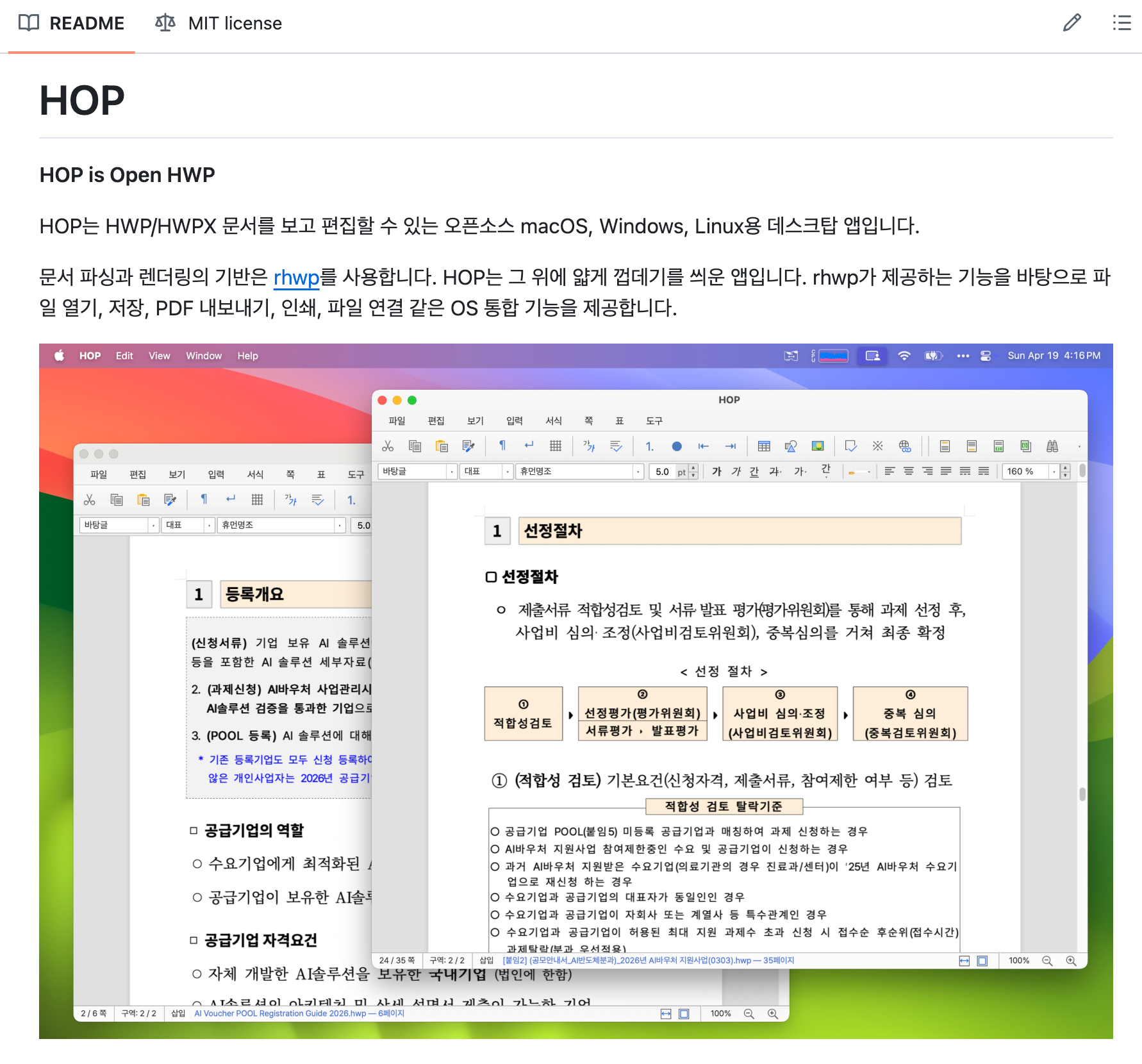
Developer Golbin Hacker, “I only made a shell”
The developer of HOP is golbin, real name Kim Jin-joong, and is known by the pen name “Golbin Hacker” on blogs and social media. As the author of 『Golbin Hacker’s 3-Minute Deep Learning TensorFlow Taste』 published by Hanbit Media in 2017, he wrote one of the most read introductory AI/deep learning books in Korea.
The notice you posted on Threads is interesting.
“This is an open source HWP desktop app based on RHWP, an open source HWP parsing engine and web editor that has been popular these days. Supports Mac, Windows, and Linux. I added a few more features, such as PDF export and printing, but I only created a shell. Glory to the developer who developed RHWP!!”
— golbin, April 2026 (Source: Threads)
As he publicly stated, he worked in the form of Claude AI and pair programming during the development process. RHWP also revealed that Edward Kim created it through pair programming with Claude, so the pattern that “AI is supporting the next layer of open source productivity in Korea” becomes clear.
Why came out now — desktop packaging two weeks after RHWP
Just two weeks after RHWP received an explosive response from the community in early April 2026, HOP was someone who responded to the demand for “I want to use it even without turning on Chrome.” In Clien and GeekNews, right below the RHWP article, the comment “I wish I could open the file by double-clicking it.” was a product of the repeated comment flow.
RHWP Chrome extension and HOP, when and what to use
Technical Relations — HOP is the desktop shell of RHWP
RHWP and HOP are not competitors, but twins that share the same engine. RHWP (Edward Kim) provides a Rust + WASM-based HWP parsing and rendering engine with a Chrome extension, and HOP embeds the engine and adds a native app UX. Developer golbin also made this relationship clear in Threads.
It is important to remember that dependencies are lopsided. RHWP is upstream and HOP is downstream. If there is a bug in the RHWP engine, HOP will also have the same bug, and conversely, if RHWP is improved, HOP will take over. The background of RHWP and engine details are summarized in the previous article RHWP Complete Guide.
Feature Comparison — Same Engine, Different Clothes
| item | RHWP chrome extension | HOP desktop app |
|---|---|---|
| execution environment | Chrome/Edge/Whale/Brave/Arc | macOS·Windows·Linux native |
| Browser required? | Required (Chromium series) | otiosity |
| Detect web link `.hwp` | Automatic display of blue H badge | None (file based) |
| Double-click the file to open it | Requires specifying OS default program | Native with default app settings |
| offline only | Browser required | completely offline |
| PDF export | possible | Available (OS print system integration) |
| Browser Print | Native print dialog | |
| multiple windows | Multiple tabs | Multiple separate app windows |
| Save HWPX | v1.0 roadmap incomplete | RHWP engine limit sharing (incomplete) |
Conclusion - Installing both is the right answer
If you think about the actual routine, the answer becomes clear. When you want to immediately open the attached .hwp while browsing a public institution bulletin board on the web, the RHWP Chrome extension is fast. On the other hand, if you want to immediately open .hwp already saved locally by double-clicking in File Explorer, or if you want to work offline without turning on Chrome at all, HOP is the answer. The two do not exclude each other. The combined capacity is around 200MB, so installing both is not a burden.
HOP installation — Mac, Windows, Linux 3 paths
Download page — Direct link to the latest build for each OS
The official download page is golbin.github.io/hop. When you connect, you will see download links for each OS, and the URL pattern is github.com/golbin/hop/releases/latest/download/{filename}, so you will always be connected to the latest release. As of May 2, 2026, the actual latest tag is v0.1.10.
| OS | file name | size | significant |
|---|---|---|---|
| macOS Apple Silicon | HOP-macos-arm64.dmg | About 27MB | Code signing and notarization completed |
| macOS Intel | HOP-macos-x64.dmg | About 28MB | Code signing and notarization completed |
| Windows x64 | HOP-windows-x64.msi / .exe | About 24~27MB | No code signing → SmartScreen warnings possible |
| Linux x64 | HOP-linux-x64.deb / .rpm | About 29MB | First recommended due to IME stability |
| Linux x64 | HOP-linux-x64.AppImage | About 101MB | Run without installation, portable |
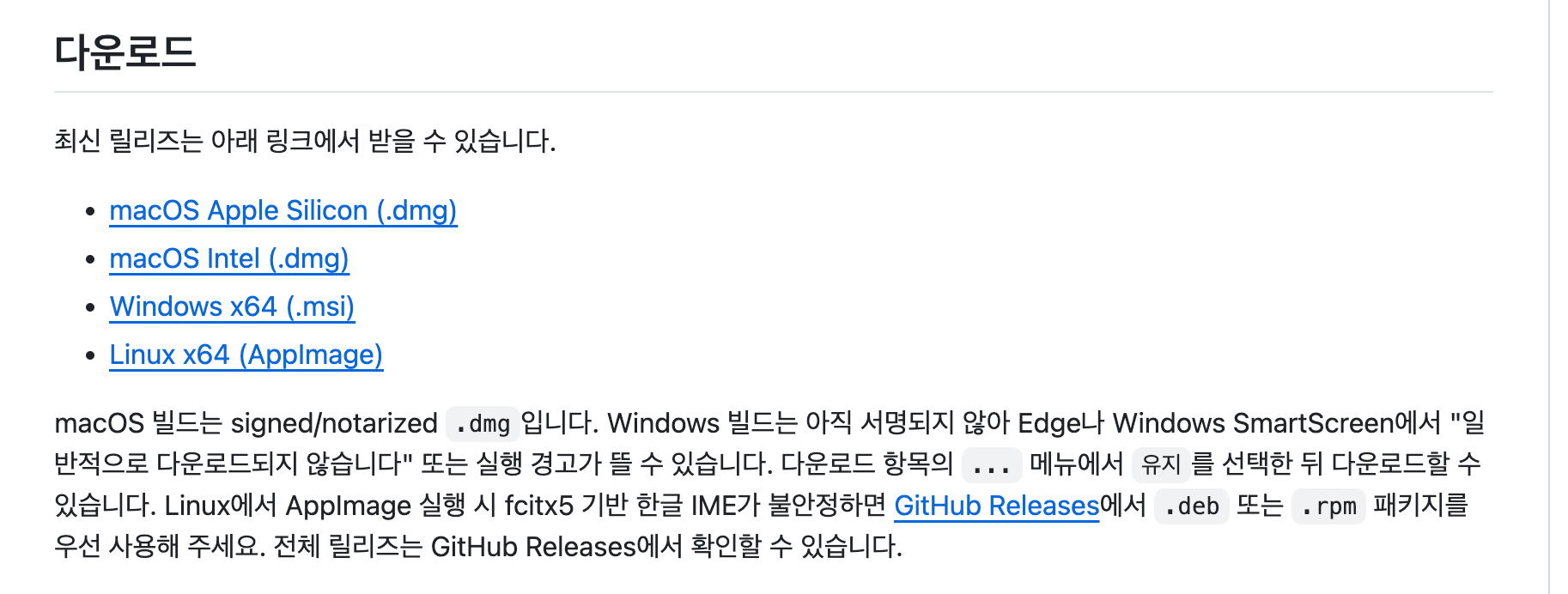
Installing on Mac (dmg)
Access download page
Go to golbin.github.io/hop and press the button that matches your chip. Apple Silicon (M1/M2/M3/M4) is arm64, Macs before 2020 are Intel x64
DMG double click
Double-click HOP-macos-arm64.dmg or HOP-macos-x64.dmg in the download folder.
Drag to Applications folder
From the mounted disk image, drag the HOP icon onto the Applications folder shortcut icon on the left.
Allow first run
Search for HOP in Launchpad or Spotlight (Cmd+Space) and run it. Since the code is signed and notarized, it appears immediately without Gatekeeper warning.
It’s relatively smooth on Mac. Because golbin has completed code signing and notarization with the Apple Developer program, warnings such as “Unidentified developer” do not appear. If it is a personal Mac, installation is completed with a single drag. If you are a terminal-preferring user, you can also use brew install hop based on README.
Installing on Windows (msi) — Responding to SmartScreen warnings
Windows MSI and EXE of HOP v0.1.10 are not code signed. When you run it, a blue screen like “Windows protected your PC” may appear. This is not a virus signal, but means “Unsigned binaries that have not yet been verified by Microsoft.” Because it is open source, you can directly verify the source on GitHub, and you only need to check that the download URL is directly linked to github.com/golbin/hop/releases/....
MSI Download
Click the Windows x64 button at golbin.github.io/hop to receive HOP-windows-x64.msi.
MSI double click
Double-click the .msi file in the download folder. SmartScreen warning appears
Click ‘More Information’
When you click the 'Additional Information' link in the warning pop-up, the 'Run' button appears.
Click the ‘Run’ button and install
When you click Run, the regular MSI installation wizard appears, and the installation is completed with Next-Next-Finish.
Installing on Linux (AppImage/deb/rpm)
Linux has three options. Choose the one that suits your distribution.
Ubuntu/Debian series (.deb):
wget https://github.com/golbin/hop/releases/latest/download/HOP-linux-x64.deb
sudo dpkg -i HOP-linux-x64.deb
# In case of lack of dependency: sudo apt --fix-broken install
Fedora/RHEL/CentOS family (.rpm):
wget https://github.com/golbin/hop/releases/latest/download/HOP-linux-x64.rpm
sudo rpm -i HOP-linux-x64.rpm
AppImage (regardless of distribution):
wget https://github.com/golbin/hop/releases/latest/download/HOP-linux-x64.AppImage
chmod +x HOP-linux-x64.AppImage
./HOP-linux-x64.AppImage
AppImage is a single file format that can be executed without installation, so you can use HOP without touching the system package manager. If you want desktop integration (menu registration), you can install additional tools such as AppImageLauncher.
Check results
Once the installation of any OS is complete, when you run the app, the HOP main window appears and you see menus such as “open file” and “recent files” at the top, indicating success. If you drag and drop the .hwp file into the window, rendering will begin immediately. Check whether the HOP icon is visible in the Launchpad for macOS, the Start menu for Windows, or the application launcher for Linux.
Opening Your First HWP File — Is It Actually Worth It?
Method 1: Drag and drop
With the HOP app turned on, if you drag a .hwp or .hwpx file from a file explorer (macOS Finder, Windows Explorer, Linux Nautilus/Dolphin) to the HOP window, rendering will begin immediately. On first load, it takes 1–2 seconds to initialize the internal WASM module and is instantaneous thereafter.
Method 2: Open a file from the menu
For macOS, menu bar File → Open or Cmd+O. For Windows/Linux, use the top menu File → Open or Ctrl+O. A standard file dialog box will pop up and filter out the .hwp/.hwpx extensions.
Method 3: Set it as the OS default app and double-click it
This is where HOP comes from. Setting HOP to automatically pop up when you double-click a file reduces the workflow by one step.
macOS: Right-click the .hwp file in Finder → Get Info → Select HOP in the Open with section → Click the Change All button.
Windows: Right-click the .hwp file → Open with → Choose another app → select HOP → check Always use this app to open .hwp files
Linux: Right-click in the file manager → Open With Other Application → select HOP and “Set as default”
After setting up, just double-click .hwp in the email attachment or download folder and HOP will appear immediately.

Multi-window — two or more documents simultaneously
One practical detail of HOP is that it opens documents in multiple windows simultaneously. Unlike the Hancom Hangul Mac version that operates based on a single document, HOP can open an additional empty window with Cmd+N (or Ctrl+N), and each window can be scrolled and edited independently. There is a big difference when comparing and editing various official documents.
Check results
Success Criteria: The HWP document is rendered in A4 page format, the formatting icon is visible in the top toolbar, and scrolling operates smoothly. Tables, images, and formats are reproduced virtually identically to those seen in the RHWP Chrome extension. It’s natural because it’s the same engine.
PDF export/print/file connection — desktop app download basics
PDF export — a function that Hancom Viewer cannot do
This is one of the biggest reasons for making HOP a desktop app. The free Hancom Viewer blocks editing, and the Chrome extension RHWP relies on the browser print dialog. HOP directly attaches the OS native PDF engine.
Open file in HOP
Open the .hwp or .hwpx file you want to convert in HOP
File > Export to PDF
Select ‘Export to PDF’ from ‘File’ in the top menu. In macOS, the Cmd+Shift+E shortcut also works.
Specify storage location and file name
Specify the PDF saving path and file name in the standard save dialog box.
Confirm by opening
Open the saved PDF with Preview (macOS), Edge (Windows), or evince (Linux) to check whether the layout has been reproduced properly.
There are often situations where I receive a HWP from a public institution, school, or financial institution, but I want to send the reply as a PDF. The routine of opening in HOP, filling in the content, and exporting to PDF is completed in 4-5 clicks. Email attachments are PDF, not HWP. In situations where the opponent does not require Hancom, this is much more general-purpose.
Print — OS native print dialog
When you press Cmd+P or Ctrl+P, the OS standard print dialog box appears. Options such as printer selection, page range, duplex/single-sided, and paper size operate at the operating system level. macOS also has a “Save as PDF” option in the print dialog, so there are two PDF export paths.
HWP/HWPX file connection — common to Mac, Windows, and Linux
This applies to specifying default apps for each OS, which was previously covered in the “Open your first HWP file” section. The HOP app itself registers itself with the .hwp/.hwpx MIME type upon installation, so the file manager recognizes HOP as a candidate. Afterwards, the user only needs to check “Set as default app”.
Toolbar — A miniature version of Hangul Hancom’s ribbon bar.

The basic icons for file, editing, and formatting are placed on the top toolbar. It is much more compact than Hancom Hangul’s ribbon bar. Cutting, copying, pasting, font shapes, and paragraph shapes required in practice are organized, and the rest can be accessed from the menu. One guiding phrase - UI maturity is still in its infancy, so if you expect it to be a “Hancom Hangul alternative editor” you will be disappointed. “Confirmation of received documents, minor modifications, PDF conversion” is the appropriate range at the moment.
Hancom Docs, Polaris, HOP — Which one is right for my situation?
Differences in three service structures
Hancom Docs, Polaris Office, and HOP have different approaches. Hancom Docs is a cloud subscription web office, Polaris is a web/desktop hybrid with ads, and HOP is an open source local desktop app. The same destination, “Edit HWP on Mac for Free,” is approached through different paths.
| item | Hancom Docs | polaris office | HOP |
|---|---|---|---|
| license fee | Subscription for 9,900 won per month | Free (with ads) / Paid plan | Completely free (MIT) |
| Installation method | Web (login) | Web or desktop | desktop app |
| File processing location | cloud upload | cloud upload | Local (completely offline) |
| join the membership | essential | essential | doesn't exist |
| advertisement | doesn't exist | Available (free plan) | doesn't exist |
| HWP rendering accuracy | Formula — highest | slander | based on RHWP engine — |
| open source | X (private) | X (private) | O (Public on GitHub) |
| Supported OS | Web (all OS) | Web·Win·Mac·Mobile | Mac·Win·Linux |
Selection Guide — By Scenario
Final delivery of .hwpx for official submission: Genuine Hancom Office is the answer. HOP is unsuitable because HWPX storage is incomplete.
Teams requiring cloud collaboration: Hancom Docs is better. It costs 9,900 won per month, but this is the only one where real simultaneous editing works.
Situation where installation rights are limited as it is a company PC: Urgent editing is done using the Polaris Office web version. Advertising has to be tolerated.
Quickly check HWP received on Mac/Linux/Convert to PDF: HOP is optimal. Ads 0, membership registration 0, files do not go to external servers.
Sensitive official documents, contracts, personnel documents: HOP is the only option. Files are processed only by the WASM engine within the app and there are no network calls. The other two services are structurally impossible areas.
HOP created by Golbin Hacker with AI Claude, what are the limits?
Development Method — Real Results of AI Pair Programming
As mentioned earlier, golbin himself revealed that HOP was created through pair programming with Claude AI. RHWP was the same way. This context aligns exactly with the [Conquering Claude Code] (/en/ai/claude-code-review) flow we introduced earlier — “In the terminal, Claude writes code and runs tests.” This is an example of a workflow that resulted in an actual open source product. Model details are summarized in Claude Opus 4.7 Complete Review.
The work of shelling the Korean HWP parsing engine and packaging it into a cross-platform app covers a wide range of things, including TypeScript, Rust, electronic signature, and installation packaging (dmg, msi, AppImage). In the past, it was difficult to imagine that one person could accomplish this within two weeks. Without AI assistance, this is a range that would have taken at least 2–3 months for one veteran.
Technical limitation 1 — Inherits RHWP engine limitations
HOP did not create its own HWP parser. Because RHWP’s parsing and rendering engine is embedded, HOP can’t do anything that RHWP can’t.
The review posted by Dokgogupae user in the Clian review pinpoints this limitation.
“I’ve tested a few files, but they’re not fully compatible yet. It’s a shame that all of the documents, including charts and images, are broken.” — Dokgo Gupae (Source: Clean)
User B2_Happy also left a similar report.
“There are errors where the file does not open at once and needs to be opened again, and there are errors where some of the merged table formats are broken.” — B2_Happy (Source: Clean)
Technical limitation 2 — Encrypted HWP does not open as is
Password-protected HWP files do not simply open without warning. A report from a Selmo user summarizes this situation:
“Password-protected files do not appear without a message.” — Selmo (Source: Clean)
There will be an error message in the future, but public documents with complex viewing restrictions still require genuine Hancom products. The basic AES-128 ECB method can be decrypted by the RHWP engine, so there is no problem with general access restricted copies.
Technical Limitation 3 — Upstream Dependency
If RHWP stops updating or changes direction, HOP is also affected. Right now, the two projects are moving together quickly, but in the long run, dependency on upstream is a risk. However, both are MIT-licensed open source, so in the worst case, companies and individuals can fork and maintain them.
Summary of pros and cons
Pros
- + Mac, Windows, and Linux all supported as native apps
- + PDF export/print OS level integration
- + Opens immediately by double-clicking the file (when specifying the OS default app)
- + Completely offline — files do not go to external servers
- + 0 ads, 0 membership registration, MIT open source
- + Can be used in combination with the Chrome extension RHWP
Cons
- − HWPX save incomplete (shared RHWP engine limitations)
- − No Windows MSI code signing → SmartScreen warning
- − Possible errors in reproducing complex public form tables and images
- − Encryption HWP not supported (no error message)
- − UI/UX maturity still in early stage (v0.1.x)
- − Depends on upstream RHWP — no independent roadmap
How the community has received HOP
Clien — 35 likes, 17 comments
On April 20, 2026, Clien user “I’ll go anywhere” introduced HOP with the title “Fully open source HWP [desktop app for macOS, Windows, Linux]”. Within a few hours of being posted, it garnered 35 likes and 17 comments and became a popular post on the park bulletin board that day (Source: Clean).
Wikitree covered it as news
Wikitree, a general news outlet rather than a tech blog, also published an article. The title is “An app that can edit Korean documents on all platforms has finally appeared… Netizens say ‘Hurray!!’” This article, written by reporter Chae Seok-won, explained HOP’s download path, supported OS, and function overview, citing several responses from netizens (Source: Wikitree).
Positive and negative, both sides
- "There are both silicon Macs and Intel Macs. thank you" — Daddy Sloth, Clien
- "Thank you to all the developers and golbin hackers who developed RHWP." — Round square, Clien
- "I think RHWP will be the seed of many innovations." — Romantic Mackerel, Clian
- "Now I don’t have to install the Korean viewer" — Netizen, Wikitree
- "To work on Korean at home, I had to turn on Naver My Box. Hurrah." — Netizen, Wikitree
- "Linux works too. he is god" — Netizen, Wikitree
- "I've tested a few files, but they're not fully compatible yet. It's a shame that all the documents, including charts and images, are broken." — Dokgogupae, Clien
- "There are errors where the file cannot be opened at once and needs to be opened again, and there are errors where some of the merged table formats are broken." — B2_Happy, Clien
- "Password-protected files do not appear without a message being displayed." — Selmo, Clien
The reaction is divided into two. “I am grateful for the Mac/Linux support itself.” is a positive response, and honest feedback is “Compatibility of complex public documents is still not possible.” This is a healthy sign for an early version. It’s worth watching over the next few months to see whether bugs are fixed at the rate reports are coming in.
conclusion
What we completed in this article
I downloaded HOP and installed it in my environment (Mac, Windows, or Linux), and I was able to open HWP/HWPX files with native apps without Hancom. We have secured a combination of PDF export, printing, and file linking that can be used like basic OS apps. It was also confirmed that it can be used together with the Chrome extension RHWP.
- Mac/Linux users: This is the most convenient route to open HWP as a native app without Hancom Office. You can immediately double-click the file.
- Windows users looking for a free alternative: Just skip the SmartScreen warning and you’ll get a completely free, ad-free HWP editor.
- Security-sensitive practitioners: This is the only HWP editing route where files are not exported to an external server. Effective in environments where cloud uploading is prohibited.
- Developers/IT early adopters: This is an opportunity to experience the actual quality of Korean open source created through AI pair programming. It’s worth sending a GitHub star.
What I did in this article
I learned the entire flow of installing HOP according to the OS, opening the HWP file, and exporting it to PDF. Differences between Hancom Docs, Polaris, and RHWP extensions were also organized by scenario.
next step
If there is a HWP form that you open frequently, create a double-click routine by specifying the OS default app as HOP. If you also install the RHWP Chrome extension, both web and local coverage will be covered.
Go further
Keep an eye out for v0.2.x or later releases when HWPX saves will become stable. If you are a developer, leaving a reproducible bug report on the GitHub issue tracker is also helpful to the ecosystem.
- GitHub - golbin/hop — Official repository, issue tracker, release notes
- HOP Download Page — Latest download links for Mac, Windows, and Linux
- GitHub - edwardkim/RHWP — Upstream parsing engine embedded by HOP.
- Threads — Developer Golbin Hacker Notice — Development motivation and RHWP credits
- Clean — HOP introduction thread — Community reaction
- Wikitree — HOP article — General news media coverage
- TechJooJoo — Complete Guide to RHWP — Chrome extension version
Is it really completely free?
Can I submit files edited with HOP to public institutions?
Is it safe to open sensitive documents?
Can I use HOP on iPhone or Android?
Isn’t the performance inferior to the genuine Hancom product?
Can I use the Chrome extension RHWP and HOP at the same time?
How often is HOP updated?
How can I contact or sponsor developer golbin?
Was this helpful?
One tap shapes what gets written next.
Topic tags

How to Open HWP Files Without Hancom in 2026: Free RHWP Chrome Extension
Open HWP files on Mac, Linux, Windows, or Chrome without Hancom Office. RHWP is a free open-source Chrome extension with local WASM processing and basic editing.
Read
How to Use NotebookLM in 2026: Free Limits, Upgrade Triggers, and Gemini Workflow
A practical NotebookLM guide covering free limits, Deep Research, Gemini Notebooks, file generation, privacy caveats, and when to upgrade.
Read
Recordly Review: A Free Screen Studio Alternative With Auto Zoom, GIF Export, and Korean UI
A hands-on Recordly review covering auto zoom, captions, cursor polish, webcam controls, extension support, current bugs, and where it stands against Screen Studio and Loom.
Read