Best Local AI Server for Mac? Rapid-MLX Install, Performance, and Ollama Comparison
A current guide to what Rapid-MLX actually is, how to run it on a Mac, and how it compares with Ollama, LM Studio, and mlx-lm serve.
Quick take
Start with this judgment
20 min readBottom line
A current guide to what Rapid-MLX actually is, how to run it on a Mac, and how it compares with Ollama, LM Studio, and mlx-lm serve.
- Best for
- Readers comparing cost, capability, and real limits before choosing a tool
- What to check
- Rapid-MLX · MLX · Apple Silicon
- Watch out
- Pricing and features can change, so confirm with the official source too.
3 key points
- Rapid-MLX is not a new AI model. It is a local AI server and agent runtime for Apple Silicon.
- Its real appeal is the combination of
standard API compatibility + broken tool-call recovery + prompt caching + Claude Code/Cursor connectivity. - But headlines like
4.2x fastercome from project-authored benchmarks on top-end Macs, so you also need to read the long-session cache issue, hybrid-model caveats, and optional cloud routing carefully.
목차
- What exactly is Rapid-MLX?
- Why is Rapid-MLX suddenly getting attention?
- Is installation really that simple?
- How true is the '4.2x faster' claim?
- How is it different from Ollama, LM Studio, and mlx-lm serve?
- Can you plug it into Claude Code, Cursor, and Aider right away?
- What models are realistic on which Macs?
- What limits should you read carefully right now?
- Who should try it now, and who should wait?
- FAQ: Common questions about Rapid-MLX
- Conclusion: Is there a real reason to switch to Rapid-MLX now?
The short version is this: Rapid-MLX makes more sense as “a local server for coding agents on Apple Silicon” than as “a tool for casually trying one local LLM on a MacBook.” If Ollama already works well enough for you, there is no automatic reason to switch. But if you care about tool-calling reliability, prompt caching, and cleaner standard-API compatibility when wiring local models into Cursor, Claude Code, or Aider, Rapid-MLX is clearly worth a look. You just should not walk in expecting the speed headline alone to tell the whole story.
What exactly is Rapid-MLX?
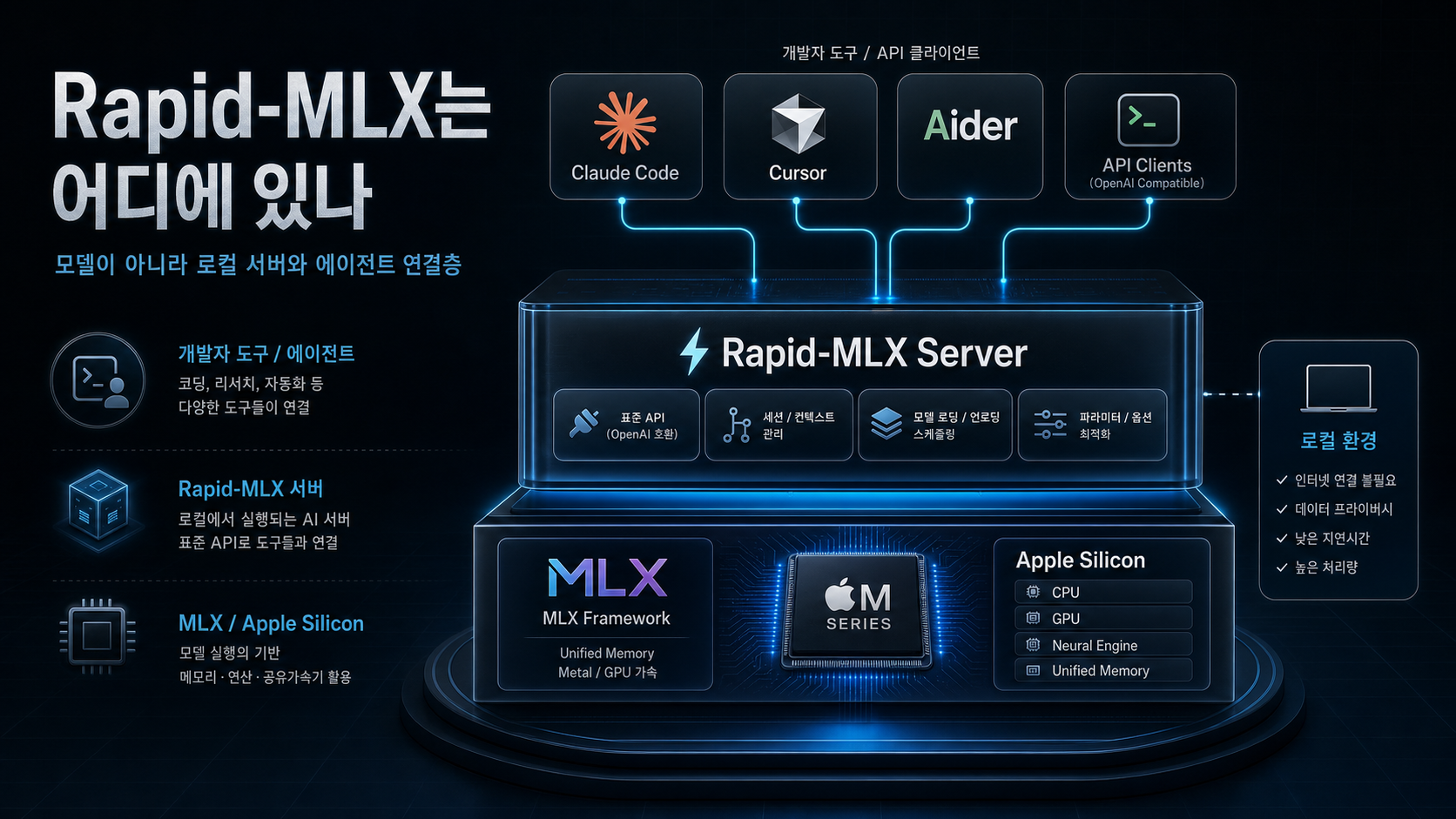
In one sentence, Rapid-MLX is a local AI inference engine and API server for Apple Silicon. The important point is that it is not the model itself. The actual models still come from external open-weight families like Qwen, Gemma, and Nemotron. Rapid-MLX is the serving layer that runs those models on top of Apple’s MLX stack in a more agent-friendly way (sources: Rapid-MLX README, pyproject.toml).
It is a runtime layer, not a model release
If you read pyproject.toml, the core dependencies center on mlx, mlx-lm, fastapi, uvicorn, and mcp. That is a strong hint that this is not a project selling new model weights. It is packaging the existing MLX ecosystem into a server that is easier to use in agent workflows (source: pyproject.toml).
This distinction matters because readers often drift into asking the wrong question, like “is Rapid-MLX smarter than Ollama?” The more accurate question is: how well does it serve the same general class of local models on Apple Silicon, especially when used behind developer tools?
What does Rapid-MLX add on top?
The repository pushes four major ideas to the front. First, standard API compatibility. Second, 17 tool parsers plus recovery for malformed tool calls. Third, prompt caching and reasoning separation. Fourth, explicit connectivity with developer tools like Claude Code, Cursor, and Aider (source: Rapid-MLX README).
Its tool-calling positioning is especially sharp. The README leans hard into 100% tool-calling support and auto-repair for tested model families, especially Qwen-derived lines, and even introduces its own MHI (Model-Harness Index). That is one reason Rapid-MLX feels more relevant to agent workflows than to generic local-chat UI use.
Why does Apple Silicon-specific design matter so much?
Rapid-MLX is built on MLX because of Apple Silicon’s unified memory architecture. MLX’s own repository highlights shared memory between CPU and GPU and the ability to compute across devices without shuffling arrays around in the usual way (source: MLX GitHub).
So if you think of Rapid-MLX as just “another local LLM tool,” you miss half the point. It is much closer to the kind of execution-surface and harness-layer improvement described in AI Apps Are Built with Harnesses, Not Prompts: less about inventing a new model, more about making the runtime and connection surface more useful.
Why is Rapid-MLX suddenly getting attention?
It is not just because “it is fast.” The real reason it stands out is that it has carved out a clearer position outside the conservative local-default lane that Ollama has occupied: Apple Silicon optimization plus explicit coding-agent friendliness.
The repository has grown quickly
Based on the repository metadata cited in the Korean article, Rapid-MLX was created on February 25, 2026, and as of May 6, 2026 it had reached 1,573 stars and 223 forks. The latest release and PyPI package are 0.6.14, published on May 5, 2026 (sources: GitHub repo, PyPI).
Those numbers are already beyond the “tiny experiment repo” phase. But they also imply the other side of the same story: this is a project moving very quickly. In fact, it shipped a tight sequence of hotfixes from 0.6.10 to 0.6.14 within just a few days in early May (source: GitHub releases).
It lines up with demand for local coding-agent backends
The README emphasizes integration targets like Cursor, Claude Code, Aider, LangChain, and PydanticAI from the start. That makes the central use case less “chat with a local model on your Mac once” and more “swap the backend of an existing agent tool to something local” (source: Rapid-MLX README).
That connects directly to the concerns covered in Claude Code Review: Complete Guide (2026). Once cost, privacy, and long work sessions become real concerns, the question shifts from “which model am I using?” to “what is my agent actually connected to underneath?”
For English readers too, the best framing is still “a Mac local AI server”
Rapid-MLX is not yet a mainstream household name. That makes the most useful framing less about celebrity and more about why it even enters the shortlist when someone is choosing a local AI server for a MacBook in the first place.
Is installation really that simple?
The base installation path is simpler than many readers expect. But “easy to install” and “ready for production-style use” are not the same thing.
There are three main install paths
The README presents three straightforward paths: Homebrew, pip, and an install script (source: Rapid-MLX README).
# Homebrew
brew install raullenchai/rapid-mlx/rapid-mlx

# pip
pip install rapid-mlx

# install script
curl -fsSL https://raullenchai.github.io/Rapid-MLX/install.sh | bash
A first run looks like this:
rapid-mlx serve qwen3.5-9bOnce the server is up, the default endpoint is http://localhost:8000/v1 (source: Rapid-MLX README).
What the article itself says was directly checked
The Korean source article explicitly states that it tested pip install rapid-mlx and rapid-mlx doctor on an Apple M4 Pro with Python 3.11.9, and that installation completed cleanly while doctor returned PASS, with model_load skipped because it required downloading a test model.
That is worth reading carefully. It supports the practical claim that basic install plus CLI health check can be smooth in reality. But it also stops short of claiming that every downstream workflow, like a full Cursor or Claude Code session, was validated end to end in the same pass.
The real friction starts with Python versions and extras
Both PyPI and the README require Python 3.10+. If your macOS default Python is older, the real first task is often upgrading Python. And if you want vision, audio, or embeddings, those require extra installs rather than the plain text-only base path (sources: PyPI, Rapid-MLX README).
So “one-line install” is technically true, but it is best read conservatively. Text-only models are the easy entry point. As soon as you want multimodal or audio-heavy use, the environment gets noticeably heavier.
How true is the “4.2x faster” claim?
Rapid-MLX leans hard on three headline ideas: “2–4x faster than Ollama,” “cached TTFT of 0.08s,” and “100% tool calling.” Those claims are not invented out of thin air, but they also should not be generalized carelessly.
What numbers does the repository actually publish?
The README’s benchmark section reports decode speeds and cached TTFT values on a Mac Studio M3 Ultra with 256GB of memory. For example, it lists Qwen3.5-9B at 108 tok/s, Qwen3.6-35B-A3B at 95 tok/s, and Qwen3.5-122B around 44–57 tok/s, while also highlighting multi-x wins over Ollama for some models (source: Rapid-MLX README).
There are three reasons not to over-read those numbers
First, the benchmarks come from the project itself. Second, the hardware is top-tier M3 Ultra territory, which is not the same thing as an ordinary 16GB to 36GB MacBook experience. Third, Ollama itself has been actively improving its Apple Silicon story via MLX preview support since late March 2026 (sources: Rapid-MLX README, Ollama MLX preview blog).
| Headline claim | What it really means | What readers should add mentally |
|---|---|---|
| Up to 4.2x faster than Ollama | A project-authored benchmark on specific models and hardware | Do not treat it as a universal constant |
| Cached TTFT of 0.08s | Very fast first-token response under strong cache-hit conditions | Long multi-turn sessions and hybrid models can behave differently |
| 100% tool calling | A strength claimed mainly for tested model families like Qwen and GLM | Do not flatten that into 'works perfectly on every model' |
The competitive landscape itself is moving
One of the easiest mistakes in local-AI writing is to treat Ollama like a frozen baseline. But Ollama’s own March 30, 2026 post makes it clear that Apple Silicon performance via MLX preview is still actively improving, including TTFT and decode speed (source: Ollama MLX preview blog).
So the better question is not “is Rapid-MLX always fastest?” It is what kind of speed and stability does it improve in your actual workflow?
How is it different from Ollama, LM Studio, and mlx-lm serve?
The easiest way to understand Rapid-MLX is to place it next to the other local runtimes readers already know.
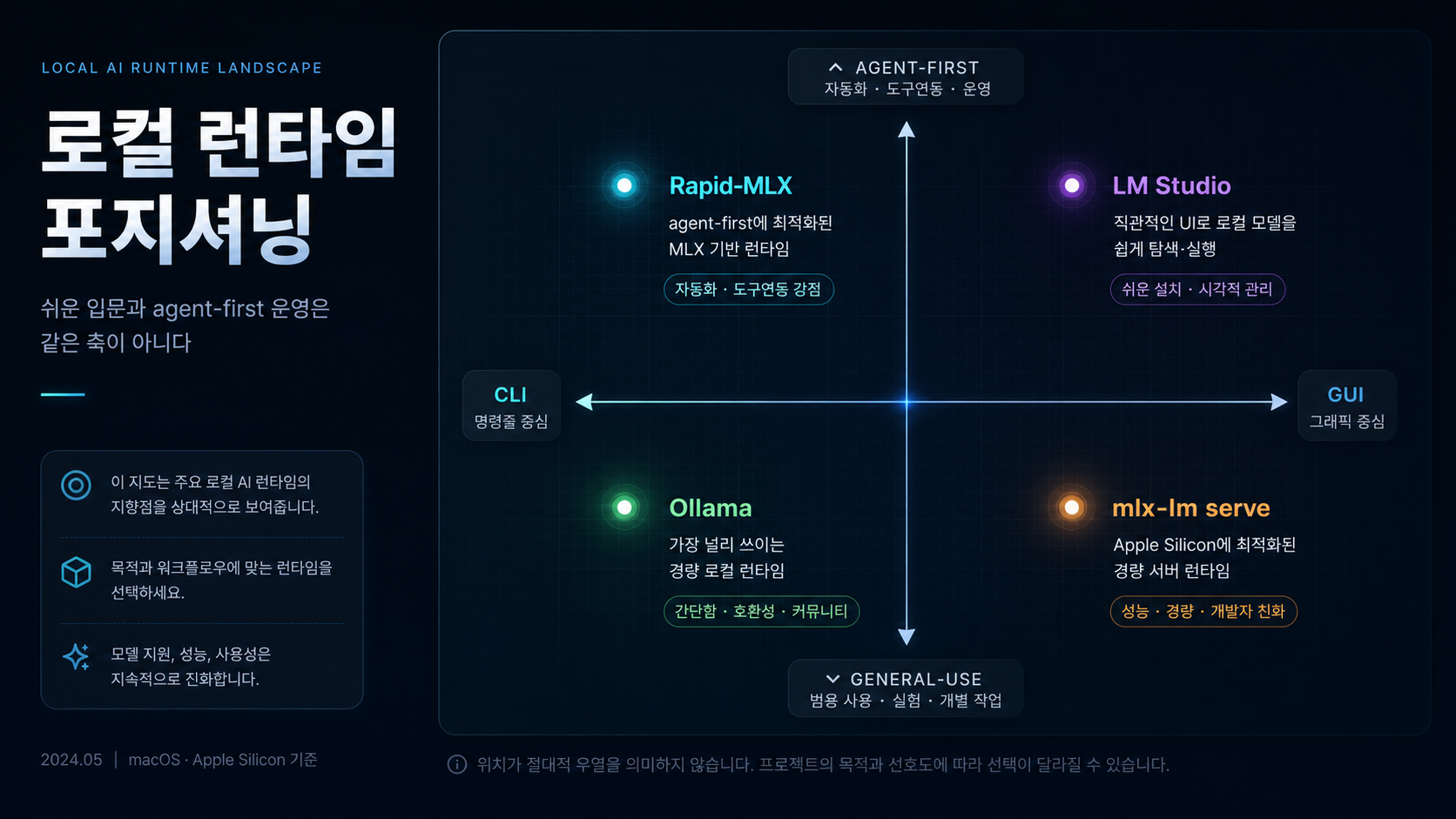
Ollama is still the default, while Rapid-MLX feels more agent-optimized
Ollama remains close to the default local-AI choice. It is easy to install, has a broad model surface, and now has a more serious Apple Silicon story thanks to MLX preview. Rapid-MLX, by contrast, foregrounds developer-facing features like standard API compatibility, tool parsers, broken tool-call recovery, reasoning separation, and optional cloud routing (sources: Ollama MLX preview blog, Rapid-MLX README).
In plain terms, Ollama is closer to “the standard way to run local models easily.” Rapid-MLX is closer to “a server that sharpens the details that matter once the backend is serving coding agents.”
LM Studio is GUI-friendly, Rapid-MLX is server-first
LM Studio’s official docs say it exposes OpenAI-compatible endpoints and even /v1/responses, which means it can also sit behind tools that expect OpenAI-style local routing (source: LM Studio OpenAI compatibility docs).
The difference is the form factor. LM Studio is visual and desktop-centric. Rapid-MLX leans much more toward terminal workflows, background local APIs, and agent connections. If you want to browse models in a GUI, LM Studio is more comfortable. If you want to leave a local API server running in the background for developer tooling, Rapid-MLX feels more natural.
mlx-lm serve is the base layer, Rapid-MLX is the batteries-included wrapper
The official MLX mlx-lm path is closer to a pure serving base. Rapid-MLX adds the more practical extras on top: tool calling, vision and audio extras, caching, doctor, and model recommendation surfaces. So technically, a lot of what it offers reads less like a brand-new engine and more like a more operations-friendly package of familiar building blocks.
| Item | Rapid-MLX | Ollama | LM Studio | mlx-lm serve |
|---|---|---|---|---|
| Primary surface | CLI and API server | CLI and service | GUI plus local server | Base serving layer |
| Apple Silicon positioning | Strong MLX optimization message | MLX preview improving fast | Uses MLX and GGUF paths depending on setup | Native MLX base path |
| Agent-integration focus | High | Medium | Medium | Low |
| Tool-call parsing and repair | Front-and-center feature | Present, but not the main positioning | Not the core product message | Not the default focus |
| Beginner friendliness | Medium | High | High | Medium |
Can you plug it into Claude Code, Cursor, and Aider right away?
The honest answer here is “yes, in principle” and “that is not the same as saying everything is production-stable.”
The basic connection model is simple
Rapid-MLX exposes a standard API-compatible server. So any client or tool that follows an OpenAI-style base URL pattern can theoretically be repointed by changing the base endpoint. The README explicitly lists Cursor, Claude Code, Aider, LangChain, and PydanticAI as supported connection targets (source: Rapid-MLX README).
For Claude Code, the README gives a pattern like this:
OPENAI_BASE_URL=http://localhost:8000/v1 claudeFor Aider:
aider --openai-api-base http://localhost:8000/v1 --openai-api-key not-neededThose are not hypothetical commands. They are the real examples shown in the project’s own documentation (source: Rapid-MLX README).
This is one of the most attractive parts of the project
This is where Rapid-MLX becomes more than an interesting benchmark repo. If you already live inside Cursor or Claude Code, local models stop being a separate chat toy and start becoming a backend that can slot under your existing flow. That is closely related to the local coding-agent angle discussed in Qwen 3.6 Review, and it also pairs naturally with the workflow habits outlined in Claude Code Review: Complete Guide (2026).
API compatibility and long-session stability are not the same thing
That said, it is worth stepping back here. Just because a tool accepts the base URL does not mean every model, every tool, and every long-running coding session will behave identically. Once tool calling, reasoning parsers, caching, and long-turn sessions are in play, runtime behavior matters almost as much as model quality.
So the safe position is: yes, the connection path is real. No, that does not automatically prove full production-grade stability across long coding sessions. The Korean source article itself keeps that distinction intact.
What models are realistic on which Macs?
When evaluating Rapid-MLX, the most important number is usually not tok/s. It is memory. Whether the reader is on a 16GB MacBook Air, a 24GB Pro, or a 64GB+ Studio completely changes what a “realistic local model” looks like.
Start with unified memory, then choose the model size
The README’s “What fits my Mac?” table suggests something like this: Qwen3.5-4B for 16GB, Qwen3.5-9B for 24GB, Qwen3.5-27B or Qwen3.6-35B-A3B for 32GB, Qwen3.5-35B-A3B for 64GB, and Qwen3.5-122B for 96GB+ systems (source: Rapid-MLX README).
| Unified memory | Realistic first choice | Why that line matters |
|---|---|---|
| 16GB | Qwen3.5-4B 4bit | Light and fast, but long coding-agent sessions hit limits quickly |
| 24GB | Qwen3.5-9B 4bit | The most balanced beginner point for many users |
| 32GB | Qwen3.5-27B 4bit or Qwen3.6-35B-A3B 4bit | This is where local coding-agent use starts feeling much more real |
| 64GB | Qwen3.5-35B-A3B 8bit | Closer to a practical quality-speed balance |
| 96GB+ | Qwen3.5-122B mxfp4 | Frontier-style local experiments become realistic |
Model choice is still a separate decision from runtime choice
It is worth separating this again. Rapid-MLX is the engine. Choosing the model is a different decision. For coding and agent workflows, Qwen 3.6 Review is the better companion read. For a broader look at open-weight local LLMs, Gemma 4 Review is useful.
And if Korean-language quality or Korean business context matters more than the runtime layer itself, the model question shifts again. In that case, LG EXAONE 4.5 and the Real State of Korean Local LLMs is the better comparison frame because licensing and Korean-language quality can matter more than the local serving engine.
”It runs on a MacBook” is not the same thing as “it feels good to use”
If you miss this distinction, the whole article collapses into marketing fluff. Yes, local models can run even on a 16GB Mac. But whether they stay responsive behind Cursor or Claude Code in long editing sessions, whether tool calls stay stable, and whether the response latency stays tolerable are separate questions. That is exactly where Rapid-MLX becomes interesting: it is not chasing mere execution, but perceived real-world usability.

What limits should you read carefully right now?
The more seriously you look at Rapid-MLX, the more clearly you need to write down its limits instead of its strengths.
The most reader-friendly warning is Issue #214
Public issue #214 points out that on the hybrid model Qwen3.6-35B-A3B, prefix cache misses can happen repeatedly as multi-turn conversations get longer, causing TTFT to grow almost linearly. The issue body includes a concrete jump from 11.57s to 43.58s (source: Issue #214).
That matters a lot in agent workflows. A one- or two-turn demo may look totally fine, but the experience can degrade badly once a real coding session accumulates context over time.
Stability and security still do not read as “finished product”
Among the open issues, there is also medium-severity issue #194, which argues that prefix-cache directory name sanitization does not fully block .., and issue #197, which says partial tool calls can be silently lost if a stream is interrupted mid-tool-call (sources: Issue #194, Issue #197).
These are not reasons to say “do not use it at all.” But they are reasons to say this is still a fast-moving runtime with quality boundaries that are actively moving.
”Fully local” should not be read too simplistically either
The README strongly emphasizes “no cloud, no API costs.” But it also exposes smart cloud routing options like --cloud-model and --cloud-threshold. So the default path is local, but the user can choose to route long-context requests out to external models like GPT or Claude when needed (source: Rapid-MLX README).
Issue #236 also proposes anonymous usage telemetry. It is not a shipped behavior in the way the Korean source describes it; it is still a proposal, and the design text explicitly stresses opt-in behavior and no PII. Even so, readers should avoid flattening “local” into “guaranteed zero external transmission forever” without reading the fine print (source: Issue #236).
Rapid-MLX’s core appeal is local speed plus agent-friendliness. But if you do not read the long-session cache behavior, open issue state, and optional cloud-routing layer together, the article starts sounding like a pasted README instead of a real evaluation.
| Risk | When it becomes a problem | How readers should interpret it |
|---|---|---|
| Issue #214 cache misses | Long coding or agent sessions | Short demos and real usage can feel very different |
| Issue #194 path traversal concern | Prefix-cache directory handling | Security maturity is still moving |
| Issue #197 partial tool-call drop | Interrupted streaming during tool calls | Tool-call reliability needs real workflow testing |
| Cloud-routing option | When long contexts get routed to external models | The pure-local privacy assumption can break if you turn it on |

Who should try it now, and who should wait?
Rapid-MLX is a tool with a very clear taste profile, in the best possible way.
It fits these users well
First, people using Apple Silicon Macs as their main development machine. Second, developers who want to plug local models into Cursor, Claude Code, or Aider for cost and privacy reasons. Third, users who are more comfortable with a local API server and terminal workflow than with a GUI-first desktop app.
For users like that, the real appeal of Rapid-MLX is not the tok/s number. It is the connectivity question: can my existing agent workflow keep working the same way while a local model powers it underneath?
Ollama or LM Studio may still be better for other users
If you want a GUI, if your team prioritizes stability over everything else, or if you are not planning to rotate local backends often, LM Studio or Ollama may still be more comfortable. And if your priority is simply “start with the easiest local AI option first,” Ollama’s default status is still strong.
Why would existing Ollama users even reconsider?
The decision rule is simple. If you feel pain around tool-call recovery, standard API compatibility, prompt caching, or Claude Code/Cursor integration, Rapid-MLX becomes interesting. If you mostly just download a model, chat with it, and hit a local API a few times, the reason to switch is much weaker.
FAQ: Common questions about Rapid-MLX
Is Rapid-MLX completely free?
Can I use it on a 16GB MacBook Air?
I already use Ollama. Do I really need to switch?
Is Rapid-MLX itself a new local model?
Can it connect to Claude Code and Cursor right away?
If it is local, does that mean privacy is automatically perfect?
Conclusion: Is there a real reason to switch to Rapid-MLX now?
The cleanest summary is that Rapid-MLX goes beyond “a local model runs on a Mac” and starts answering a more interesting question: how should you run the backend for coding agents on Apple Silicon more deliberately? For the right user, the combination of Apple Silicon, MLX, standard API compatibility, tool-call recovery, and caching is very appealing.
But the most honest conclusion is still a cautious one. Rapid-MLX is a fast-growing project, and the fairest current label is probably “one of the most interesting next-default candidates” rather than “the winner is already decided for every Mac user.”
One-line judgment
If you want to plug local models into agent tools like Claude Code or Cursor on Apple Silicon, Rapid-MLX is one of the most interesting candidates to watch right now. Just check long-session stability and open-issue status before you let the speed numbers do all the talking.
If you want to understand the local models first, continue with Gemma 4 Review and Qwen 3.6 Review. If you care more about the agent-connection workflow, pair this with Claude Code Review: Complete Guide (2026) and AI Apps Are Built with Harnesses, Not Prompts.
Step 1 — check your Mac's memory first
Figure out whether you are in the 16GB, 24GB, 32GB, or 64GB+ class before you choose a model.
Step 2 — start the server with a smaller model
Install Rapid-MLX and bring up a 4B or 9B model first before chasing the biggest model your hardware might fit.
Step 3 — connect one agent tool only
Pick just one tool such as Claude Code, Cursor, or Aider and test the base-URL integration in isolation first.
Step 4 — validate long sessions and tool calls
Do not stop at a short demo. Run a real editing session and watch cache behavior and tool-call stability.
- Rapid-MLX GitHub
- rapid-mlx PyPI
- MLX GitHub
- Ollama MLX preview blog
- LM Studio OpenAI compatibility docs
- Public issues cited in the limits section:
#214,#194,#197, and#236
Topic tags

Gemma 4 Review: Benchmarks, Multilingual, Local Setup
Gemma 4 model lineup, benchmarks, Llama 4 vs Qwen 3.5 comparison, multilingual performance, and Ollama local setup in one guide.
Read
What Is Vectorless RAG? Is PageIndex a Real RAG Alternative?
A current guide to why PageIndex says it can search long documents without vector databases or chunking, and how to read its pricing, MCP surface, FinanceBench claims, and real limits.
Read
What Is PlayMCP? Kakao's MCP Hub and OpenClaw Integration Explained
A current guide to what PlayMCP really is, how Kakao's toolbox and mcp-gateway work, and why the OpenClaw integration matters.
Read