Gemma 4 Review: Benchmarks, Multilingual, Local Setup
Gemma 4 model lineup, benchmarks, Llama 4 vs Qwen 3.5 comparison, multilingual performance, and Ollama local setup in one guide.
Quick take
Start with this judgment
17 min readBottom line
Gemma 4 model lineup, benchmarks, Llama 4 vs Qwen 3.5 comparison, multilingual performance, and Ollama local setup in one guide.
- Best for
- Readers comparing cost, capability, and real limits before choosing a tool
- What to check
- Gemma 4 · open source AI · local LLM
- Watch out
- Pricing and features can change, so confirm with the official source too.
3 key points
- Gemma 4 is Apache 2.0 open source — the 31B model scores 89.2% on AIME 2026, matching 400B-class commercial models on reasoning
- In multilingual usability testing, Gemma 4 (26B) ranks #1 among open-source models, just 0.2 points behind ChatGPT o3-mini
- One command gets it running locally via Ollama with zero commercial restrictions — follow this guide to try it yourself
목차
- What is Gemma 4?
- 4-model lineup: which one should you pick?
- How do the benchmarks actually hold up?
- How does it compare to Llama 4 and Qwen 3.5?
- How good is the multilingual performance?
- How do you install Gemma 4 locally with Ollama?
- What are the real-world gotchas?
- What is the community saying?
- Troubleshooting Q&A
- Conclusion: who should use which model?
What is Gemma 4?
Google DeepMind’s next-gen open-source strategy
Gemma 4 is an open-source LLM family released by Google DeepMind in March 2026. Previous generations up through Gemma 3 used a proprietary “Gemma Terms of Service” license that imposed monthly active user (MAU) limits and other commercial restrictions. Starting with Gemma 4, Google switched to the Apache 2.0 license — no MAU caps, no revenue ceilings, no royalties (source: Google Blog).
Why does this matter? Simple: any startup or enterprise can embed Gemma 4 in a product without paying Google anything. Meta’s Llama 4 still uses its own custom license, so Gemma 4’s Apache 2.0 switch is a clear differentiator in the open-source AI ecosystem.
# Verify Gemma 4 license on Hugging Face
from huggingface_hub import model_info

info = model_info("google/gemma-4-27b")
print(info.card_data.license)  # apache-2.0
What is the PLE architecture?
The key technical innovation in Gemma 4 is PLE (Per-Layer Embeddings). Standard transformers share the same input embedding across every decoder layer. PLE assigns separate embeddings per layer. As a result, the E2B model has only 2.3B active parameters but delivers the expressiveness of a 5.1B model (source: WaveSpeed AI).
Think of it this way: the same-size brain (parameters) can process more “perspectives” simultaneously. Because each layer’s embedding captures different contextual information, a smaller model can behave like a larger one.
# Inspect per-layer embedding dimensions (pseudo-code)
from transformers import AutoModel

model = AutoModel.from_pretrained("google/gemma-4-e2b")
for i, layer in enumerate(model.layers):
    print(f"Layer {i}: embed_dim={layer.embed.weight.shape}")
Native multimodal support
Every Gemma 4 model supports text + image input out of the box. Variable-resolution images can be passed directly without preprocessing. E2B and E4B additionally support 30-second audio input, while the 26B and 31B models handle up to 60-second video input (source: Google AI Dev).
⚠️ Note: multimodal support is currently input (understanding) only. Gemma 4 cannot generate images, audio, or video.
4-model lineup: which one should you pick?
Core specs by model
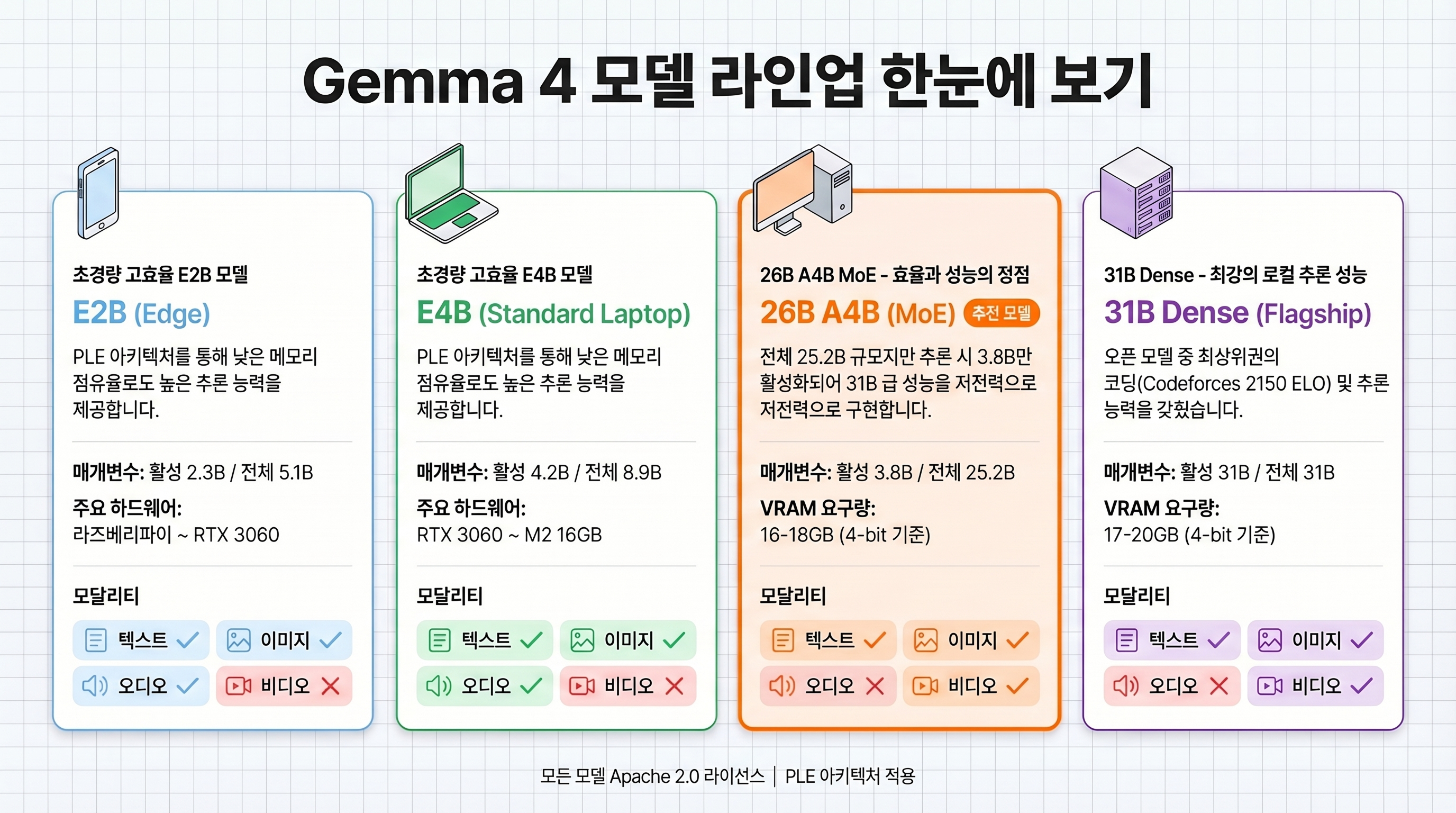
The Gemma 4 family comes in four sizes. The right choice depends on your hardware, from smartphones to datacenter GPUs (source: LM Studio).
| Spec | E2B | E4B | 26B A4B (MoE) | 31B Dense |
|---|---|---|---|---|
| Total parameters | 5.1B | 8.9B | 25.2B | 31B |
| Active parameters | 2.3B | 4.2B | 3.8B | 31B |
| Architecture | PLE Dense | PLE Dense | MoE + PLE | Dense |
| Image input | Variable resolution | Variable resolution | Variable resolution | Variable resolution |
| Audio input | 30s | 30s | Not supported | Not supported |
| Video input | Not supported | Not supported | 60s | 60s |
| Context window | 128K | 128K | 128K | 256K |
| VRAM required | 4GB | 6GB | 16–18GB | 17–20GB |
Recommended model by hardware
| Hardware | Recommended model | Reason |
|---|---|---|
| Raspberry Pi 5 / mobile | E2B | 4GB VRAM, 133 tok/s prefill — ideal for IoT edge inference |
| Everyday laptop (RTX 3060 / M2 16GB) | E4B | 6GB VRAM handles coding assistance and document summarization |
| Dev workstation (RTX 4090 / M2 Max) | 26B A4B | 4B-class speed with 26B-class quality — best price-performance |
| Server / full performance needed | 31B Dense | AIME 89.2% — optimal for research and complex reasoning |
# Check Ollama download sizes for each model
ollama show gemma4:e2b --modelfile | grep SIZE
# E2B: ~3.2GB (Q4_K_M)

ollama show gemma4:26b --modelfile | grep SIZE
# 26B A4B: ~15.1GB (Q4_K_M)
Why the MoE architecture matters
The 26B A4B model is particularly compelling because of its MoE (Mixture of Experts) design. Total parameters are 25.2B, but only 3.8B activate per inference pass. That means inference speed at the 4B level with output quality at the 26B level (source: WaveSpeed AI).
In practice: 82.6% on MMLU Pro and 88.3% on AIME 2026 — close to the 31B Dense (85.2%, 89.2%) — while fitting on a single RTX 4090 at 16–18GB VRAM.
How do the benchmarks actually hold up?
Reasoning benchmarks: a dramatic leap from Gemma 3
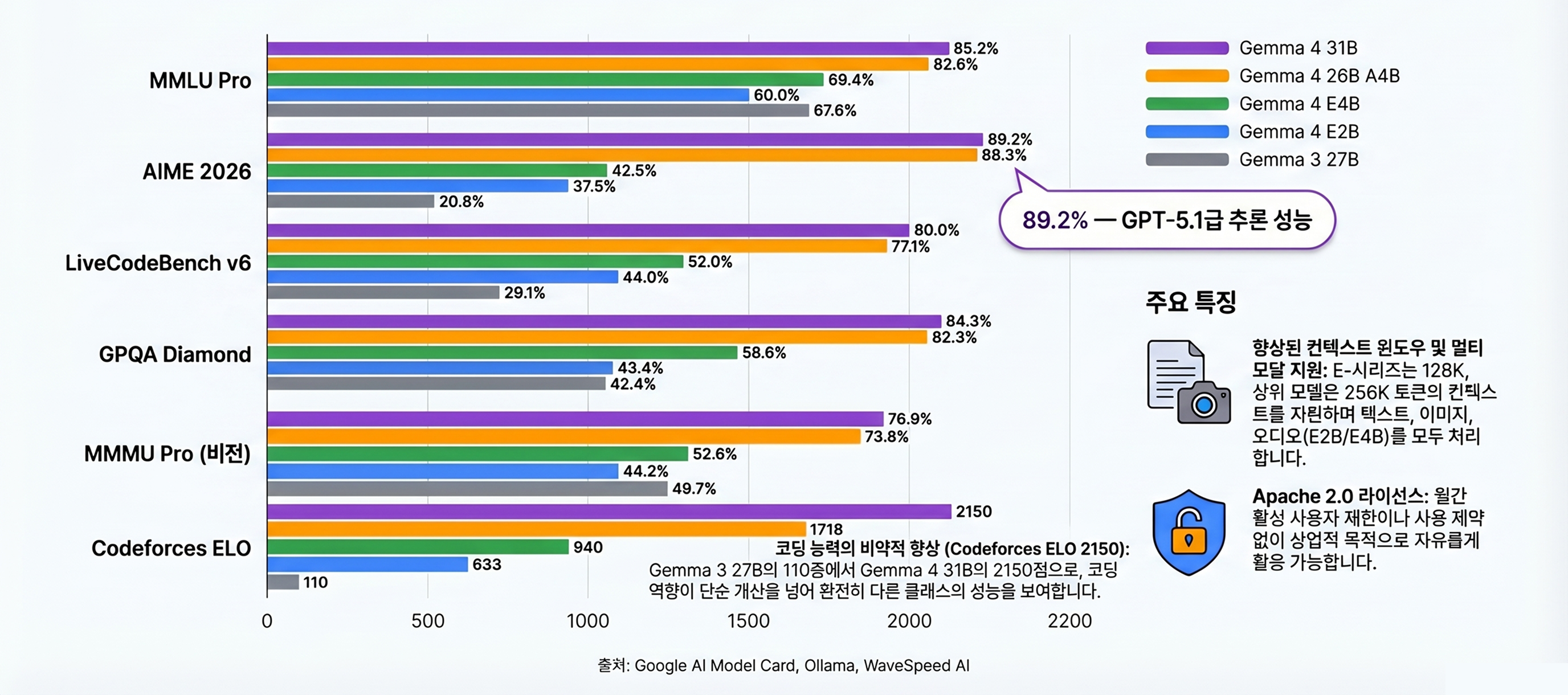
The standout improvement in Gemma 4 is reasoning. By integrating Thinking Mode (step-by-step chain-of-thought), the 31B model hit 89.2% on AIME 2026. Gemma 3 27B scored 20.8% on the same benchmark — that’s a 4× improvement (source: Google Blog).
| Benchmark | Gemma 4 31B | Gemma 4 26B A4B | Gemma 4 E4B | Gemma 3 27B |
|---|---|---|---|---|
| MMLU Pro | 85.2% | 82.6% | 69.4% | 67.6% |
| AIME 2026 | 89.2% | 88.3% | 42.5% | 20.8% |
| LiveCodeBench v6 | 80.0% | 77.1% | 52.0% | 29.1% |
| GPQA Diamond | 84.3% | 82.3% | 58.6% | 42.4% |
| BigBench Extra Hard | 74.4% | 64.8% | 33.1% | 19.3% |
| MMMU Pro (vision) | 76.9% | 73.8% | 52.6% | 49.7% |
Coding benchmarks: Codeforces ELO 2150
Coding performance is equally impressive. Gemma 4 31B achieves Codeforces ELO 2150 — equivalent to an “Expert to Candidate Master” level human programmer. That’s a massive jump from Gemma 3 27B’s ELO 110 (beginner level).
# Example: solving a coding problem with Gemma 4 31B (Thinking Mode)
import ollama

response = ollama.chat(
    model="gemma4:31b",
    messages=[{
        "role": "user",
        "content": "<start_of_turn>思考\nWrite a function to find the intersection of two integer arrays in O(n) time.<end_of_turn>"
    }],
)
print(response["message"]["content"])
Agent workflows: from 6% to 86%
Another major upgrade is native function calling. On agentic benchmarks, Gemma 3 scored 6% — Gemma 4 jumped to 86% (source: CoderSera). JSON output mode is also natively supported, so structured responses require no extra parsing.
# Gemma 4 function calling example
import ollama

tools = [{
    "type": "function",
    "function": {
        "name": "get_weather",
        "description": "Get the current weather for a city",
        "parameters": {
            "type": "object",
            "properties": {
                "city": {"type": "string", "description": "City name"}
            },
            "required": ["city"]
        }
    }
}]

response = ollama.chat(
    model="gemma4:26b",
    messages=[{"role": "user", "content": "What's the weather in Seoul?"}],
    tools=tools
)
print(response["message"]["tool_calls"])
How does it compare to Llama 4 and Qwen 3.5?
Gemma 4 vs. Llama 4 Scout (109B MoE)
Llama 4 Scout is a large MoE model with 109B total parameters and 17B active parameters. Its 10M token context window dwarfs Gemma 4’s 256K. But the VRAM requirement is 64GB+, making single-GPU local deployment essentially impossible.
Gemma 4 26B A4B, by contrast, runs on a single RTX 4090 at 16–18GB VRAM. It scores 82.6% on MMLU Pro, ahead of Llama 4 Scout’s 80.1%, and holds an edge on coding and reasoning benchmarks (source: CoderSera).
| Spec | Gemma 4 26B A4B | Llama 4 Scout 109B | Qwen 3.5 27B |
|---|---|---|---|
| Active parameters | 3.8B | 17B | 27B (Dense) |
| VRAM required | 16–18GB | 64GB+ | 18–20GB |
| MMLU Pro | 82.6% | 80.1% | 79.8% |
| Context window | 128K | 10M | 1M |
| License | Apache 2.0 | Llama License | Apache 2.0 |
| Function calling | Native | Limited | Native |
| Local deployment | Single RTX 4090 | 2× A100+ | Single RTX 4090 |
Gemma 4 vs. Qwen 3.5 27B in practice
Qwen 3.5 27B is a dense model with a similar parameter count to Gemma 4 26B A4B. Community testing across 18 business tasks found Gemma 4 won 13:5 (source: CoderSera). That said, Qwen 3.5 has a standout advantage with its 1M token context window — for long-document workloads, Qwen has the edge.
# Compare model sizes in Ollama
ollama list | grep -E "gemma4|qwen3.5"
# gemma4:26b    15.1GB
# qwen3.5:27b   16.7GB
The gap versus proprietary models (GPT-5.1)
GPT-5.1 is OpenAI’s latest commercial flagship. Gemma 4 31B at 85.2% on MMLU Pro is nearly on par. However, GPT-5.1 still leads on SWE-bench (software engineering) and complex multi-turn conversations.
The decisive difference is cost. GPT-5.1 bills per API call; Gemma 4 running locally costs nothing extra. If your production API bill is hitting hundreds of dollars monthly, local Gemma 4 deployment is a legitimate alternative.
How good is the multilingual performance?
#1 open-source model for non-English language tasks
On the WikiDocs LLM Multilingual Usability Test (22 categories, 40-point scale), Gemma 4 (26B) scored 76.20 points — #16 overall and #1 among open-source models (source: WikiDocs LLM Korean Rankings). That’s 4.5 points above Gemma 3 27B (71.71, ranked 20th) and more than 10 points ahead of Qwen3-32B (65.97, ranked 26th).
| Model | Score | Rank | Type |
|---|---|---|---|
| Gemini 3.0 Pro (Thinking) | 99.25 | #1 | Commercial |
| ChatGPT 4.5 | 95.57 | #3 | Commercial |
| Claude Sonnet 4 | 88.65 | #4 | Commercial |
| ChatGPT o3-mini | 76.40 | #14 | Commercial |
| Gemma 4 (26B) | 76.20 | #16 | Open source #1 |
| Gemma 3 27B (Q4_K_M) | 71.71 | #20 | Open source |
| CLOVA X | 70.51 | #23 | Commercial (Korean-focused) |
| Qwen3-32B | 65.97 | #26 | Open source |
| Llama 3 8B | 22.89 | #60 | Open source |
The key takeaway: Gemma 4 is only 0.2 points behind ChatGPT o3-mini (76.40). An open-source 26B model matching OpenAI’s lightweight reasoning model on multilingual tasks is significant. It also beats CLOVA X (70.51) — a commercial model specifically optimized for Korean — by 5.7 points. The gap to top-tier commercial models (Gemini 3.0 Pro at 99.25, ChatGPT 4.5 at 95.57) is still over 20 points, but the trajectory is clear.
Detailed results across 22 test categories
The evaluation covers 22 categories from basic language tasks to literary analysis, dialect interpretation, and coding. Gemma 4 earned “Excellent” ratings across most categories (source: WikiDocs Gemma 4 detailed results).
| Domain | Test item | Result |
|---|---|---|
| Basic language | Conversational fluency, identity recognition | Excellent |
| Creative writing | Poetry composition (acrostic, free verse) | Excellent — strong literary expression |
| Language games | Word chain participation | Excellent |
| Translation | English↔Korean, context-specific multiple renderings | Excellent |
| Dialect | Regional dialect interpretation | Excellent — accurate dialect recognition |
| Literary analysis | Analysis of classic Korean poetry | Excellent — nuanced interpretation |
| Document comprehension | Policy document analysis | Excellent |
| Register conversion | Business / formal / newsletter styles | Excellent |
| Text correction | Three-style revision suggestions | Excellent |
| Local knowledge | Regional geography and products | Excellent |
| Coding | Unicode text processing, math problems | Excellent |
| Date / real-time | Current date, live information | Limited — offline model constraint |
⚠️ Note: the “date awareness” and “real-time information” categories scored low. This is a structural limitation of all offline LLMs, not a language capability issue. Gemma 4 has no internet access by default.
What this score means for multilingual users
Three key conclusions from Gemma 4’s multilingual performance:
- It’s the best locally runnable option. A single RTX 4090 can now deliver commercial-service-grade multilingual quality.
- Clear improvement over Gemma 3. At the same quantization level (Q4_K_M), Gemma 4 gains 4.5 points — and the gap widens at higher quantization.
- It beats Korean-specialized commercial models. A general-purpose open-source model surpassing dedicated language-specific commercial products is noteworthy.
One caveat: without an explicit system prompt, Gemma 4 may default to English responses or produce lower-quality non-English output. See the troubleshooting section below for the system prompt setup that locks in the target language.
How do you install Gemma 4 locally with Ollama?
Installing Ollama and downloading the model
The easiest way to run Gemma 4 locally is Ollama. It supports macOS, Linux, and Windows (source: Ollama).
Install Ollama
Download the installer for your OS from ollama.com. macOS uses a .dmg file; Linux uses a curl install script.
Download the Gemma 4 model
Run 'ollama pull gemma4:26b' in your terminal. The 26B model downloads approximately 15GB.
Verify the model runs
Run 'ollama run gemma4:26b' to start an interactive session. The first response may take 10–30 seconds.
Use the API server
Ollama exposes a REST API at localhost:11434 by default. Call it with curl or the Python SDK for programmatic access.
# 1. Install Ollama (Linux)
curl -fsSL https://ollama.com/install.sh | sh

# 2. Download Gemma 4
ollama pull gemma4:26b

# 3. Start interactive session
ollama run gemma4:26b
Calling the Ollama API from Python
The Ollama Python SDK lets you call Gemma 4 in a few lines. Pair it with basic prompt engineering patterns such as role definition, fixed output formats, and example-driven instructions for better results.
# pip install ollama
import ollama

response = ollama.chat(
    model="gemma4:26b",
    messages=[
        {"role": "system", "content": "You are a helpful technical blog assistant."},
        {"role": "user", "content": "Explain Python's GIL in 3 sentences"}
    ]
)
print(response["message"]["content"])
# Streaming responses for better perceived latency
import ollama
stream = ollama.chat(
model="gemma4:26b",
messages=[{"role": "user", "content": "Compare FastAPI vs Flask"}],
stream=True
)
for chunk in stream:
print(chunk["message"]["content"], end="", flush=True)Running with LM Studio (GUI)
If you prefer a graphical interface, LM Studio is the recommended option. Search for and download models directly in the UI, then chat through the built-in interface (source: LM Studio). I will cover the full local setup flow in a separate guide.
# Download via LM Studio CLI (beta)
lms get google/gemma-4-26b-it-GGUF
lms server start
What are the real-world gotchas?
Quantization sensitivity
Gemma 4 is more sensitive to quantization than most models. Aggressive quantization below Q4 causes a steep quality drop. Multiple Reddit r/LocalLLM reports called the 26B MoE Q4 quantization “terrible in practice.”
Recommended quantization levels:
| Quantization level | VRAM usage (26B) | Performance retention | Recommendation |
|---|---|---|---|
| FP16 (full precision) | ~32GB | 100% | Best when VRAM allows |
| Q8_0 | ~25GB | ~98% | Recommended — minimal quality loss |
| Q5_K_M | ~18GB | ~95% | Recommended — optimal for most users |
| Q4_K_M | ~15GB | ~88% | Caution — quality degradation in MoE models |
| Q3_K | ~12GB | ~70% | Not recommended — severe quality loss |
# Download Q5_K_M quantized model (Ollama)
ollama pull gemma4:26b-q5_K_M

# Quick quality sanity check by quantization level
ollama run gemma4:26b-q5_K_M "What is the capital of France?"
ollama run gemma4:26b-q4_K_M "What is the capital of France?"MoE models (26B A4B) have expert routing weights that are vulnerable to heavy quantization. Below Q4_K_M, routing accuracy degrades and overall performance can drop sharply. If you’re VRAM-constrained, choosing E4B at FP16 may actually outperform 26B at Q4.
Context window limits
Gemma 4’s maximum context window is 256K tokens (31B Dense). That covers roughly 190,000–200,000 words — plenty for most tasks. But for full codebase analysis or large-batch document processing, it becomes a bottleneck.
For comparison: Llama 4 Scout supports 10M tokens and Qwen 3.6 supports 1M tokens. Workloads requiring very long context (analyzing an entire codebase, comparing dozens of papers simultaneously) are where Gemma 4 loses out.
# Set context window length explicitly
import ollama

# Set context to 128K tokens for the 31B model
response = ollama.chat(
    model="gemma4:31b",
    messages=[{"role": "user", "content": "Summarize this text: " + long_text}],
    options={"num_ctx": 131072}  # 128K tokens
)
Tool calling stability
Gemma 4’s function calling hit 86% on benchmarks, but there are still real-world bugs. Reported issues include the model refusing to process images when function calling is active simultaneously, and the safety filter over-triggering in some scenarios.
⚠️ Warning: if you’re using Gemma 4 tool calling in production, always implement a fallback. Defensive code that falls back to text-based parsing when tool calls fail is not optional.
# Tool calling with fallback pattern
import json
import ollama

def safe_tool_call(prompt, tools):
    response = ollama.chat(
        model="gemma4:26b",
        messages=[{"role": "user", "content": prompt}],
        tools=tools
    )
    msg = response["message"]

    # Successful tool call
    if msg.get("tool_calls"):
        return msg["tool_calls"]

    # Fallback: attempt JSON parsing from text
    try:
        return json.loads(msg["content"])
    except json.JSONDecodeError:
        return {"error": "tool call and parsing both failed", "raw": msg["content"]}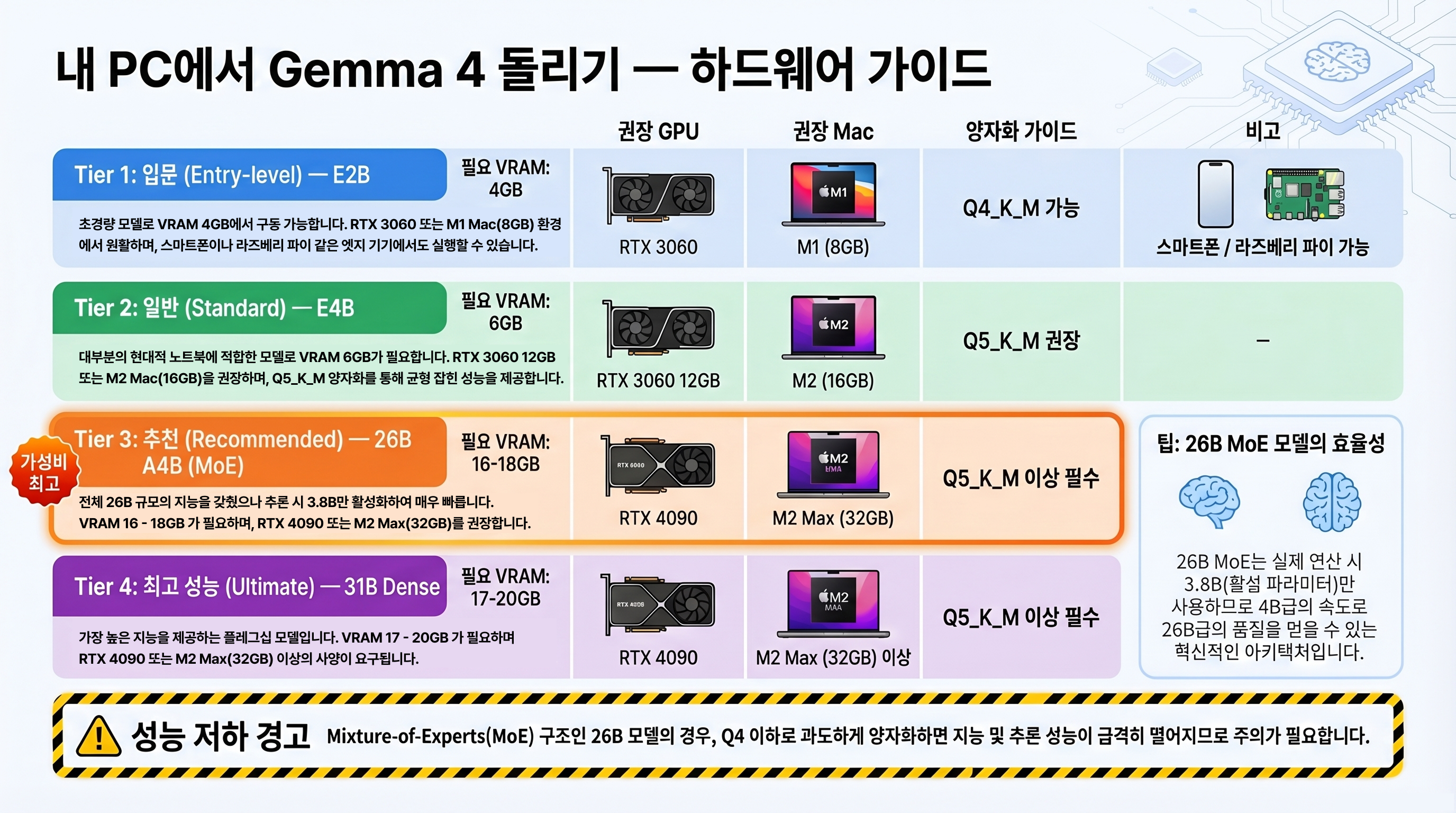
What is the community saying?
Real-world feedback from Reddit and GitHub
Since Gemma 4’s release, active discussions have been running across Reddit r/LocalLLaMA, r/LocalLLM, and r/ollama. The general tone: praise for benchmark performance alongside legitimate concerns about real-world stability.
- "31B on a single GPU hitting GPT-5.1-class benchmarks" — r/LocalLLM
- "Beats everything on every leaderboard except Opus 4.6 and GPT-5.2" — r/LocalLLaMA (1.8K upvotes)
- "26B beat Qwen 3.5 27B 13:5 across 18 business task tests" — r/ollama
- "26B MoE Q4 quantized version performs way below expectations" — r/LocalLLM
- "This model perfectly illustrates the gap between benchmark scores and real-world feel" — r/LocalLLaMA
- "First tool call attempt refused to process the image" — r/LocalLLM
Key takeaways from community feedback
Three patterns emerge from the community data:
- Stay at Q5_K_M or higher. MoE models are particularly quantization-sensitive.
- Validate tool calling before deploying. 86% on a benchmark does not guarantee it works in your specific production scenario.
- Benchmarks ≠ perceived quality. Open-ended creative tasks in particular tend to feel weaker than the benchmark numbers suggest.
Troubleshooting Q&A
Model fails to load in Ollama
The most common issue when running Gemma 4 via Ollama is insufficient VRAM. If you see Error: model requires more system memory, either drop to a lower quantization level or switch to a smaller model variant.
# Monitor VRAM usage in real time (NVIDIA GPU)
nvidia-smi --query-gpu=memory.used,memory.total --format=csv -l 1

# Fix for low VRAM: use a lower quantization or smaller model
ollama pull gemma4:26b-q4_K_M   # ~15GB — fits on an 18GB GPU
ollama pull gemma4:e4b           # Only 6GB VRAM needed
Non-English responses or degraded output quality
Gemma 4 is English-dominant by training. Without an explicit system prompt specifying the target language, it may respond in English or produce lower-quality output in other languages. This is consistent with what you’d observe across most open-source models when comparing multilingual performance.
# System prompt for consistent non-English output
system_prompt = """You are a professional AI assistant.
Rules:
1. Always respond in the user's language
2. Include English technical terms in parentheses when helpful (e.g., Quantization)
3. Use clear, professional prose"""

response = ollama.chat(
    model="gemma4:26b",
    messages=[
        {"role": "system", "content": system_prompt},
        {"role": "user", "content": "Explain the transformer attention mechanism"}
    ]
)
Reasoning stops mid-generation
Some complex prompts cause Gemma 4 to truncate its output prematurely. Increasing num_predict or breaking the prompt into smaller steps usually resolves this.
# Prevent premature truncation: increase max output tokens
response = ollama.chat(
    model="gemma4:31b",
    messages=[{"role": "user", "content": complex_prompt}],
    options={
        "num_predict": 8192,    # Default is 2048 — raise it
        "temperature": 0.7,     # Too low can cause repetition loops
    }
)
Conclusion: who should use which model?
Pros
- + Apache 2.0 — fully free license with no MAU or revenue caps
- + 26B MoE delivers 26B-class quality at 4B-class inference speed
- + AIME 2026 89.2% — commercial-model-level reasoning on a single GPU
- + E2B runs at 7.6 tok/s on a Raspberry Pi 5
- + Agent benchmark jumped from 6% to 86% with native function calling
Cons
- − Max context window 256K — short compared to Llama 4 (10M) and Qwen 3.6 (1M)
- − MoE model quality drops sharply below Q4 quantization
- − Unstable when combining tool calls and image input simultaneously
- − Open-ended creative tasks feel weaker than benchmark scores suggest
- − Multilingual score of 76.20 (open-source #1) still trails top commercial models (99+ range)
Key summary
Gemma 4 is an Apache 2.0 open-source LLM family. The 31B model scores 89.2% on AIME 2026 and 85.2% on MMLU Pro — GPT-5.1-class reasoning on a single GPU. The 26B MoE model achieves 26B-class quality with only 3.8B active parameters, making it arguably the best price-to-performance open-source model available right now.
- Developers wanting a local coding assistant: 26B A4B + Ollama gives you Codeforces 1718 ELO-level coding help at zero cost
- IoT / embedded developers running AI on low-power hardware: E2B runs at 7.6 tok/s on a Raspberry Pi 5
- Startups building commercial products without API costs: Apache 2.0 means you can embed it in any product royalty-free
- Enterprises prioritizing data privacy: local execution means your data never leaves your infrastructure
- AI enthusiasts tracking open-source progress: Gemma 4 sets a new benchmark baseline for open-source LLMs in the first half of 2026
Install the model via Ollama
Follow the local setup guide and start with 'ollama run gemma4'
Pick your model and quantization
Match the model to your GPU VRAM: 26B A4B for 16GB+, E4B or E2B for 6GB or less
Set a language system prompt
Add your target language rules to the Modelfile for consistent non-English output
Implement tool calling fallback logic
If using function calling in production, fallback to text-based parsing on failure — this is required
Verify quantization quality
Stay at Q5_K_M or above; benchmark before dropping to Q4 on MoE models
What is the biggest difference between Gemma 4 and Gemma 3?
Can Gemma 4 be used freely for commercial purposes?
Can Gemma 4 run without a GPU?
Which is better — Gemma 4 26B or 31B?
How good is Gemma 4's multilingual performance?
Are there other ways to run Gemma 4 besides Ollama?
Topic tags

GPT-5.5 Review: Benchmarks, Pricing, Codex Impact, and Early Reactions (2026)
What changed in GPT-5.5, where it leads on agent benchmarks, why pricing looks 2x higher, and how Codex users should think about upgrading as of April 2026.
Read
What Is Vectorless RAG? Is PageIndex a Real RAG Alternative?
A current guide to why PageIndex says it can search long documents without vector databases or chunking, and how to read its pricing, MCP surface, FinanceBench claims, and real limits.
Read
What Is PlayMCP? Kakao's MCP Hub and OpenClaw Integration Explained
A current guide to what PlayMCP really is, how Kakao's toolbox and mcp-gateway work, and why the OpenClaw integration matters.
Read